

Last updated Oct 29, 2026. Prices, limits and GitHub stars checked Oct 28, 2026.
Last week’s problem was that your coding agent forgets everything. This week’s problem is the opposite: it can reach everything.
When Claude Code or Codex runs npm install, a test suite or a migration script, that command runs as you. Same files, same network, same logged-in tools. Claude Code’s own docs are blunt about it. Even with its sandbox turned on, a command can read “most of the machine, including credential files such as ~/.ssh and ~/.aws/credentials“ unless you block them. And that sandbox is off by default.
That’s not a reason to panic. It’s a reason to decide where your agent runs, the same way Part 1 was about deciding what it remembers.
Here’s what’s inside:
what an agent sandbox is, and the one decision that matters most: a throwaway sandbox or a dedicated VM
what Claude Code and Codex already give you for free
10 agent sandboxes worth knowing, with verified pricing, who’s backing them, and GitHub stars for the ones that are open source
why your agent should get fake Stripe and Slack accounts, not real ones, and how to keep secrets out
when to pick a dedicated VM and when to pick an ephemeral sandbox
This is part 2 of a two-part series on the missing layers of the agent stack. Part 1 covered memory. If you’re still picking the agent itself, start with 10 agent harnesses: the harness decides what your agent does, the sandbox decides where it runs.
Quick answer:
On your own laptop, watching the agent: turn on Claude Code’s sandbox with
/sandbox(it’s off by default) or keep Codex’s defaults, and block credential files.Every run should start clean: an ephemeral sandbox. E2B is the safe default; Modal, Cloudflare and Railway also fit.
The agent comes back tomorrow: a dedicated VM, like Fly.io Sprites, boat or Daytona.
Always: a narrow network allowlist, no real keys inside the sandbox, and fake Stripe and Slack accounts.
What is an AI agent sandbox?
An AI agent sandbox is an isolated place where your agent’s commands run, so a mistake or a poisoned dependency can only touch what you chose to give it. It decides which files the agent can read and write, which hosts it can reach, and which secrets it ever sees.
For coding agents, I think in three layers:
An isolated place to run. A separate machine, or an OS-level jail on yours. That can be a container, a container with a stronger kernel boundary like gVisor, or a microVM with its own kernel, like Firecracker.
Fake accounts for the services it touches. If the agent works on payments or notifications, give it a test Stripe or Slack account, not your real one. Then a bad run creates fake charges and fake messages.
Control over what it can reach. Network allowlists, secrets that stay outside the sandbox, and file access limited to the repo. This is the layer most people skip, and it’s the one that stops data leaving.
Key takeaway: isolation without network and secret control is only half a sandbox. You need both.
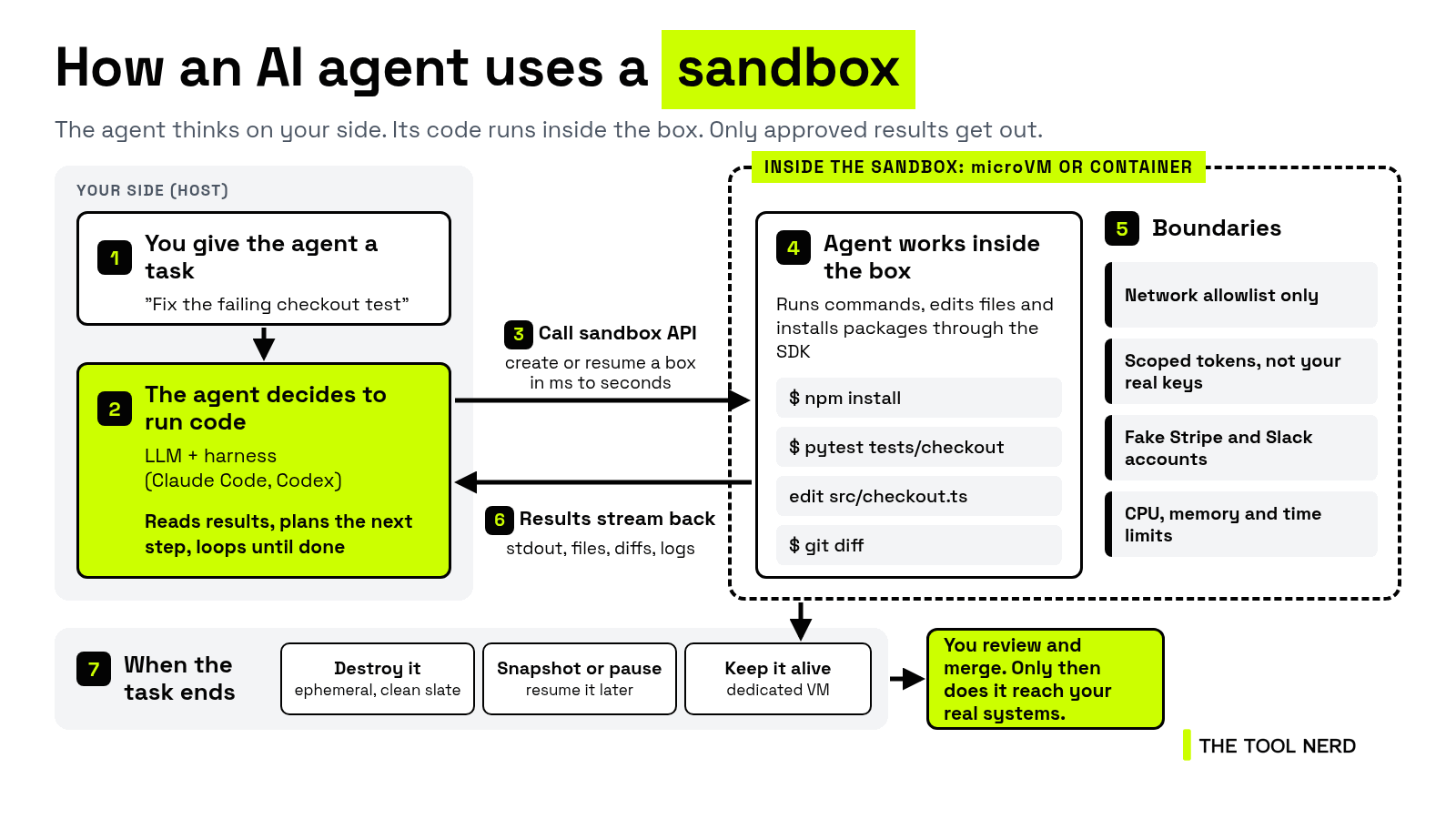
Here is the basic loop: the agent thinks on your side, its code runs inside the box, and only approved results come out.
Words you will see in this post:
BYOC (Bring Your Own Cloud): the vendor’s sandbox software runs inside your own AWS, GCP or Azure account, so your code and data never leave your cloud, while the vendor still manages the software.
microVM: a small virtual machine with its own kernel that starts in a fraction of a second. It’s a stronger wall than a plain container.
Ephemeral: created for one task and thrown away after, so every run starts clean.
Sandbox vs dedicated VM for AI agents: the one decision that matters
Every product below sits somewhere between two shapes:
Ephemeral sandbox: spin it up, run the task, throw it away. It starts fast, often from a snapshot, and every run begins clean. Think “run this agent-written script,” “run the tests on this PR,” “execute this user’s code.” You pay for seconds.
Dedicated VM: a full Linux computer that belongs to one agent and keeps its disk. You install things once, and they’re still there tomorrow. Think “a dev box for my coding agent,” “an agent that works all week on one repo,” “a personal agent with a browser that stays logged in.” It sleeps when idle and wakes with its state.
The line is blurring. E2B can pause a sandbox, Vercel sandboxes persist by default, and Daytona and Railway let you checkpoint and fork. Fly.io, from the other side, sells “computers for agents” with durable disks. So don’t pick on labels. Pick on what your workload needs to keep between runs.
Key takeaway: if every run should start clean, use a sandbox. If the agent needs to come back to the same machine, use a VM.
Do Claude Code and Codex have a built-in sandbox?
If you’re coding on your own laptop and watching what the agent does, start with the sandbox that’s already built in.
Claude Code has an OS-level sandbox around its shell commands (Seatbelt on macOS, bubblewrap on Linux and WSL2; native Windows runs unsandboxed). It’s off by default: turn it on with /sandbox.
Writes are limited to the working directory, but reads include most of the machine,
~/.sshand~/.aws/credentialsincluded, until you block them with thecredentialssetting.Network goes through a local proxy with an allowlist that starts empty.
mode: "mask"gives a command a placeholder token, and the proxy adds the real one only on hosts you allow.By default, Claude can retry a blocked command outside the sandbox.
allowUnsandboxedCommands: falsestops that, andfailIfUnavailable: truestops it running unsandboxed when a dependency is missing.It covers shell commands only. Claude’s file tools, MCP servers and hooks run outside it.
The sandbox runtime is Apache-2.0, open source, with 6,812 stars. Claude Code itself is proprietary.
→ Directory: Claude Code on The Tool Nerd
Codex is stricter out of the box: “by default, the agent runs with network access turned off,” per OpenAI’s security docs. The default workspace-write mode limits edits to the workspace; danger-full-access removes the boundaries. You turn network on with network_access = true in config.toml. The Codex CLI is Apache-2.0 with 131,417 stars.
The catch with both: they jail the shell on your computer. Once the agent runs unattended, it should get its own machine.
The 10 best AI agent sandboxes in 2026, at a glance
My rule for this list: this is infrastructure your agents will depend on, so every company here has verified funding or traction from its own announcement, or is a big company (AWS, Cloudflare, Vercel). One exception, on purpose: boat (#8) is early stage, backed by Y Combinator, with no round disclosed for boat itself, but it’s built for the dedicated-VM side of this post, so it’s in with that caveat. Tools I couldn’t back up are in “Other agent sandboxes on my radar” at the end.
Open source matters here, because it means you can read the code and run it yourself. So I show GitHub stars only where the product itself is open source (from the GitHub API, as of Oct 28, 2026). A closed platform with an open client SDK is listed as closed.
We’re not a sandbox vendor: The Tool Nerd sells none of these, and the only referral link here is Railway’s, disclosed where it appears.
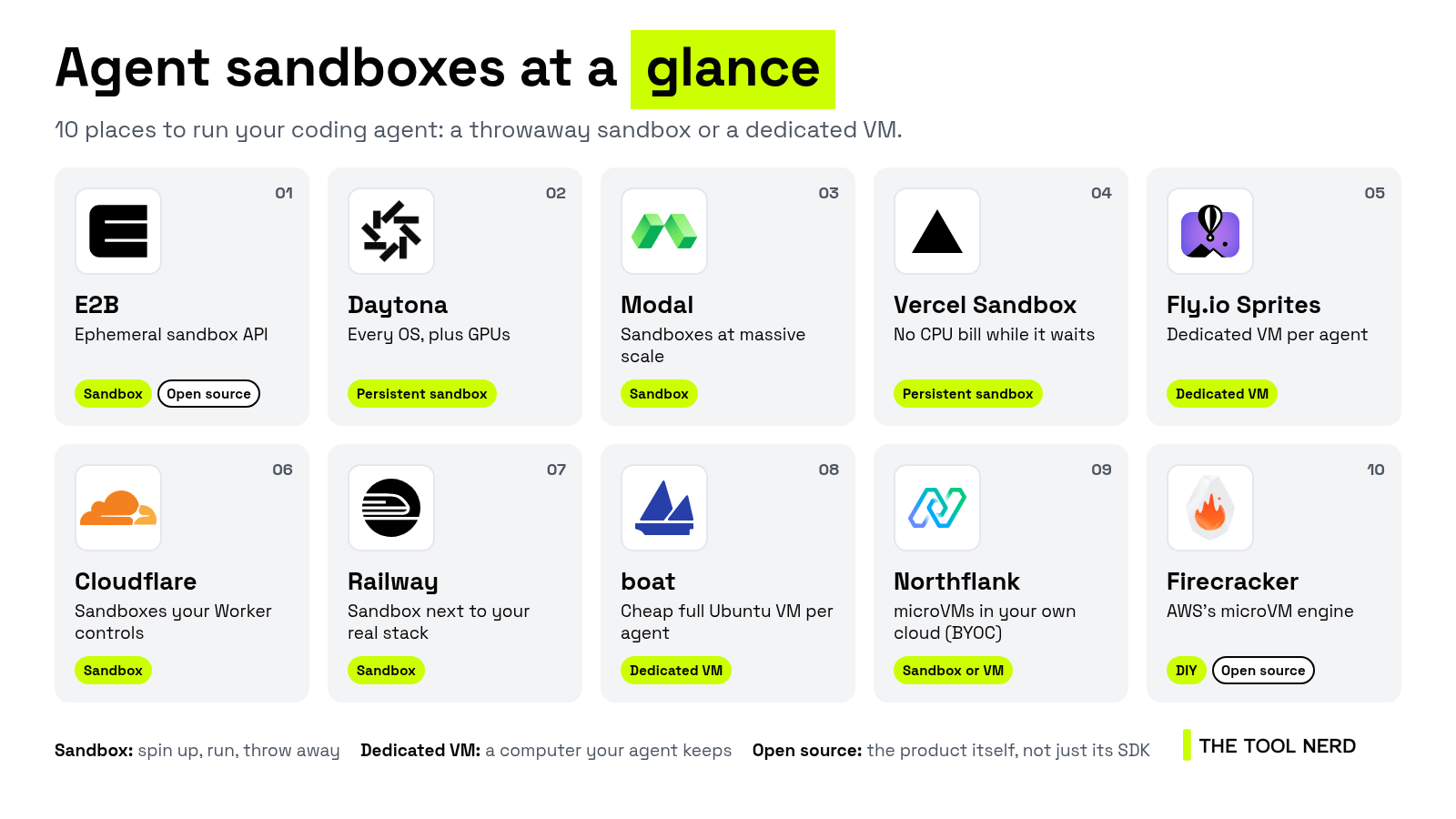
The 10 tools at a glance: which ones are throwaway sandboxes, which are dedicated VMs, and which are open source.
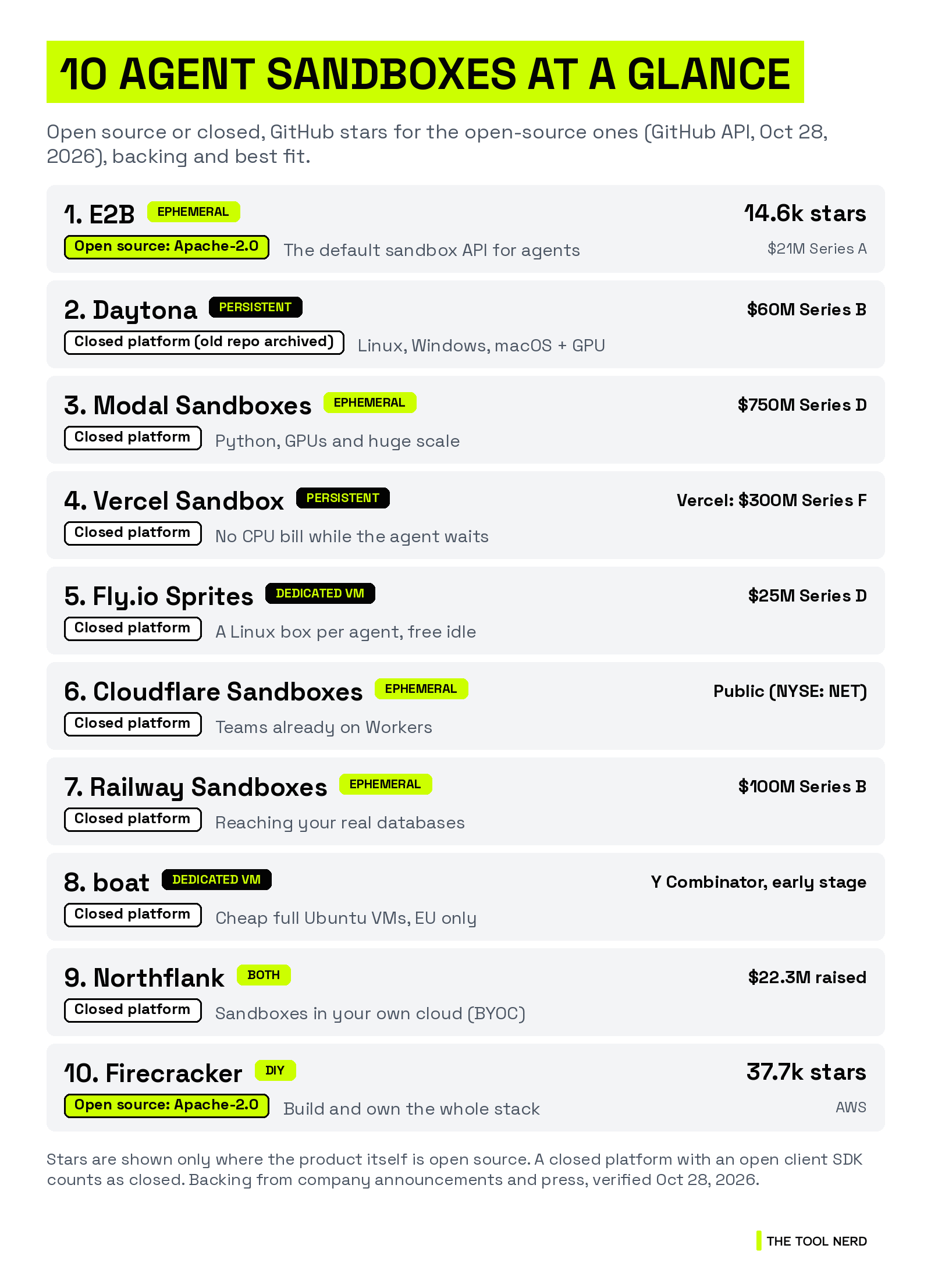
E2B: ephemeral, with pause and resume. Open source (Apache-2.0), 14,592 stars. $21M Series A. Best for: the default sandbox API for agents.
Daytona: persistent. Closed platform now; its old open-source repo is archived. $60M Series B. Best for: Linux, Windows, macOS and GPU sandboxes on one platform.
Modal Sandboxes: ephemeral. Closed platform. $750M Series D. Best for: Python, GPUs and huge scale.
Vercel Sandbox: persistent by default. Closed platform. Vercel raised a $300M Series F. Best for: agents that mostly wait on the model.
Fly.io Sprites: dedicated VM. Closed platform. $25M Series D. Best for: a Linux computer per agent that costs nothing while idle.
Cloudflare Sandboxes: ephemeral. Closed platform. Public company. Best for: teams already on Workers.
Railway Sandboxes: ephemeral. Closed platform. $100M Series B. Best for: sandboxes that reach your real databases.
boat: dedicated VM. Closed platform. Early stage, backed by Y Combinator. Best for: cheap full Ubuntu VMs for many agents, EU regions only.
Northflank Sandboxes: both. Closed platform. $22.3M raised. Best for: running sandboxes in your own cloud.
Firecracker: build it yourself. Open source (Apache-2.0), 37,674 stars. AWS. Best for: teams who want to own the whole stack.
Quick one before the deep dive: subscribers get each deep dive in their inbox first, plus the Tuesday new-tools roundup.
The 10 AI agent sandboxes, reviewed
1. E2B: the default sandbox API for agents
Shape: ephemeral by default, with pause, resume and snapshots
E2B calls itself “the AI Agent Cloud. An isolated machine for every AI agent: run code, browse, use tools, pause, fork.” Every sandbox runs on what E2B calls its “proprietary MicroVM runtime, built on Firecracker with dedicated kernels,” in E2B’s cloud or in your own AWS, GCP or Azure account (BYOC, Enterprise only).
Network: internet is on by default. You can switch it off, or set allow and deny lists by IP, CIDR or domain, and change them on a running sandbox.
Secrets: per-host request transforms (public beta) inject a header or stored secret at the egress proxy, so the code never holds it.
Free plan: Hobby is $0 with a one-time $100 credit, 20 concurrent sandboxes and 1-hour sessions.
Pro: $150/month plus usage, with 100 concurrent sandboxes and 24-hour sessions.
Usage: $0.000014 per vCPU-second plus $0.0000045 per GiB-second, CPU-only (pricing).
Facts:
Open source: yes. The main repo is Apache-2.0, and so is the E2B runtime (1,779 stars), which its README calls “the complete backend that powers E2B Cloud” and which you can run on your own machine. E2B’s homepage still calls the microVM runtime “proprietary,” so read the repo before you plan to self-host.
GitHub: e2b-dev/E2B, 14,592 stars as of Oct 28, 2026
Backing: $21M Series A (July 2025) led by Insight Partners, with Decibel, Sunflower Capital and Kaya, for $32M raised in total
Customers: Hugging Face, Perplexity, Groq and Manus, named in the funding announcement
→ Directory: E2B on The Tool Nerd
2. Daytona: Linux, Windows, macOS and GPU sandboxes
Shape: persistent and stateful, with snapshots and forks
Daytona builds what it calls “the Agent Cloud.” Its Series B post says it’s “the only provider with Linux, Windows, macOS, and GPU sandboxes on one platform.”
Network: network limits cover domain and CIDR allowlists, block-all and your own proxy. On the lower billing tiers, the organization’s restrictions apply and can’t be overridden per sandbox.
Pricing (pricing): pay as you go, per second. $0.0504 per vCPU-hour and $0.0162 per GiB-hour.
Free: $200 of free compute, and startups can apply for up to $50k in credits.
It’s not open source any more. The main GitHub repo is archived, and its README says: “As of June 2026, Daytona’s core development has moved to a private codebase.” You can still read the old code, but the platform you’d use today is closed.
Facts:
Open source: no. The platform is closed source now. The old repo, daytonaio/daytona (AGPL-3.0), is archived and read-only
Backing: a $24M Series A led by FirstMark Capital (Feb 2026), then a $60M Series B led by FirstMark Growth (Oct 2026), for $91M raised in total, per Daytona
Valuation and customers: Fortune reported a $1B valuation and customers including Anthropic, OpenAI, Nvidia, Cursor and Cognition
→ Directory: Daytona on The Tool Nerd
3. Modal Sandboxes: Python and GPU sandboxes at massive scale
Shape: ephemeral. 5 minutes by default, 24 hours at most
Modal Sandboxes are “secure containers for executing untrusted code.”
Two runtimes: gVisor, or a VM with its own Linux kernel (needed for Docker inside the sandbox). GPU sandboxes are gVisor-only.
Lifetime: 5 minutes by default, up to 24 hours, with filesystem snapshots for longer work.
Network:
block_networkand outbound CIDR and domain allowlists onSandbox.create(reference).Pricing (pricing): sandboxes bill at 3x the base rate, so $0.00003942 per physical core per second (one core is two vCPUs) and $0.00000667 per GiB per second.
Free: the Starter plan includes $30 of compute a month.
Facts:
Open source: no. Modal is a closed platform. Its Python client is on GitHub at modal-labs/modal-client
Backing: a $750M Series D (Oct 2026) at a $15.75B valuation, led by Accel, after crossing $1B in annualized run rate
Traction: Modal says Sandboxes alone is “a $300M run rate product,” and Accel says it has run more than 3 billion sandboxes
→ Directory: Modal on The Tool Nerd
4. Vercel Sandbox: you don’t pay for CPU while the agent waits
Shape: persistent by default. Saves state when it stops, resumes later
Vercel Sandbox runs “untrusted or agent-generated code in isolated Linux microVMs,” each a Firecracker microVM. It “starts in milliseconds,” per Vercel’s docs.
Active CPU pricing. No CPU charge while your code waits on model calls or APIs, which is most of an agent’s life. Memory still bills while it runs.
Sandbox and VM in one. Sandboxes save state when they stop and resume where they left off. That’s the default.
The strongest network controls I found. The firewall has
allow-all(the default),deny-alland custom allowlists, which you can tighten on a running sandbox: install packages with internet, then lock it down before the agent runs.Credentials brokering injects tokens on the way out, so “the secrets never enter the sandbox.”
Free: on Hobby within quotas: 5 hours of Active CPU, 420 GB-hours of memory and 5,000 creations a month, with 45-minute sessions.
Pro: $0.128 per Active CPU hour and $0.0212 per GB-hour, charged against Pro’s $20/month credit first, with 24-hour sessions (pricing).
Facts:
Open source: no. The service is closed source. The SDK and CLI are on GitHub at vercel/sandbox
Backing: Vercel raised a $300M Series F at a $9.3B valuation (Sept 2025), co-led by Accel and GIC
→ Directory: Vercel Sandbox on The Tool Nerd
You’re about halfway through. If this is saving you time, subscribing is free, and the next deep dive comes straight to your inbox.
5. Fly.io Sprites: a Linux computer per agent that sleeps for free
Shape: dedicated VM. Keeps its disk and checkpoints itself
Sprites are “full Linux computers designed for agents,” with a persistent 100 GB disk, checkpoints and their own HTTPS URL. Fly.io investor Martin Casado (Andreessen Horowitz) sums up the dedicated-VM side of this post: Fly is “giving agents real computers instead of disposable sandboxes.”
Checkpoints: snapshot the whole filesystem “in about a second,” and restore when the agent breaks something. Sprites also checkpoint on their own while you work.
Connectors: the agent reaches GitHub, Slack, OpenRouter or any HTTP API “without the credential ever entering the Sprite.”
Pricing: billed on actual use. $0.0385 per CPU-hour and $0.021875 per GB-hour of memory, plus storage.
Idle is free: idle Sprites aren’t billed for compute. Fly’s own example puts a 4-hour Claude Code session at $0.23.
Facts:
Open source: no. Sprites is a closed platform. The Go client is on GitHub at superfly/sprites-go
Backing: a $25M Series D (July 2026) co-led by Dell Technologies Capital and Intel Capital, with Andreessen Horowitz
Customers: more than 37,000, and 8,000 of them “agent-native,” per Fly.io
→ Directory: Sprites (Fly.io) on The Tool Nerd
6. Cloudflare Sandboxes: sandboxes your Worker controls
Shape: ephemeral. Lifetime is tied to the Worker that started it
Cloudflare Sandboxes come in two forms, both driven from a Worker:
Containers: a full Linux environment where “each instance is a microVM with its own kernel and network.”
Dynamic Workers: for untrusted JavaScript, Python or WebAssembly.
Network and secrets: Containers start with
enableInternet: false, and Cloudflare recommends keeping credentials in your Worker and adding them to outgoing HTTPS requests from there.Pricing: it needs the Workers Paid plan, with a $5/month minimum; sandbox usage bills on top.
Its security page is the most honest I read. One heading says it all: “Code can read what you put in its sandbox.” Another: “Every opening is also a way out.”
Facts:
Open source: no. Sandboxes run on Cloudflare’s closed Containers and Workers platform. The SDK and the container image code are on GitHub at cloudflare/sandbox-sdk
Backing: Cloudflare is a public company (NYSE: NET)
Cloudflare Sandboxes aren’t in The Tool Nerd directory yet.
7. Railway Sandboxes: a sandbox next to your real stack
Shape: ephemeral. Idle timeout on by default, with checkpoints and forks
Railway Sandboxes are “isolated, ephemeral Linux VMs” that went generally available on Sept 18, 2026, on every plan, Free included.
Agents preinstalled: Claude Code, Codex, OpenCode and Pi come in the default image, along with git and Node.
Prepare once, fork many: clone and install once, checkpoint it, then fork copies to try several approaches in parallel.
Its angle: with
networkIsolation: "PRIVATE", a sandbox joins your project’s private network and reaches your Postgres, Redis and internal services by hostname. The default,ISOLATED, allows outbound internet only. Be deliberate here: private access is powerful, and it’s exactly what a sandbox normally keeps out.Pricing: per second, for what it uses: $0.00001929 per vCPU-second of active CPU and per GB-second of memory in use. Railway puts that at about $50 per vCPU or GB for a full month of continuous use.
Also billed: $0.05 per GB of egress. Idle sandboxes still bill, which is why an idle timeout is on by default.
Facts:
Open source: no. Railway is a closed platform. The TypeScript SDK is on GitHub at railwayapp/railway-ts-sdk
Backing: a $100M Series B (Jan 2026), led by TQ Ventures per Railway’s press release
Traction: Railway says more than 2 million developers have shipped on it
Want to try it? Start on Railway here. This is my Railway referral link; it helps support The Tool Nerd at no cost to you. Per Railway’s affiliate docs, new accounts that sign up through it get $20 in Railway credits.
Railway Sandboxes don’t have their own directory page; Railway’s platform is listed: → Railway on The Tool Nerd
8. boat (formerly Box by ASCII): a full Ubuntu VM per agent, priced low
Shape: dedicated VM. Stops to a snapshot, then resumes or forks
boat was renamed on Sept 15, 2026, and box.ascii.dev now redirects to boat.dev. It calls itself “the cheapest, most powerful sandbox for agents.” Each sandbox is a full Ubuntu machine with root, SSH, Docker, Chrome and a desktop you can stream.
Isolation: “Each sandbox is its own virtual machine, with its own kernel, disk and IP address,” per its security docs. Its docs don’t name the hypervisor. The agent is root inside, so treat everything in the sandbox as readable.
How an agent uses it: the
boatCLI (boat new,boat exec,boat fork,boat stop), Python and TypeScript SDKs, or a REST API.boat promptruns Claude Code, Codex and other agents inside the sandbox.Lifecycle: a stop removes the machine and keeps the disk for 14 days. Saved snapshots keep a state with no expiry. Auto-stop is 1 hour by default, up to 30 days on a paid plan, or off.
Network and secrets: outbound internet is open by default, and there’s no API setting for network rules, so you add firewall rules inside the sandbox. With its AI credentials proxy on, the sandbox gets placeholder AI keys and the real ones stay with boat.
Pricing (pricing): billed per second, from $0.018/hour for 2 vCPU and 4 GB, or $0.036/hour for 4 vCPU and 8 GB. Per vCPU-hour, that’s the lowest list price in this post. There’s a $20/month minimum, which comes back as VM time.
Free trial: 7 days and 25 compute hours; a card is required.
Limits: EU regions only (Germany, Finland and France). SOC 2 is “in progress,” per its compliance page.
Facts:
Open source: no. boat is a closed platform. Its CLI and SDK releases are on GitHub at ariana-dot-dev/agent-server
Backing: early stage, backed by Y Combinator (Fall 2026 batch). Earlier, the founders said they had closed a pre-seed of about half a million dollars from Entrepreneurs First, Founders, Inc. and angels (April 2026), for their earlier product, Ascii. No round for boat itself has been disclosed.
Team: 3 people in Paris, led by Anicet Nougaret (CEO) and Kirill (CTO), per YC
Customers: none named publicly that I could find
It’s the earliest company on this list, so weigh that before you build on it. I’ve included it because it’s built for exactly the dedicated-VM side of this post, at a price that’s hard to ignore.
→ Directory: boat on The Tool Nerd
9. Northflank Sandboxes: microVMs in your own cloud (BYOC)
Shape: both. Ephemeral per task, or long-running with volumes and a public endpoint
Northflank Sandboxes are “secure microVM sandboxes for untrusted code,” inside Northflank’s wider deployment platform.
Isolation: microVMs on Cloud Hypervisor, “a dedicated guest kernel per sandbox,” or gVisor for GPU sandboxes.
Your cloud or theirs: the same runtimes run on Northflank Cloud or on BYOC clusters in your own AWS, GCP or Azure account. That’s its main angle: the sandbox runs where your data already lives.
Secrets: secrets injected at egress, plus mTLS and Tailscale.
Pricing (pricing): billed by the second. On Northflank Cloud, $0.01667 per vCPU-hour and $0.00833 per GB-hour of memory.
Free: a Sandbox plan covers up to $20/month of resources, with no card.
GPUs: from $0.80/hour for an NVIDIA L4.
Facts:
Open source: no. Northflank is a closed platform, with no open-source sandbox repo
Backing: $22.3M across a $16M Series A led by Bain Capital Ventures and a $6.3M seed led by Vertex Ventures US (BusinessWire, Nov 2024)
Customers: its sandbox page says it’s “the runtime behind 2,000+ ambitious teams”
→ Directory: Northflank Sandboxes on The Tool Nerd
10. Firecracker: build your own agent sandbox
Shape: whatever you build. It’s the engine, not the car
Firecracker is the open-source virtual machine monitor AWS built for Lambda: “secure and fast microVMs for serverless computing,” each with its own kernel. E2B and Vercel Sandbox say in their own docs that they run on it, and InstaBox’s docs say the same.
If you’d rather own the stack, there are two other open-source building blocks worth knowing:
gVisor (from Google): an “application kernel for containers” that intercepts system calls before they reach the host. Modal uses it, and Northflank uses it for GPUs. Apache-2.0, 19,810 stars.
Kata Containers: “lightweight Virtual Machines (VMs) that feel and perform like containers.” Apache-2.0, 9,035 stars.
Be honest with yourself here: images, snapshots, networking, secrets and scheduling on top of Firecracker are real work. That work is exactly what the nine companies above sell.
Facts:
Open source: yes, Apache-2.0
GitHub: firecracker-microvm/firecracker, 37,674 stars as of Oct 28, 2026
Backing: built and maintained by AWS
Firecracker isn’t in The Tool Nerd directory yet.
Give your agent fake Stripe and Slack accounts, not real ones
A sandbox protects your computer. It doesn’t protect your accounts. If the agent holds your real Stripe or Slack keys, one bad run can charge a real customer, message your team or delete real data.
So when an agent builds or tests anything that touches Stripe, Slack, GitHub or your database, give it a fake version:
Stripe: a Stripe sandbox, where payments “aren’t processed by card networks.” Agents can create one with
stripe sandbox create.Slack: a free developer sandbox, a separate test workspace.
Your database: a copy with test data, never production.
The rest: Rystic simulates Slack, GitHub, Stripe and more on your machine. → Directory
Key takeaway: your real keys stay with you. The agent gets test ones.
How to keep API keys out of an agent sandbox
The pattern every serious tool converges on: the agent gets a placeholder, and something outside the sandbox adds the real credential on the way out.
Claude Code:
credentialsentries withmode: "mask".Vercel Sandbox: credentials brokering on the firewall.
E2B: per-host request transforms and
Secret.fill(public beta).Cloudflare: an outbound handler in your Worker.
Sprites: Connectors.
boat: an AI credentials proxy that gives the sandbox placeholder AI keys.
Two warnings from the vendors themselves. Claude Code and Vercel both note that domain allowlists check the hostname at the start of the connection, so a broad domain or a shared CDN can still be a way out. Keep allowlists narrow. And Cloudflare’s rule applies everywhere: anything inside the sandbox, the code can read.
Key takeaway: never put a real key inside the sandbox if a broker can add it outside.
Next week’s roundup lands Tuesday. Subscribe so you don’t miss it.
When to use a dedicated VM vs an ephemeral sandbox
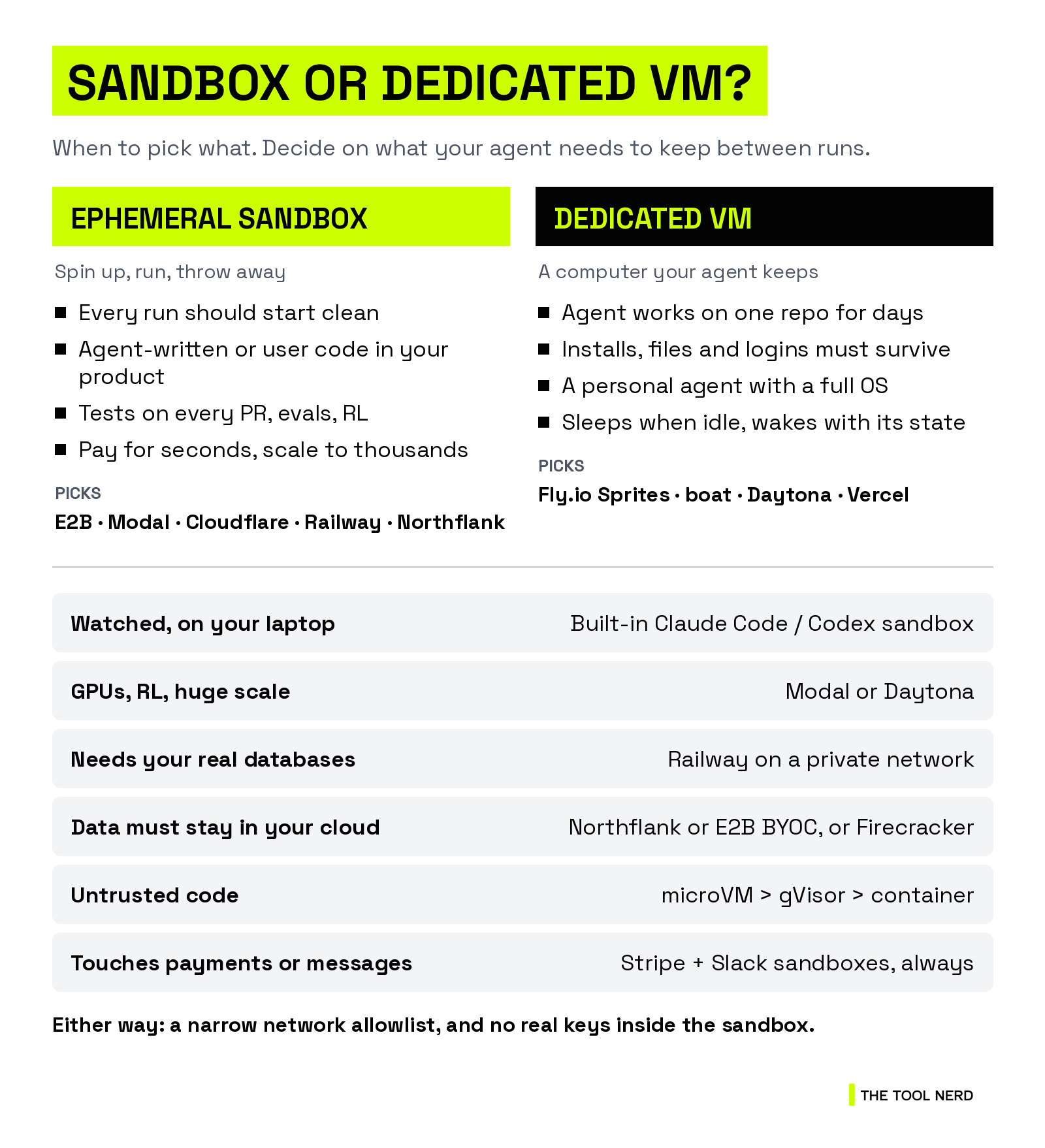
The simple test: does your agent need to come back to the same machine tomorrow?
Pick an ephemeral sandbox when:
every run should start clean, like agent-written code or user snippets
you run lots of short jobs: tests on every PR, evals, RL
you want to pay for seconds, not idle time
Good fits: E2B, Modal, Cloudflare, Railway.
Pick a dedicated VM when:
the agent works on the same repo or job for days
its installs, files and logins must survive between runs
it’s a personal agent that needs a full OS and a browser
Good fits: Fly.io Sprites, boat, Daytona.
You can mix both: a sandbox for risky one-off runs, a VM for the always-on agent.
Other agent sandboxes on my radar
These didn’t make the list. Some are too early for me to call them infrastructure you can depend on; others have changed.
Blaxel: hosted agent sandboxes on microVMs that suspend when idle and wake fast. It was acquired by Baseten in Sept 2026, so it’s now part of a bigger platform. → Directory
InstaBox from InsForge (YC Spring 2026): Firecracker microVMs with a persistent
/datadisk and a free plan with one machine. It opened as an invite-only beta on Oct 14, 2026. InsForge says it raised an $8M seed, but no investors have been named. Worth watching.Cube Sandbox from Tencent Cloud: a self-hosted sandbox service with an E2B-compatible API. Apache-2.0, 13,070 stars. With Daytona’s repo archived, it’s the biggest open-source option I found that’s still active. → Directory
kosa8: a sealed VM for Claude Code or Codex on your own Mac or Linux box, with your API key brokered outside the VM. It goes straight at the problem in the intro, but I found no public funding or customer data. From $29/month after a 14-day trial. → Directory
Agent Computer: cloud computers on “isolated Firecracker instances directly on bare metal hosts,” at $0.07 per CPU-hour. No funding found. → Directory
ForeverVM: forevervm.com now redirects to Modal. → Directory
More agent infrastructure is on The Tool Nerd directory.
My take: which agent sandbox should you use?
If you’re coding on your own laptop and watching what the agent does, the sandbox built into Claude Code or Codex is enough. Just make sure it’s turned on. Claude Code’s default settings still let commands read your SSH keys, so block that first.
Once an agent runs without you watching, it should be on its own machine, with a narrow network allowlist and no real keys inside. Which machine matters less than those two rules.
Then pick the shape. If every run should start clean, use an ephemeral sandbox, and E2B is the safe default. If the agent should come back to the same machine tomorrow, use a dedicated VM like Sprites or boat. And for anything that moves money or sends messages, give the agent fake accounts for testing.
One more, because this is how I think about it. If you’re building personal agents, like Grok Bot, Muse or Hermes, that live with you, remember context and run all day, give each one a dedicated VM, not an ephemeral sandbox. Sandboxes are for throwaway task runs: coding agents, code interpreters, untrusted code. A personal agent needs a persistent computer of its own, with its own files, logins and memory, still there tomorrow.
Don’t choose from a blog post, including this one. Pick two of these, run a real task from your own project on each, and keep the one that gets in your way the least.
That’s the series: Part 1 on memory and Part 2 on where your agent runs. Where do your coding agents run today: your laptop, a sandbox, or their own VM? Drop it in the comments.
Useful? Forward it to the teammate who runs Claude Code with permission prompts turned off.
Disclosure: links to Railway’s own site in this post use my referral link, which supports The Tool Nerd at no cost to you.
Keep reading
Your Coding Agent Has Amnesia: The Best Memory Layers for Claude Code, Codex and Cursor (2026)
10 New AI Tools This Week: Ghosthand, Rystic, Isoquant and More (Oct 2026)
Want more tools like these? Browse 1,200+ of them on The Tool Nerd directory, and subscribe to get the new-tools roundup every Tuesday.
Agent sandbox FAQ
Sandbox vs VM for AI agents: which should I use?
Use an ephemeral sandbox when every run should start clean: agent-written scripts, tests on every PR, evals or user code. You pay for seconds. Use a dedicated VM when the agent comes back to the same machine and its installs, files and logins must survive between runs, like a personal agent or a week-long repo job.
What is the best sandbox for Claude Code?
For watched work on your laptop, start with Claude Code’s built-in sandbox. It’s off by default, so turn it on with /sandbox and block credential files like ~/.ssh with the credentials setting. Once Claude Code runs unattended, give it its own machine: E2B for clean throwaway runs, or a dedicated VM like Fly.io Sprites or boat.
Is Codex sandboxed by default?
Yes. Per OpenAI’s security docs, Codex runs with network access turned off by default, and the default workspace-write mode limits edits to the workspace. You turn network on with network_access = true in config.toml. danger-full-access removes the boundaries entirely, so keep it off.
What is BYOC?
BYOC (Bring Your Own Cloud) means the vendor’s sandbox software runs inside your own AWS, GCP or Azure account, so your code and data never leave your cloud, while the vendor still manages the software. In this list, Northflank runs its sandboxes on BYOC clusters, and E2B offers BYOC to Enterprise customers.
What are the best E2B alternatives?
It depends on what E2B doesn’t give you. Daytona runs Linux, Windows, macOS and GPU sandboxes. Modal suits Python and GPUs at huge scale. Vercel Sandbox doesn’t bill CPU while the agent waits. Fly.io Sprites and boat give each agent a persistent VM. Northflank runs sandboxes in your own cloud. Cloudflare suits teams on Workers.
What is the difference between a container, gVisor and a microVM?
A plain container shares your host’s kernel. gVisor adds a stronger kernel boundary: it intercepts system calls before they reach the host, and Modal offers it. A microVM such as Firecracker gives each sandbox its own kernel, a stronger wall again; E2B and Vercel Sandbox run on it. Each still needs network and secret controls.