

Yesterday I fixed a nasty webhook bug with Claude Code. Today Codex hit the same bug from scratch, made the same wrong guess, and I explained the same signing rule all over again.
That’s not a bug in either tool. Claude Code’s own docs say it plainly: “Each Claude Code session begins with a fresh context window.”
In my 10 Agent Harnesses Every AI Builder Should Know in 2026 post, I called the harness the agent’s body: the loop, the tools, the permissions. But a body without memory starts every day as a stranger to your codebase.
So this post is about the memory layer. Here’s what’s inside:
what “agent memory” actually means, and whether you even need a memory layer
what Claude Code, Codex and Cursor already remember, plus the project .md files people use
memory tools in two groups: for your coding workflow, and for products you build
how portable your memory is, and one graphic that maps them all
This is part 1 of a two-part series on the missing layers of the agent stack. Part 2, on sandboxes, lands next Thursday.
What is agent memory? (and why your coding agent forgets)
Agent memory is anything that lets an AI agent carry useful context from one session into the next. That includes your project rules, the corrections you gave it, the bugs it already solved, and the preferences it learned.
For coding agents, I think in three layers:
Instructions you write. Files like CLAUDE.md or AGENTS.md: “we use pnpm”, “never touch /legacy”. Stable, hand-written, checked into the repo.
Memory the agent learns. Notes the agent saves on its own from your corrections, wins and failures.
Shared memory. The same memory available across tools, sessions and teammates. This is the hard part, and it’s where most new tools play.
Memory is a building block of context engineering, which I covered in What is context engineering?, and the human version lives in my second brain with Obsidian guide.
Key takeaway: start with the instructions you write. Learned and shared memory come later, if at all.
Do you even need a memory layer?
Honest answer: often, no. Not a separate one.
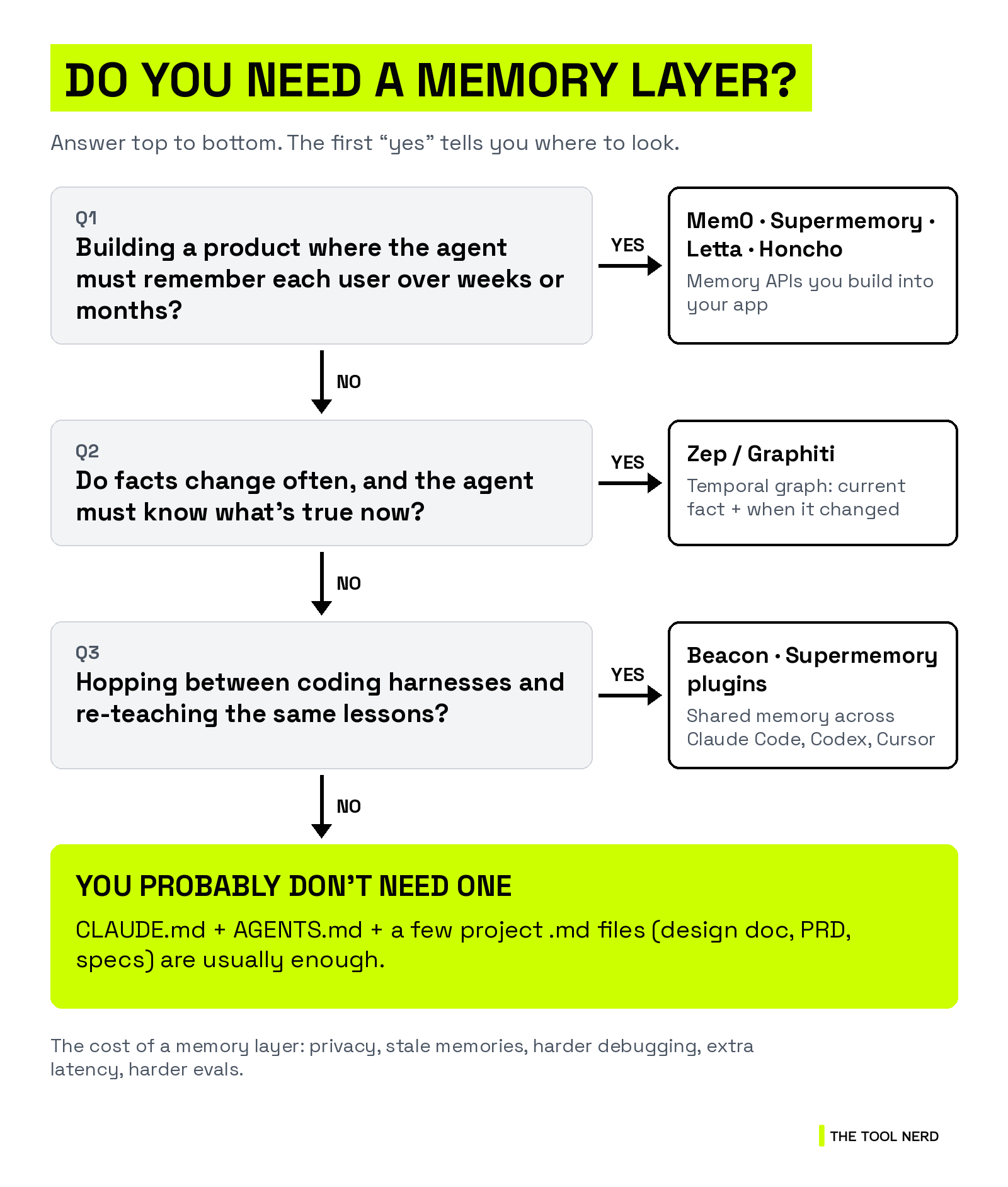
Read it top to bottom. The first “yes” tells you where to look:
Building a product where the agent must remember each user over weeks or months? Mem0, Supermemory, Letta or Honcho.
Facts change often, and the agent must know what’s true now (and what used to be true)? Zep or Graphiti.
Hopping between harnesses and re-teaching the same lessons, or many agents sharing what one learned? Beacon or Supermemory’s plugins.
None of the above? CLAUDE.md, AGENTS.md and a few project .md files are usually enough.
What memory costs you:
Privacy. Memory that captures sessions can capture secrets. Mem0’s own docs tell you to avoid storing secrets, raw credentials or unredacted sensitive data.
Stale memories. Old facts don’t delete themselves. Letta calls this “memory rot”, and there’s an open Codex issue titled “
Memoriesin codex potentially a bad idea” for the same reason.Debugging. When the agent acts oddly, you now ask “which memory did that?”
Latency and cost. Extraction and retrieval are extra model calls on every turn.
Evals. Recall is easy to test. Whether memory makes the agent better is much harder (more in the Letta section).
Key takeaway: if your memory is mostly rules and conventions, write it down. Don’t buy a memory layer for it.
The tools at a glance
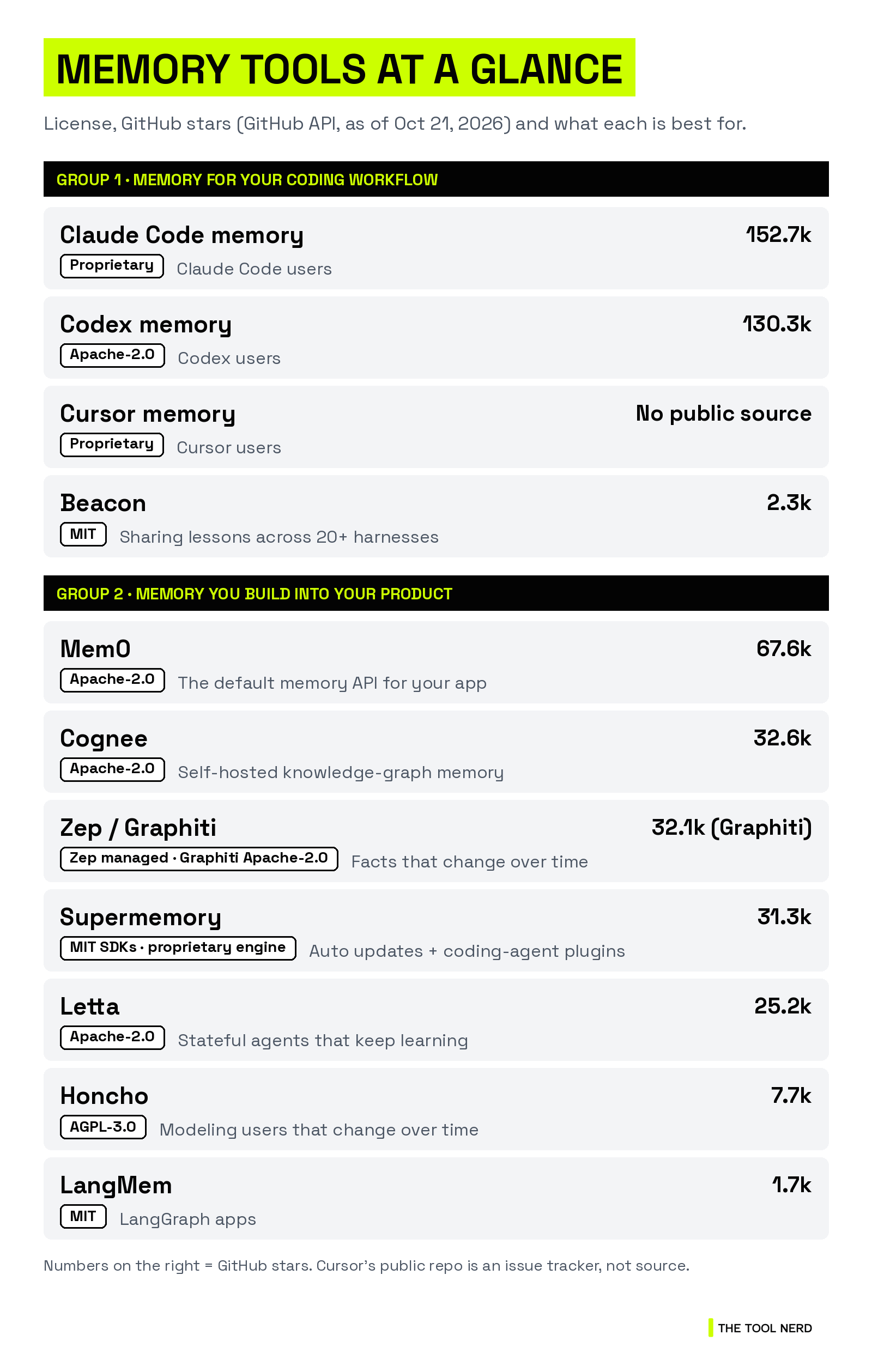
Two groups. Built-in files come first, because they’re free and already there. Within each group, tools are ordered by GitHub stars (from the GitHub API, as of Oct 21, 2026).
Group 1: memory for your coding workflow
Claude Code memory (CLAUDE.md, AGENTS.md, auto memory): proprietary, 152,683 stars. Best for: Claude Code users.
Codex memory (AGENTS.md + Memories): Apache-2.0, open source, 130,264 stars. Best for: Codex users.
Cursor memory (Rules + AGENTS.md): proprietary, no public source. Best for: Cursor users.
Beacon: MIT, open source, 2,313 stars. Best for: sharing lessons across 20+ coding harnesses.
Group 2: memory you build into your own product or agent
Mem0: Apache-2.0, open source, 67,577 stars. Best for: the default memory API for your app.
Cognee: Apache-2.0, open source, 32,622 stars. Best for: self-hosted knowledge-graph memory.
Zep / Graphiti: Zep is a managed (proprietary) service. Graphiti is Apache-2.0 with 32,107 stars. Best for: facts that change over time.
Supermemory: MIT SDKs and plugins, proprietary engine, 31,341 stars. Best for: automatic memory updates and plug-ins for coding agents.
Letta: Apache-2.0, open source, 25,216 stars. Best for: stateful agents that keep learning.
Honcho: AGPL-3.0, open source, 7,721 stars. Best for: modeling users and entities that change over time.
LangMem: MIT, open source, 1,716 stars. Best for: LangGraph apps.
Quick one before the deep dive: Part 2 on sandboxes lands next Thursday, and subscribers get it first.
Group 1: memory for your coding workflow
Claude Code memory (CLAUDE.md, AGENTS.md + auto memory)
Claude Code has two ways to carry knowledge across sessions:
CLAUDE.md files: instructions you write. Claude reads them at the start of every session. You can scope rules to file types with
.claude/rules/, and import other files with@path/to/file.Auto memory: notes Claude writes itself. It saves four types (user, feedback, project, reference) into
~/.claude/projects/<project>/memory/, with aMEMORY.mdindex. Only the first 200 lines or 25KB of that index load at session start.
Does Claude Code support AGENTS.md now? Yes, natively. Since v2.1.277, Claude Code reads AGENTS.md directly, “without adding a CLAUDE.md, an import, or a setting.” The details matter:
By default it reads AGENTS.md only when there’s no CLAUDE.md (or CLAUDE.local.md) in your working directory or above it.
If both exist, it reads CLAUDE.md only, unless you change Project instructions in
/configtoclaude-md-and-agents-md.The old trick still works: put
@AGENTS.mdat the top of CLAUDE.md, and Claude imports it. The docs recommend this for sessions that can’t load AGENTS.md directly.A CLAUDE.md that just says “read AGENTS.md” in words is the weak version. Claude only sees the file if it decides to open it.
Can Claude reference another session? Partly, and it’s worth being precise:
In Claude Code you can @-mention another live session (v2.1.232+) with cross-session messaging. Type
@plus the session’s name, for example “Let @api-worker know the schema migration finished.” Claude sends that session a message.What crosses over is a short message Claude writes, “never the sender’s conversation history or files.” To bring a whole past conversation back, you resume the session (
--continue,--resumeor/resume).In the Claude apps, paid plans can search and reference past chats. Ask “what did we discuss about X?” and Claude pulls it in as a tool call. Memory itself is on by default for Free, Pro and Max.
→ Directory: Claude Code on The Tool Nerd
Codex memory (AGENTS.md + Memories)
Codex reads AGENTS.md for project instructions. It also has Memories, which “let ChatGPT and Codex carry useful context from earlier work into future work.”
Local clients use “a separate local memory store.” Manage it with
/memories, or toggle it under Settings > Personalization > Enable Codex memories.OpenAI’s own advice: “Treat memories as a helpful recall layer, not as the only source for rules that must always apply.” Keep the must-follow stuff in AGENTS.md.
The Codex CLI is Apache-2.0.
Cursor memory (Rules + AGENTS.md)
Cursor handles persistent context through Rules: Project Rules in .cursor/rules, plus User and Team Rules. Project rules must be .mdc files with frontmatter. A plain .md file in that folder is ignored, and the docs point you to AGENTS.md if you prefer plain markdown.
Cursor is proprietary. Its public GitHub repo is an issue tracker, not source code.
→ Directory: Cursor on The Tool Nerd
The other project .md files people use
CLAUDE.md and AGENTS.md aren’t the only memory files in a repo now. Here’s what’s real, and whether a tool reads each one natively or only by convention (meaning you point the agent at it).
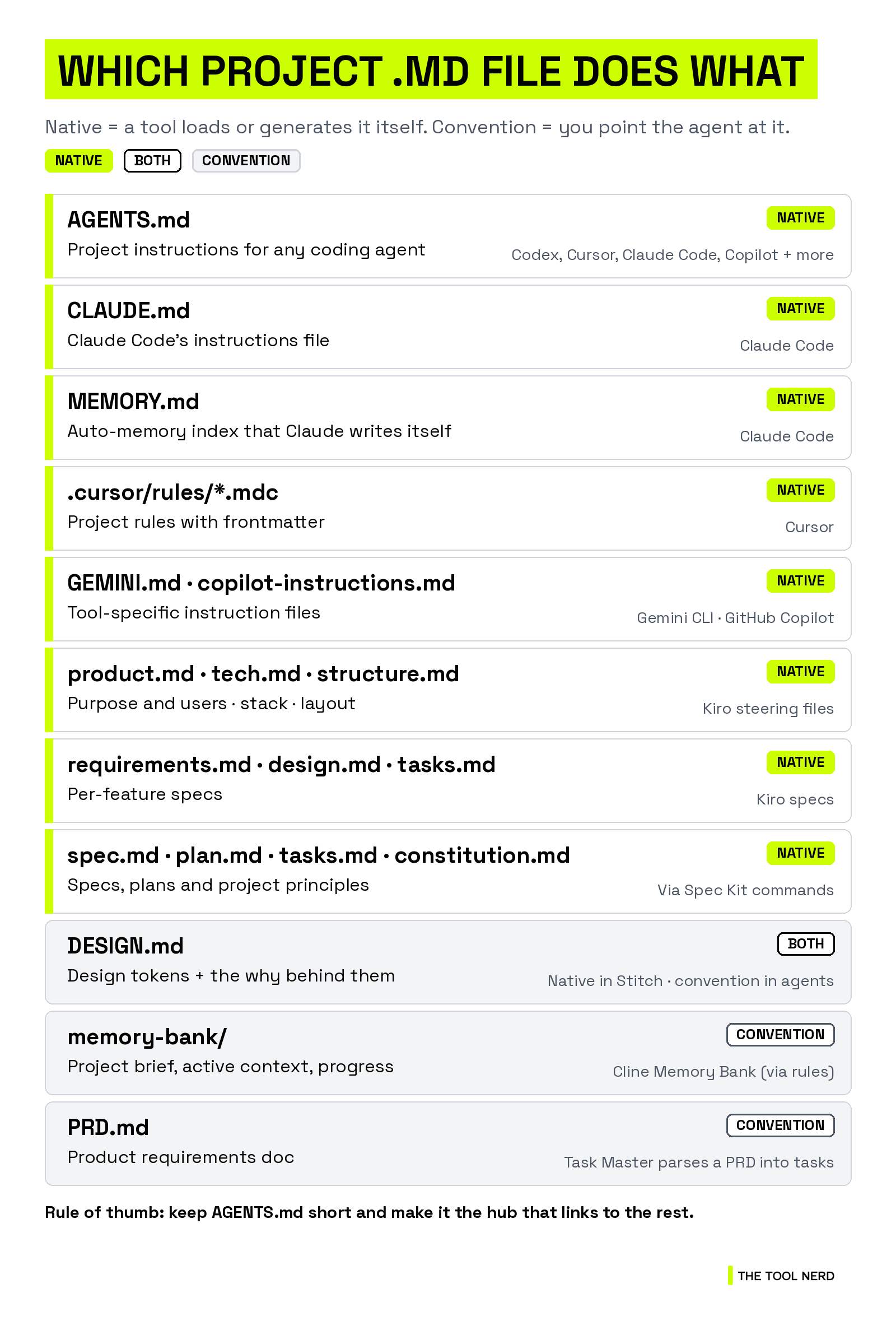
AGENTS.md: a “README for agents.” The agents.md site lists Codex, Cursor, Gemini CLI, GitHub Copilot’s coding agent, Jules, Zed and more, and says it’s used by over 60k open-source projects. It’s now stewarded by the Agentic AI Foundation. Native in many tools, including Claude Code as above.
DESIGN.md: Google’s open format for describing a design system to coding agents: YAML design tokens plus prose on why they exist. Google open-sourced the spec from its Stitch app, which can export and import it. It ships a linter (
npx @google/design.md lint DESIGN.md). Native in Stitch; by convention in coding agents.product.md, tech.md, structure.md: Kiro’s steering files in
.kiro/steering/. product.md holds the purpose, users and goals; tech.md holds the stack; structure.md holds the layout and naming. Native in Kiro, loaded in every interaction by default.requirements.md, design.md, tasks.md: Kiro’s specs for each feature. Native in Kiro.
spec.md, plan.md, tasks.md, constitution.md: GitHub’s Spec Kit (MIT, 142,261 stars) generates these through commands like
/speckit-specifyand/speckit-plan. constitution.md holds your project’s principles. Native when you use Spec Kit’s commands.memory-bank/ (projectbrief.md, activeContext.md, progress.md…): Cline’s Memory Bank, “a documentation methodology” set up through a rules file. By convention.
MEMORY.md: Claude Code’s auto-memory index, covered above. Native, but Claude writes it, not you.
PRD.md: a product requirements doc. Mostly by convention. Task Master parses a PRD (at
.taskmaster/docs/prd.txt) into tasks.GEMINI.md and .github/copilot-instructions.md: the native instruction files for Gemini CLI and GitHub Copilot.
My rule of thumb: keep AGENTS.md short and make it the hub that links out to DESIGN.md, a PRD or specs.
You’re about halfway through the guide. If this is saving you time, subscribe for Part 2 on sandboxes next Thursday.
Beacon (Asymptote Labs): cross-tool session memory
Beacon calls itself “self-improving memory for coding agents.” It’s the one tool here built for the gap the built-ins leave: each harness remembers inside its own walls.
It captures session history across Claude Code, Cursor, Codex, OpenCode, Cline “and 20+ other harnesses”: prompts, tool calls, edits and outcomes in one trace.
A “dreaming” process reviews successful sessions and turns the correction that mattered into a reusable skill. You review it once, and future agents retrieve it through MCP or Agent Skills.
It’s local-first, with durable JSONL. One thing to know: the README says interactive setup “preselects Beacon Cloud, with an explicit Local opt-out.” Choose deliberately.
The parent company, Asymptote, describes Beacon as “our open-source telemetry layer for capturing and normalizing agent activity,” and sells enterprise security on top. Developers get pitched memory, and enterprises get pitched telemetry. The same session trace powers both.
License: MIT, open source · GitHub: Asymptote-Labs/agent-beacon, 2,313 stars as of Oct 21, 2026 · Who uses it: no public customer list.
→ Directory: Asymptote on The Tool Nerd
Key takeaway for Group 1: the built-ins cover one tool each. Beacon is the option for one memory across all of them.
Group 2: memory you build into your own product or agent
Mem0: the default memory API
Mem0 is “the memory layer for AI agents.” You call add after a useful turn and search before the next model call.
How memory is created: an LLM extracts facts, deduplicates them and links entities. Extraction is additive: per the docs, “I moved from Austin to Seattle” stores the new fact “without silently rewriting the old one.” Corrections are explicit
updateanddeletecalls.Graph memory is on the managed Platform. The open-source version “has no graph memory.”
Pricing: Hobby is free (10,000 add requests and 1,000 retrievals a month). Starter is $19/month, and Pro is $249/month (pricing).
There are also integrations for Claude Code, Cursor and Codex, and an MCP server.
License: Apache-2.0, open source · GitHub: mem0ai/mem0, 67,577 stars as of Oct 21, 2026 · Who uses it: TechCrunch reported that Mem0 is the exclusive memory provider for AWS’s Agent SDK.
→ Directory: Mem0 on The Tool Nerd
Cognee: open-source graph memory you can self-host
Cognee turns documents, code and conversations into “a self-hosted knowledge graph your agents can search and reuse.”
Core operations include
remember,recall,improve(enrich memory and apply feedback) andforget.It plugs into Claude Code, Codex and any MCP client, such as Cursor or Cline.
Pricing: the free tier includes 1M tokens, then it’s $1 per 1M tokens (pricing).
License: Apache-2.0, open source · GitHub: topoteretes/cognee, 32,622 stars as of Oct 21, 2026 · Who uses it: case studies with Bayer R&D and the University of Wyoming, plus homepage quotes from Knowunity, SlideSpeak and Dynamo.
→ Directory: Cognee on The Tool Nerd
Zep + Graphiti: memory that knows when a fact changed
Zep is a managed context platform. Its open-source engine, Graphiti, builds a temporal context graph.
In a context graph, “each fact has a validity window: when it became true, and when (if ever) it was superseded.” When information changes, “old facts are invalidated, not deleted.” Every fact traces back to the raw episode that produced it.
Why that matters for agents: in real conversations you often start with one assumption and override it later. At decision time, the agent needs the current fact plus when and why it changed. A graph connects those dots.
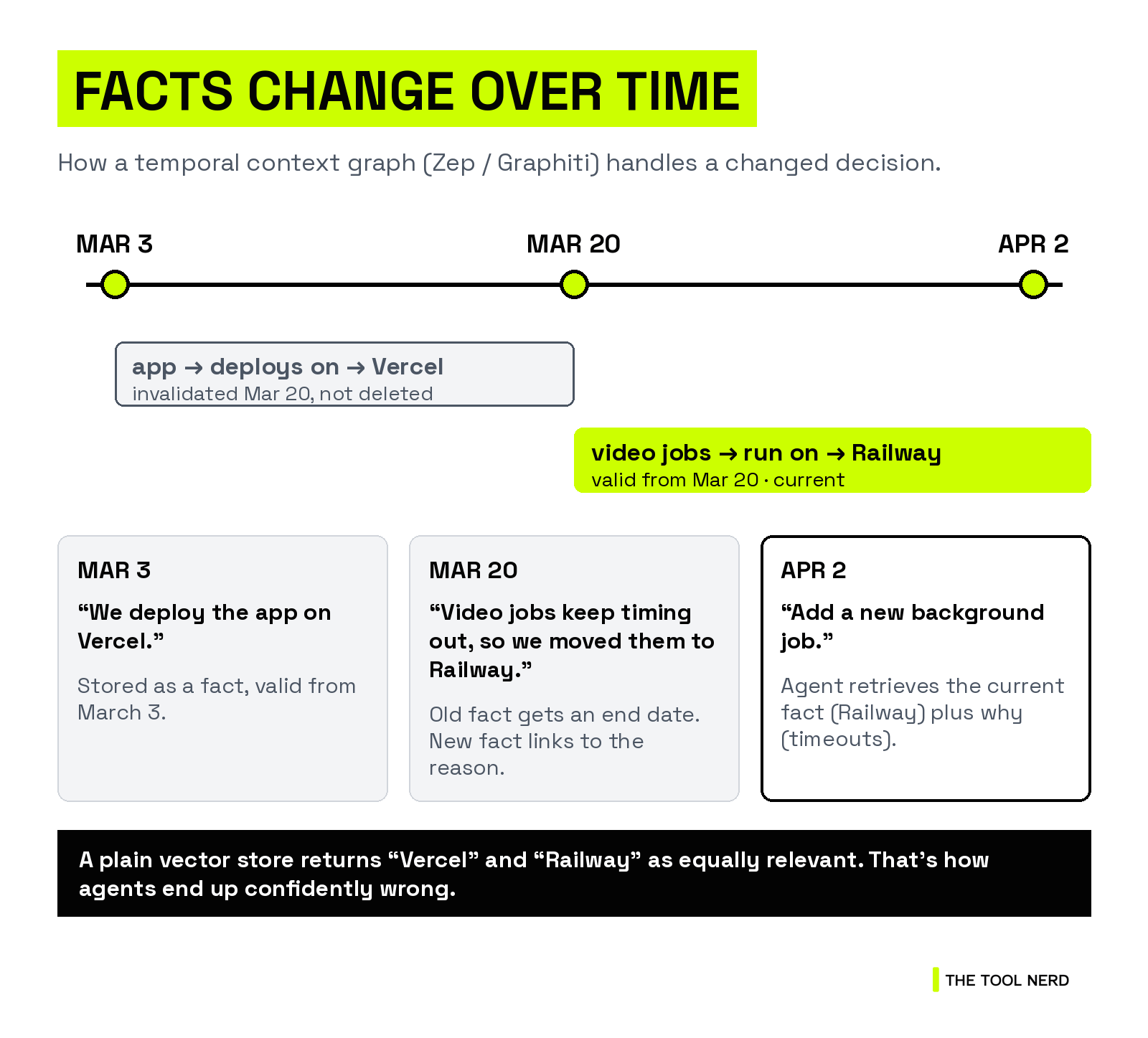
The same example, step by step:
March 3: “We deploy the app on Vercel.” Graphiti stores app → deploys on → Vercel, valid from March 3.
March 20: “Our video jobs keep timing out, so we moved them to Railway.” The Vercel fact gets an end date (it’s invalidated, not deleted). A new fact, video jobs → run on → Railway, starts March 20, linked to that message about the timeouts.
April 2: you ask the agent to add a new background job. It retrieves the current fact (Railway) and the reason (timeouts), so it doesn’t put a long job back on Vercel.
Key takeaway: a plain vector store would return “Vercel” and “Railway” as equally relevant. That’s how agents end up confidently wrong.
Pricing: free plan with 10,000 credits a month, then Flex at $125/month (pricing). Fully managed or in your cloud; SOC 2 Type II, with HIPAA BAAs on Enterprise.
Graphiti runs on Neo4j, FalkorDB or Amazon Neptune, and ships a reference MCP server.
License: Zep is proprietary (managed). Graphiti is Apache-2.0 and open source · GitHub: getzep/graphiti, 32,107 stars as of Oct 21, 2026 · Who uses it: customer logos on Zep’s homepage include Zscaler, HoneyBook, Samsung, Praktika.ai and Twin Health.
→ Directory: Zep on The Tool Nerd
Still with me? If these deep dives are useful, subscribing is free, and the next one comes straight to your inbox.
Supermemory: memory that updates and forgets on its own
Supermemory is a memory and context engine: a memory API, user profiles, RAG and connectors (Google Drive, Gmail, Notion, GitHub and more).
Where it differs from Mem0 is what happens after a memory is saved. Per its graph memory docs:
Extraction: one input becomes many atomic facts. A background “dreaming” step keeps linking them as new content arrives.
Updates are automatic. New facts connect to old ones as updates (the new fact replaces the old for search, and history stays for audit), extends (adds detail), or derives (an inferred fact). An
isLatestflag keeps retrieval on the current truth. Mem0, by contrast, adds by default and leaves corrections to you.Forgetting is built in. Temporary facts like “meeting at 3pm today” expire, contradictions resolve to the newest fact, and casual chatter is filtered out. Episodes “decay unless significant,” while preferences “strengthen with repetition.”
For coding agents, there are plugins for Claude Code, Codex, Cursor, OpenCode and Hermes, plus an MCP server. SMFS mounts your memory as a folder the agent can grep.
Portability: the API, MCP and plugins share one store, so memory follows you across tools. On lock-in: the SDKs are MIT, but the self-hosted server is a binary “built from a separate, non-public codebase,” free within a “lite license limit.” There are migration guides from Mem0 and Zep, but I found no documented bulk export.
Pricing: Free includes $5 of credits a month, and Pro is $19/month (pricing).
License: MIT for the SDKs and plugins, proprietary for the engine · GitHub: supermemoryai/supermemory, 31,341 stars as of Oct 21, 2026 · Who uses it: case studies with Chatarmin, Adapta, Scira AI (which moved from Mem0), Montra and Flow.
Letta: agents built for continual learning
Letta (formerly MemGPT) frames memory as learning. Its research calls this “continual learning in token space”: agents improve by updating their context, not their weights, so what they learn can outlive any one model.
What that looks like in practice:
Sleep-time compute (paper, 2025): agents “think” offline about their context during idle time, before the next question arrives.
Context Repositories (Feb 2026): memory in Letta Code is git-backed files, so every change is versioned.
FrontierMemory 1.0 (Oct 2026): a new benchmark from Letta Research. It scores memory by how much it helps an agent solve later tasks, not by quiz-style recall like LoCoMo. It has 15 tasks covering task, user and environment memory. It’s Letta’s own benchmark, so read the leaderboard (where Letta’s harness ranks first) with that in mind.
Portability: Letta’s Agent File (.af) is an open format for exporting an agent with its memory.
Pricing: free to start, then Pro at $20/month (pricing).
License: Apache-2.0, open source · GitHub: letta-ai/letta, 25,216 stars as of Oct 21, 2026 · Who uses it: case studies with Bilt, 11x, Kognitos and Hunt Club.
Other systems designed for continual learning: Claude Managed Agents has “dreaming” in research preview, which merges duplicates and replaces stale entries in a memory store. Beacon and Supermemory both “dream” too, Honcho has a Dreaming agent, and LangMem has a background manager. FrontierMemory also tests the OpenAI Agents SDK, Hermes Agent and Prime Agent.
Honcho (Plastic Labs): memory that models people over time
Honcho is “an open source memory library with a managed service for building stateful agents.” Its specialty is modeling people and entities that change over time, and its docs call it “a continual learning system.”
How it works: workspaces hold peers (users, agents, groups and more), and peers take part in sessions. New messages trigger background reasoning that updates each peer’s “representation.”
Dreaming: Honcho 3 (Jan 2026) added a Dreaming agent for background tasks that produce deductive, inductive and abductive conclusions. It also added
.chat()reasoning levels from minimal to max, plus a freecontext()call.Managed API: api.honcho.dev charges $2 per million tokens for ingestion. Honcho claims that’s “2.5-25x cheaper” than other solutions.
Integrations: MCP, plus plugins for Claude Code, Codex, Cursor, OpenCode, Kilo Code, OpenClaw and Hermes.
AGPL caution: you can self-host with
honcho startor the FastAPI server. But AGPL-3.0 requires you to share your source if you modify Honcho and let users reach it over a network. Check that before you build a self-hosted copy into a commercial product, or use the managed API instead.
License: AGPL-3.0, open source · GitHub: plastic-labs/honcho, 7,721 stars as of Oct 21, 2026 · Who uses it: no public customer list yet.
LangMem: memory for LangGraph agents
LangMem from LangChain helps agents “learn and adapt from their interactions over time.”
It provides memory tools agents use mid-conversation, plus a background manager that “extracts, consolidates, and updates agent knowledge.”
It can also refine prompts from experience, and memory lives in a LangGraph store you run.
License: MIT, open source · GitHub: langchain-ai/langmem, 1,716 stars as of Oct 21, 2026 · Who uses it: no public customer list.
How portable is your memory?
Before you commit, ask: if I leave, does my agent’s knowledge come with me?
Built-in files (CLAUDE.md, AGENTS.md, MEMORY.md, Cursor rules): plain markdown in your repo or home folder. That’s the most portable memory there is.
Beacon: local-first JSONL, open source, exposed through MCP and Agent Skills.
Mem0: self-host the open-source version on stores you choose. The Platform has a Memory Export API, plus MCP.
Cognee: self-host on your own databases, with an MCP server.
Zep / Graphiti: with Graphiti, the graph lives in your own Neo4j, FalkorDB or Neptune. I didn’t find a documented bulk export for Zep’s managed service.
Supermemory: strong across tools (API, MCP, plugins, SMFS), but the engine is proprietary, and I found no documented export.
Letta: open source, with the Agent File (.af) export format, and git-backed memory in Letta Code.
Honcho: self-host with
honcho startor the FastAPI server (AGPL-3.0), or use the managed API, plus MCP. I didn’t find a documented bulk export.LangMem: your LangGraph store, your database.
Key takeaway: plain files are the most portable memory. Check for open source, self-hosting or a real export before you commit.
Also on my radar
Newer open-source projects chasing “one memory for every coding agent”: AgentMemory (directory), shared-agent-memory, Stele and Honeycomb. Untested by me so far. More in our RAG & Memory category.
Part 2 next Thursday: sandboxes. Subscribe so you don’t miss it.
How to choose an AI agent memory layer
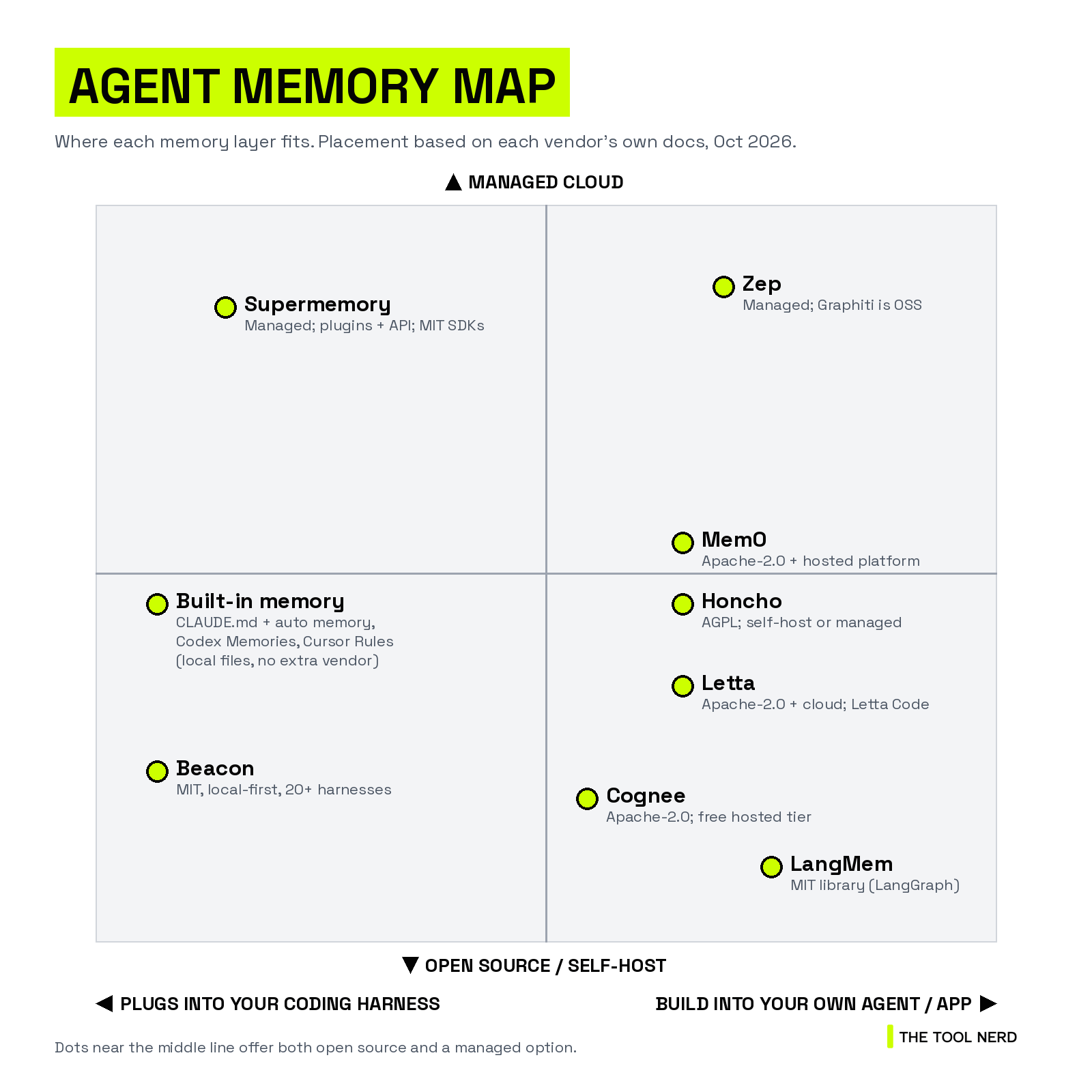
The map has two axes: “plugs into your coding harness” vs “build into your own agent or app,” and “open source / self-host” vs “managed cloud.” In short:
Harness side: built-in memory (local files, no vendor), Beacon (MIT, local-first) and Supermemory (managed, with plugins).
Build side: Zep (managed, with Graphiti open source), Mem0 and Letta (open source plus cloud), Cognee (open source, free hosted tier) and LangMem (open-source library).
The quick decision list:
Want Claude Code or Codex to stop forgetting? Start with AGENTS.md (plus CLAUDE.md if you need Claude-specific rules) and auto memory or Memories.
Switch harnesses every day? Try Beacon, or Supermemory’s plugins.
Building user memory into a product? Start with Mem0 or Supermemory.
Facts that change over time? Zep or Graphiti.
Want the agent itself to keep learning? Letta.
Must self-host or stay open source? Mem0, Cognee, Letta or Graphiti (all Apache-2.0); Beacon or LangMem (MIT); Honcho (AGPL-3.0).
Key takeaway: pick by where the memory lives (your harness or your product) first, then by open source vs managed.
The other missing layer: where your agent runs
Memory is half of what a serious agent needs. The other half is a safe computer to work on.
Once your agent remembers more and runs longer, you won’t want it on your laptop next to your SSH keys. Sandboxes like E2B, Vercel Sandbox and kosa8 give it an isolated machine instead. More next week.
My take
For most dev and coding work, you don’t need a memory product. Even on one project where I’m running a lot of Claude Code and Codex, CLAUDE.md and AGENTS.md, plus a few project .md files (a design doc, a PRD, specs), are usually enough. They’re plain text, versioned with the code, and every agent can read them.
It changes when you’re building a product yourself. If your users expect the app to remember them, look at Supermemory, Mem0 and Letta-type products. Each has its own pros and cons: Supermemory handles updates and forgetting for you, Mem0 is the flexible open-source default, and Letta is built around agents that keep learning.
So don’t pick from a blog post, not even this one. Play around with two or three of them on your real data and see what your exact use case needs.
If you switch between agents every day, I want to hear your setup. Which agents do you jump between, and what do you do about memory today? Drop it in the comments.
Useful? Forward it to the teammate who keeps re-explaining the repo to their agent.
Next Thursday, part 2: sandboxes. I’ll compare E2B, Daytona, Modal, Vercel Sandbox, Cloudflare, Fly Sprites, Blaxel, kosa8 and more: what they isolate, what they cost, and which one I’d actually hand my agents the keys to. Subscribe and it’ll land in your inbox.