

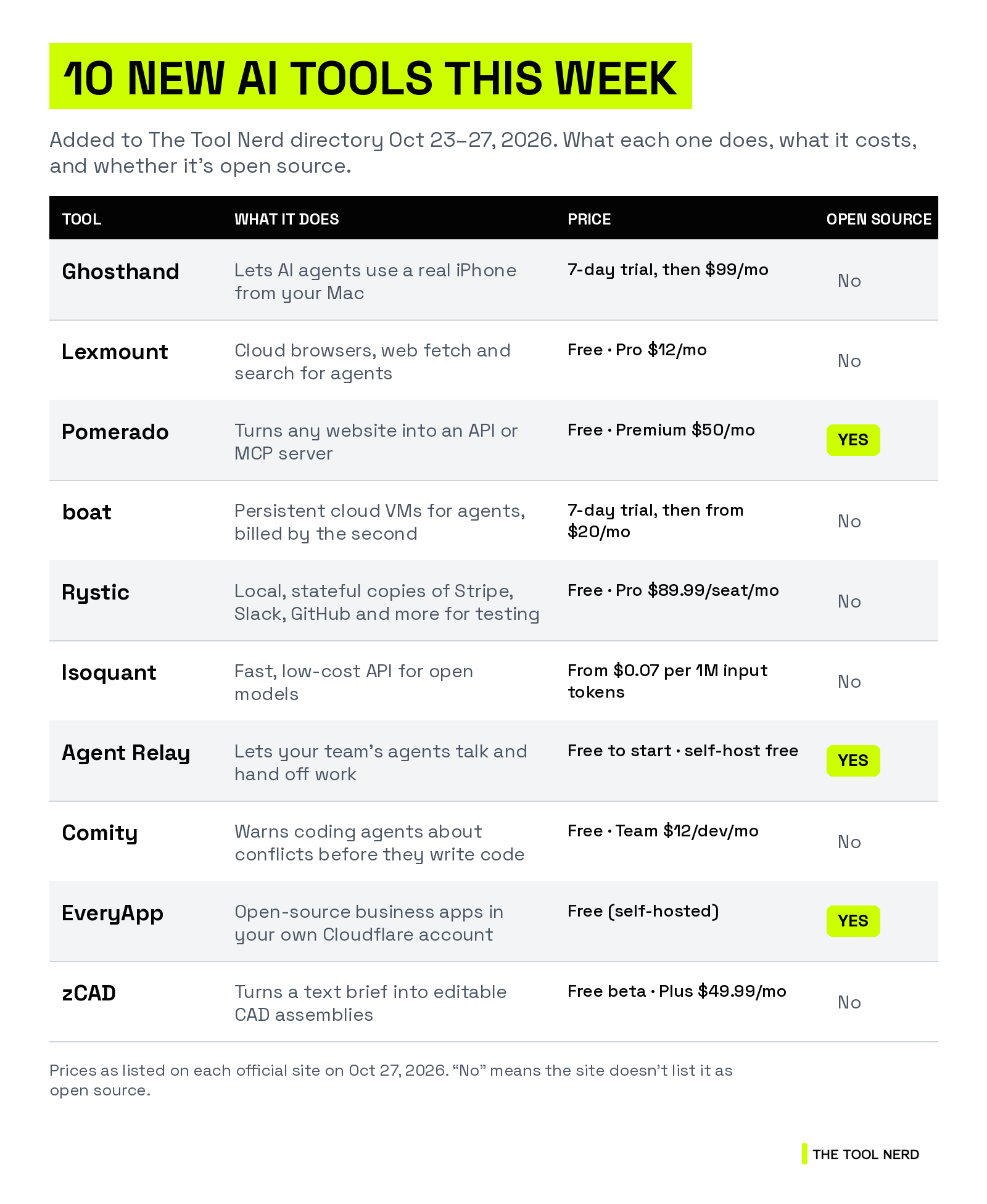
This week’s launches have one thing in common: they give agents a way to get things done in the real world. One lets an agent tap an iPhone. Another gives it a cloud browser. A third turns websites with no API into tools it can call.
Then come the tools that let you run agents, test them and pay less for them, and the tools that help a team’s agents work together without stepping on each other.
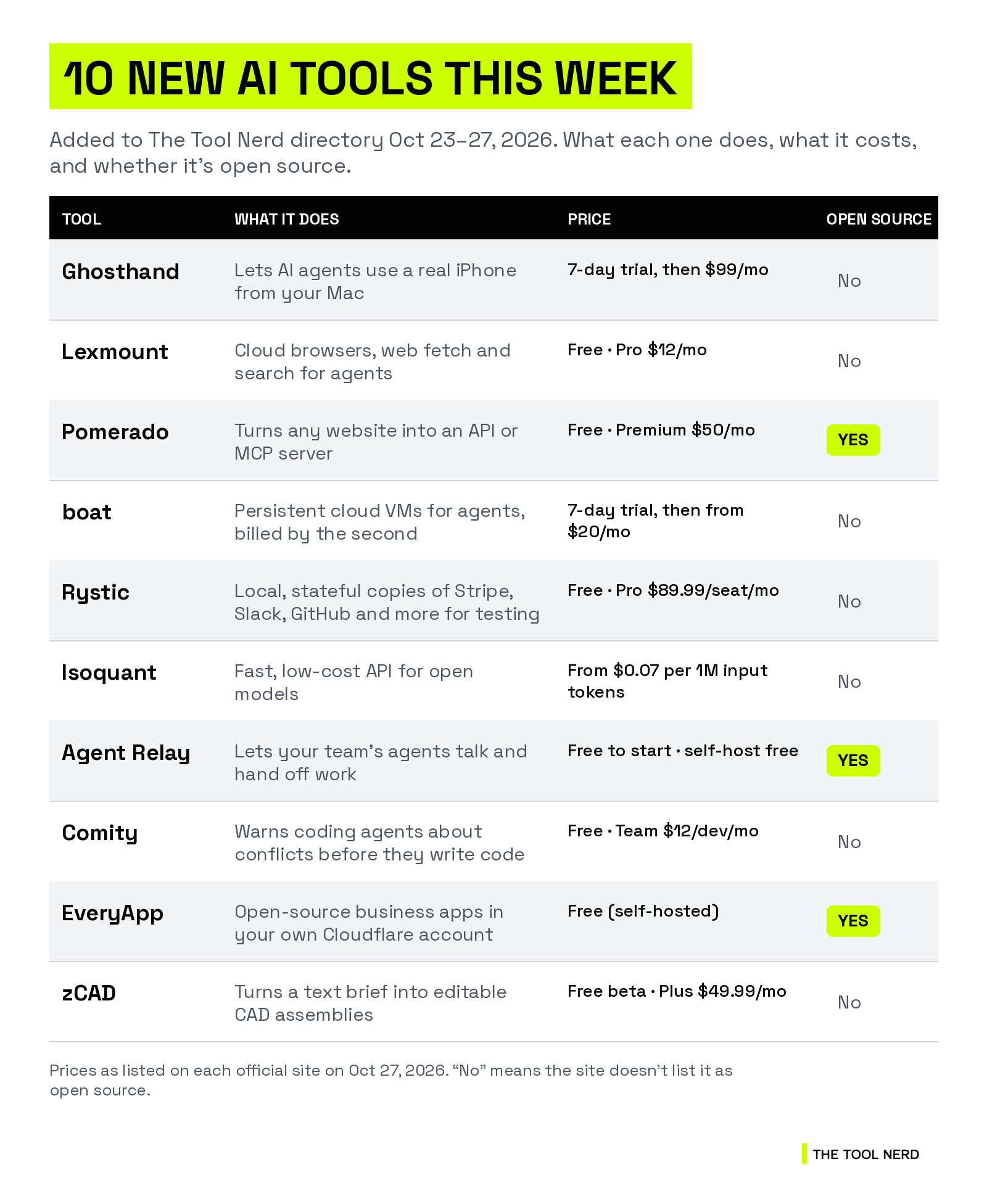
All 10 were added to The Tool Nerd directory between Oct 23 and Oct 27, 2026. I checked every official site, and prices are as listed there today.
TL;DR
Agents that use phones, browsers and websites: Ghosthand (a real iPhone), Lexmount (cloud browsers) and Pomerado (any website as an API, open source).
Running and testing agents: boat (cloud VMs from $20/mo), Rystic (local API simulators) and Isoquant (cheap, fast open-model inference).
Agent teamwork and building: Agent Relay and Comity get your team’s coding agents talking, EveryApp hosts open-source apps in your own Cloudflare account, and zCAD turns a text brief into editable CAD.
Open source: Pomerado, Agent Relay and EveryApp. Nine of the 10 have a free plan or a free trial. Isoquant is pay as you go.
Agents that use phones, browsers and websites
Who should care: anyone whose agent gets stuck when an app or website has no API.
1. Ghosthand: let your agent use a real iPhone
Ghosthand turns your Mac into a Bluetooth mouse and keyboard for an iPhone. The agent sees the screen over USB, then taps, swipes and types over Bluetooth, so it can use any iOS app, including Settings and the lock screen.
There’s no jailbreak, no Xcode and no app on the phone. You get a CLI, a remote MCP server and an HTTP API, and you can control several iPhones at once.
Who it’s for: builders whose agents need iPhone-only apps, like posting to TikTok or testing their own iOS app.
Pricing: 7 days free, then $99 a month.
Good to know: it needs a Mac on macOS 14 or later and a real iPhone. Windows, Linux and the iOS Simulator aren’t supported.
Links: Directory page · Official site


2. Lexmount: cloud browsers for AI agents
Lexmount runs browser sessions in the cloud so your agent or Playwright script doesn’t have to. It comes with four APIs: Cloud Browser (control a browser from code), Web Fetch (turn a URL into clean content), Web Search, and an Agent you can hand a whole browser task to.
It runs on its own engine, Moli, which Lexmount says starts faster and uses less memory than Chrome. You can pick Chromium when you need extensions or better compatibility.
Who it’s for: developers building scrapers, research agents or browser automations.
Pricing: free for 10 browser hours and 1,000 Web Fetch requests a month. Pro is $12 for a month with 100 hours, Pro+ is $60 and Enterprise is $180.
Links: Directory page · Official site
3. Pomerado: turn any website into an API or MCP server
Pomerado lets your agent use websites that have no API, like legacy portals, consumer sites and internal tools, without driving a browser click by click. Ask Codex, Claude or Cursor for an integration and Pomerado builds and tests it, handling logins and 2FA codes. When a site changes, it repairs the integration on its own.
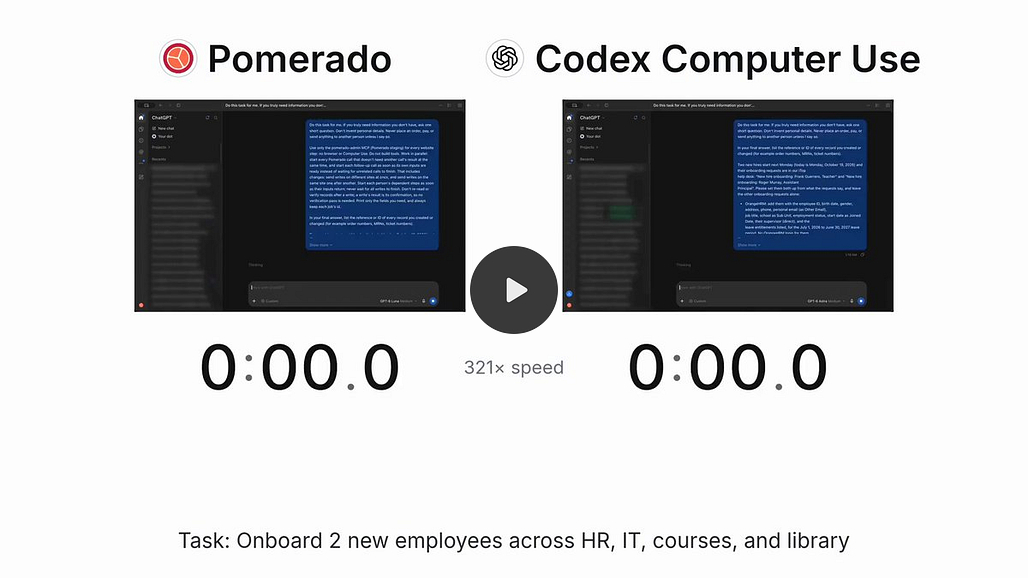
In one demo, Pomerado onboarded two employees in about 8 minutes for 3 cents, while Codex Computer Use took 21 minutes and $41. That’s the company’s own test.
Who it’s for: anyone building agents that work with bookings, bills, claims or supplier portals.
License: open source (MIT), about 990 GitHub stars. Backed by Y Combinator.
Pricing: free for 100 tool calls a day. Premium is $50 a month for 1,000 calls a day. Business is custom.
Links: Directory page · Official site

Running and testing agents
Who should care: teams putting agents into production who need somewhere to run them, a safe way to test them and a lower inference bill.
4. boat: cloud computers for your agents
boat gives each agent its own persistent Ubuntu VM with SSH, Docker, a 60fps virtual desktop and fast forking from a snapshot. Docker, VS Code, Chrome, Node.js and other tools come pre-installed, and you can run Claude Code, Codex or OpenCode inside.
Who it’s for: people running fleets of agents, CI jobs or long coding sessions in the cloud.
Pricing: billed by the second, with a $20 monthly minimum. $20 buys about 555 hours of a 4 vCPU / 8 GB machine. Stopped machines cost nothing, and there’s a 7-day free trial with 25 compute hours.
Good to know: servers are in the EU only for now (Germany, Finland and France). Backed by Y Combinator.
Links: Directory page · Official site
5. Rystic: test your agent against a copy of Stripe, not the real thing
Rystic runs local copies (simulators) of the APIs your agent uses, including Slack, GitHub, Stripe, PayPal, Okta, Linear and Kalshi. They keep state, so if your agent adds a customer, it shows up in the next call. You can reset them, load your own data and break them on purpose.
Before each release, Rystic sends the same requests to the live API and the simulator and publishes how often they match. Slack, for example, matched 96.7% across 538 checks.
Who it’s for: teams testing agents that send money, messages or code changes, and anyone tired of API rate limits in CI.
Pricing: free for 10 hours a month on one seat. Pro is $89.99 per seat a month (with $100 of credit per seat) and adds fault injection. Enterprise is custom and runs fully offline.
Good to know: part of Y Combinator’s Fall 2026 batch.
Links: Directory page · Official site


6. Isoquant: open models, cheaper and faster
Isoquant is an inference API for open models. You keep your code, add your Isoquant key and change the base URL. Prompt caching is automatic, and there are no top-up fees.
On its own benchmark, Isoquant serves GLM-5.3-Flash with a 452 ms median time to first token, against 890 ms for the next-fastest provider it tested.
Who it’s for: developers and startups running coding, reasoning or agent workloads on open models.
Pricing: GLM-5.3-Flash is $0.07 per 1M input tokens and $0.15 per 1M output. DeepSeek V4.1 Flash 1017 is $0.10 input and $0.45 output.
Good to know: backed by Y Combinator. It also trains custom models for companies.
Links: Directory page · Official site
Agent teamwork, apps and design
Who should care: teams where several people’s agents work on the same code, and makers who want to own their tools.
7. Agent Relay: let your agents talk to each other
Agent Relay connects your agents and your teammates’ agents so they can ask each other questions, read each other’s sessions and hand off work. Your frontend agent can ask the backend agent what an endpoint returns, instead of asking you.
It works with the tools you already use, from terminal agents to desktop apps.
Who it’s for: teams where Claude Code, Codex and other agents work on the same codebase.
License: the relay is open source (Apache 2.0, about 1k GitHub stars), and you can host it yourself.
Pricing: the hosted cloud is free to start. Self-hosting is free.
Good to know: backed by Y Combinator.
Links: Directory page · Official site

8. Comity: catch agent conflicts before the code is written
Comity is a coordination layer for your team’s coding agents. Everyone keeps their own agent, and Comity warns two agents heading for the same function, API or table before either one writes a line. It also turns a spec into a shared task list, passes context along when you log off, and enforces team rules through agent hooks.
It works with Claude Code, Codex, Cursor, GitHub Copilot, Gemini CLI and any MCP client.
Who it’s for: engineering teams with several coding agents in one repo.
Pricing: free for up to 5 active developers and 3 repos. Team is $12 per active developer a month, Business is $24, and Enterprise starts at $40. Agents are unlimited on every plan.
Links: Directory page · Official site
9. EveryApp: open-source business apps in your own Cloudflare account
EveryApp wants to “make every app open source.” It deploys ready-made apps into your own Cloudflare account: OpenSEO for SEO research, OpenCRM, OpenAnalytics (no cookies) and OpenMail, where an agent drafts your replies. You can run one as is, or fork it and build your own.
Apps have no public address, and a gateway makes API calls for them, so no app ever holds your keys.
Who it’s for: founders and small teams who’d rather own their tools than pay per seat.
License: open source (MIT). It comes from the makers of OpenSEO, which has about 25k GitHub stars. Backed by Y Combinator.
Pricing: free and self-hosted. You pay Cloudflare: an app nobody uses costs $0, and the $5/month Workers Paid plan can host hundreds of apps.
Good to know: it’s still in alpha.
Links: Directory page · Official site

10. zCAD: from a text brief to an editable CAD assembly
zCAD has two parts. zCAD AI turns a text description or a reference image into editable parametric CAD, with dimensions, constraints and assembly mates. zCAD Online is a browser CAD workspace where you keep editing that model, add sheet metal and weldments, make 2D drawings and work on it with your team.
It can read SolidWorks, CATIA, NX, Inventor and STEP files.
Who it’s for: mechanical engineers, product designers and hardware makers.
Pricing: free during the beta. AI Plus is $49.99 a month and AI Pro is $89.99. Online Standard is $589 a year at its beta price.
Good to know: models on free accounts are public, and free use is non-commercial only.
Links: Directory page · Official site
Keep reading
Want more tools like these? Browse 1,200+ of them on The Tool Nerd directory, and subscribe to get this roundup every Tuesday.