

We have all heard about MCP, the Model Context Protocol. Anthropic introduced MCP in November 2024 as a way for AI applications to connect to tools and data through a common interface. The original MCP announcement describes it as an open standard for connecting AI assistants to the systems where data lives.
That idea helped agents move beyond answering questions. An agent can now use tools to search, read, write, and complete work.
They can search for a product, book a trip, check an order, fill out a form, and update an account. Much of this work still happens the hard way. The AI looks at a website, guesses what each button means, clicks around, and tries to recover when the page does not behave as expected.
Check out my previous articles and do subscribe to keep yourself updated on the latest happenings in the world of AI


WebMCP is an attempt to make that process clearer.
It gives a website a way to tell an AI agent what the website can do. The agent can use named actions such as get_order_status or create_support_request. It does not have to guess from the page layout alone.
A website that is easier for AI to use may give customers faster service, fewer steps, and a better way to complete complex tasks.
This article explains what WebMCP is, how it works, how to build a small example, and where it may matter for a business.
Short version: WebMCP helps an AI agent use the website that is already open. MCP usually connects AI to backend systems. They solve different problems and can work together.
Who Created WebMCP? W3C, Google, and Microsoft
WebMCP is not an OpenAI-only technology. It is an experimental proposal being developed in the W3C Web Machine Learning Community Group.
The current WebMCP editors listed in the specification are:
Brandon Walderman from Microsoft
Khushal Sagar from Google
Dominic Farolino from Google
The public design discussion was already active in September 2025. The work is still a draft, not a finished web standard. Chrome announced an early preview on February 10, 2026, and published its WebMCP documentation in May 2026.
The WebMCP specification, WebMCP GitHub repository, and Chrome early preview announcement are the best places to follow the work.
WebMCP Explained in Simple Terms
WebMCP is a proposed browser standard. It lets a website describe actions that a browser-based AI agent can use.
The website supplies four things:
A name for the action
A short explanation
The information the action needs
The website code that runs the action
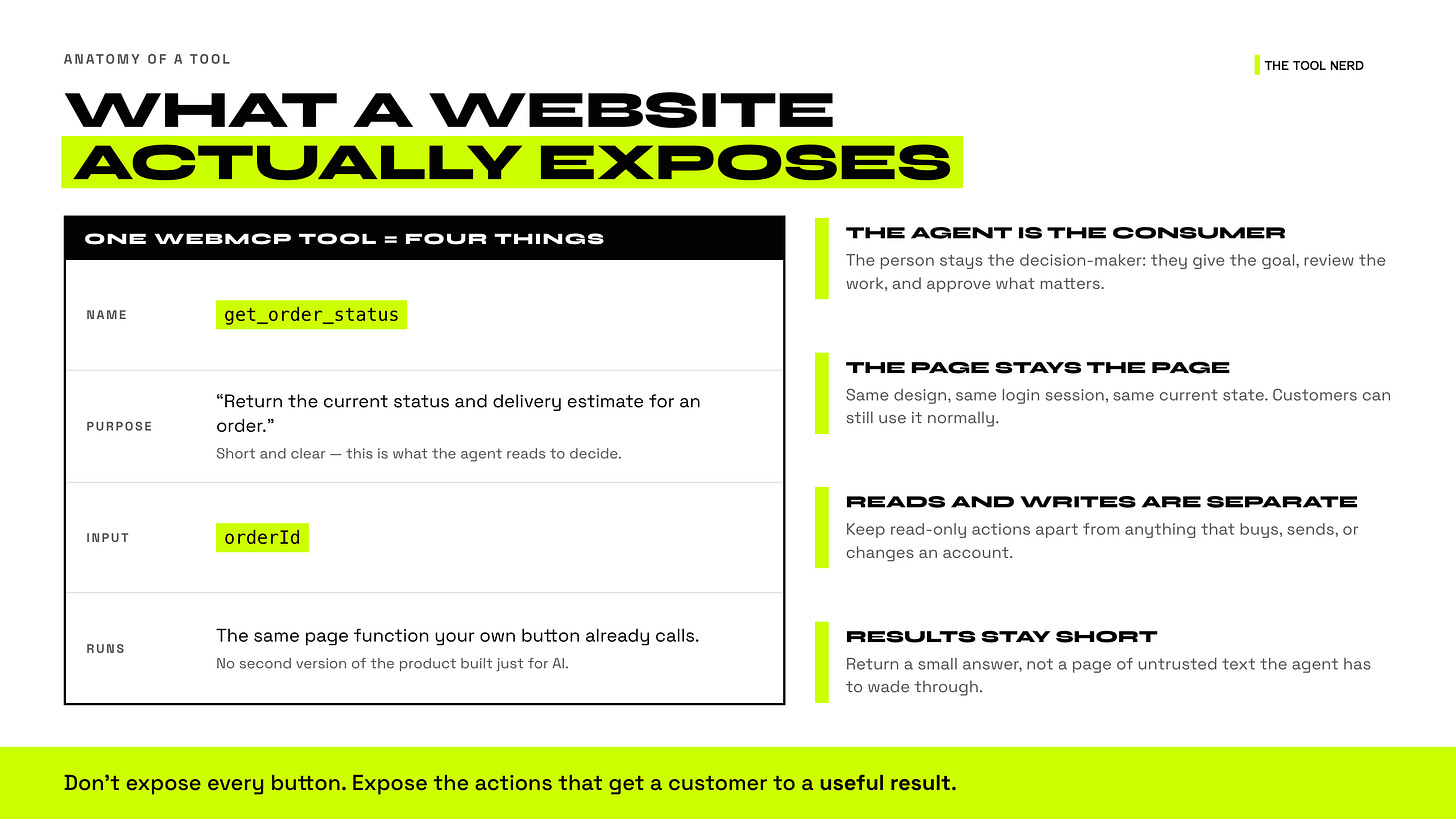
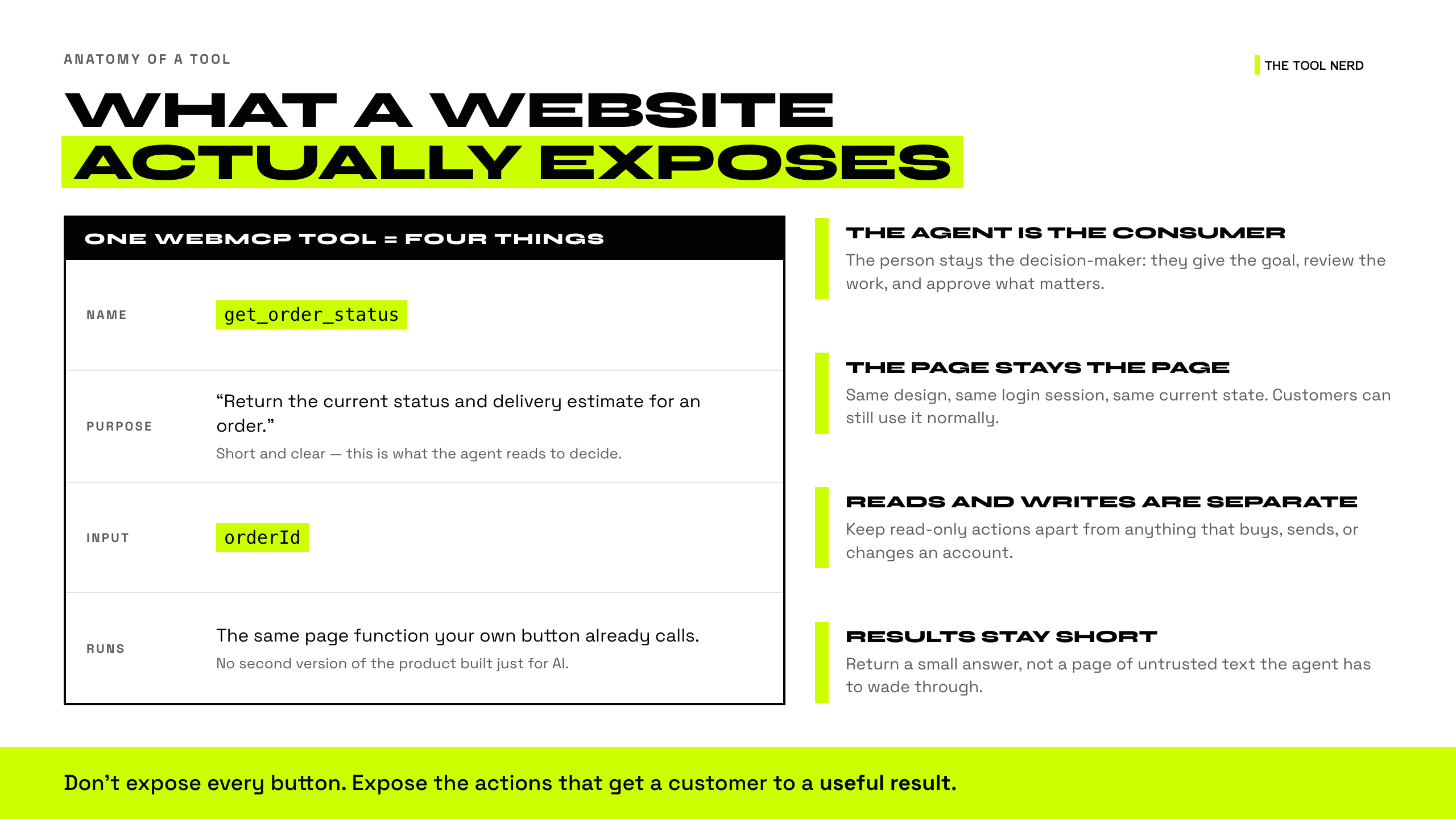
Example, a support website might expose this action:
Name: get_order_status
Purpose: Return the current status and delivery estimate for an order.
Input: orderId
Result: status, estimated delivery, explanation
The customer can still use the website normally. The page keeps its design, login session, and current information. A compatible AI agent gets a clearer way to use the product.
The main consumer of these tools is the agent. The person remains the decision-maker.
Why WebMCP Matters for Businesses
WebMCP is interesting because it connects AI to the product experience that already exists.
The human does not disappear from the journey. The agent handles the search, form filling, and repetitive steps. The person supplies intent, judgment, and approval.
That can matter in four areas:
Reduce Customer Effort with WebMCP
Some tasks are simple in theory but tiring in practice. A customer may need to open several pages, find the right order, choose a category, enter the same information again, and wait for a result.
An AI agent can help. The problem is that ordinary browser automation often makes the agent work like a person with a blindfold. It has to infer the meaning of the page from text, buttons, and layout.
WebMCP gives the agent a direct path to the product action.
Lower Customer Support Costs with WebMCP
Support teams spend time on tasks such as checking an order, finding a policy, changing an address, and preparing a ticket.
WebMCP does not remove the support team. It can help the customer find the right answer and prepare a better request before a human takes over.
That can reduce repeated questions and improve the quality of the first support message.
Improve Conversion and Task Completion
Every extra step creates a chance for a customer to drop.
This matters in travel booking, applications, checkout, insurance claims, onboarding, and other long forms. An agent that can use the product directly may help more customers finish the task.
A business should measure completion rate, customer satisfaction, support contacts, and errors before claiming an improvement.
Build Customer Trust and Control
The best agent experience is not invisible automation. The customer should see what is happening and approve important actions.
WebMCP keeps the page in the browser. A website can show the current state, highlight the action, and ask the customer to confirm before a purchase, message, or account change.
WebMCP Example: Before and After
Imagine a customer says:
“Find my delayed order, explain what happened, and open a support request.”
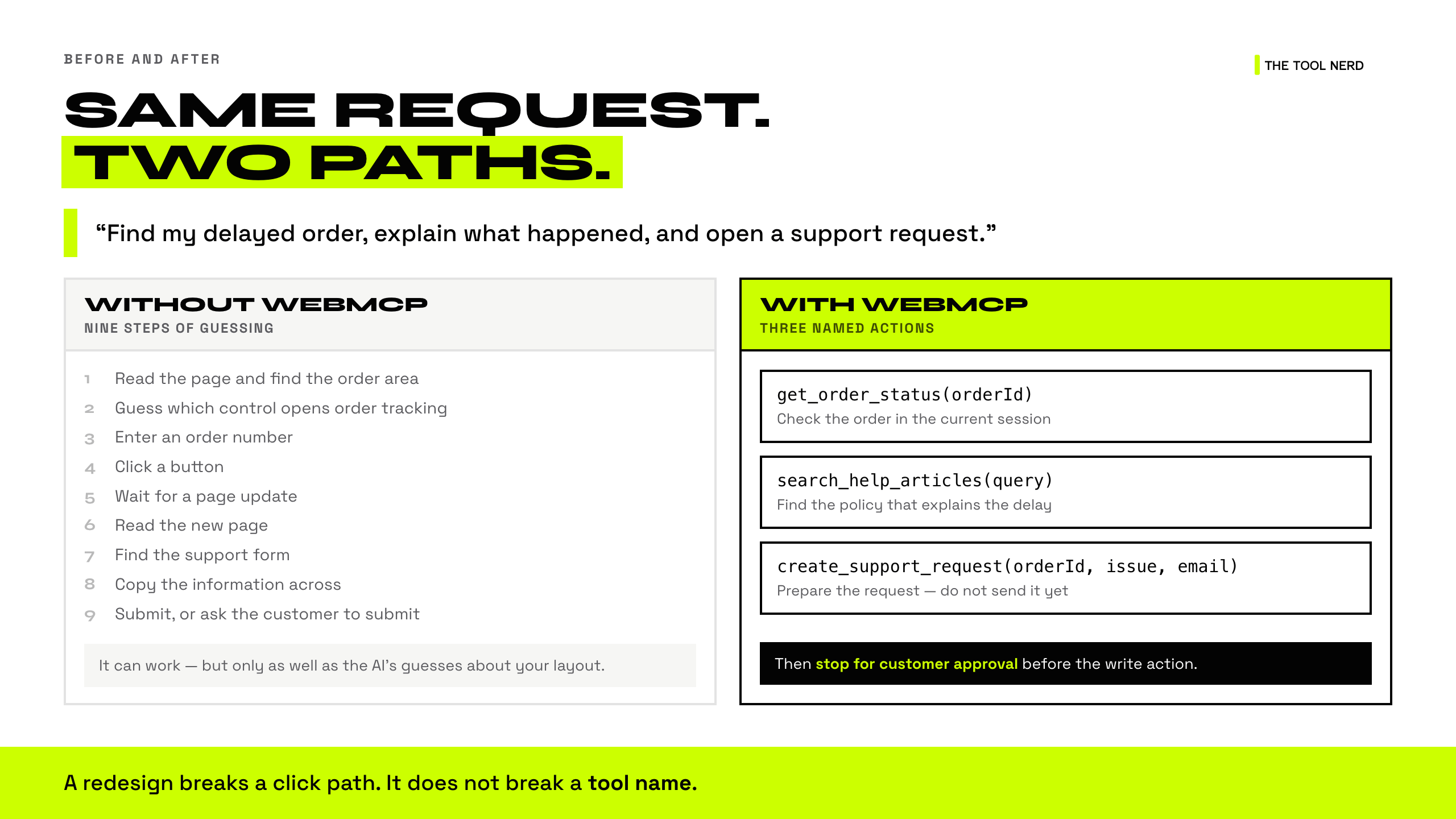
How Browser Automation Works Without WebMCP
The AI may need to:
Read the page and find the order area.
Guess which control opens order tracking.
Enter an order number.
Click a button.
Wait for a page update.
Read the new page.
Find the support form.
Copy information into the form.
Submit or ask the customer to submit it.
The flow can work. It depends on the page layout and the AI’s guesses.
How WebMCP Makes Website Tasks Easier
The website can expose three actions:
get_order_status(orderId)search_help_articles(query)create_support_request(orderId, issue, email)
The AI can use the first action to check the order. It can search the help content next. It can prepare the support request and stop for customer approval before the final action.
The customer still sees the page. The business still owns the rules. The AI has a clearer way to use the product.
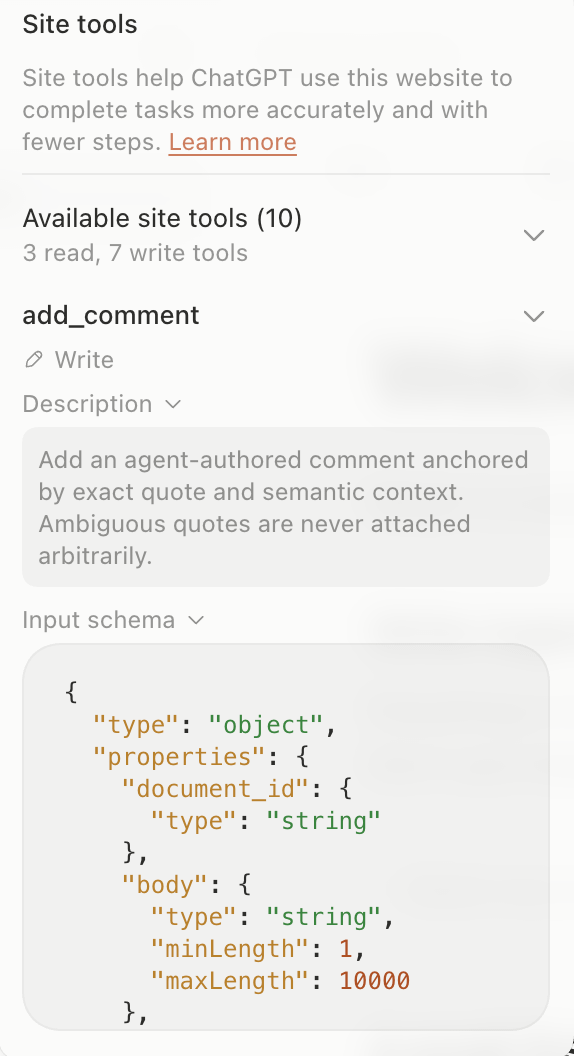
Real WebMCP tool in the OpenAI’s demo - Margin Editor
WebMCP Demo: Build Agent-Ready Websites
The best way to see the idea is OpenAI’s short video, Build agent-ready sites with WebMCP.
How the WebMCP Architecture Works
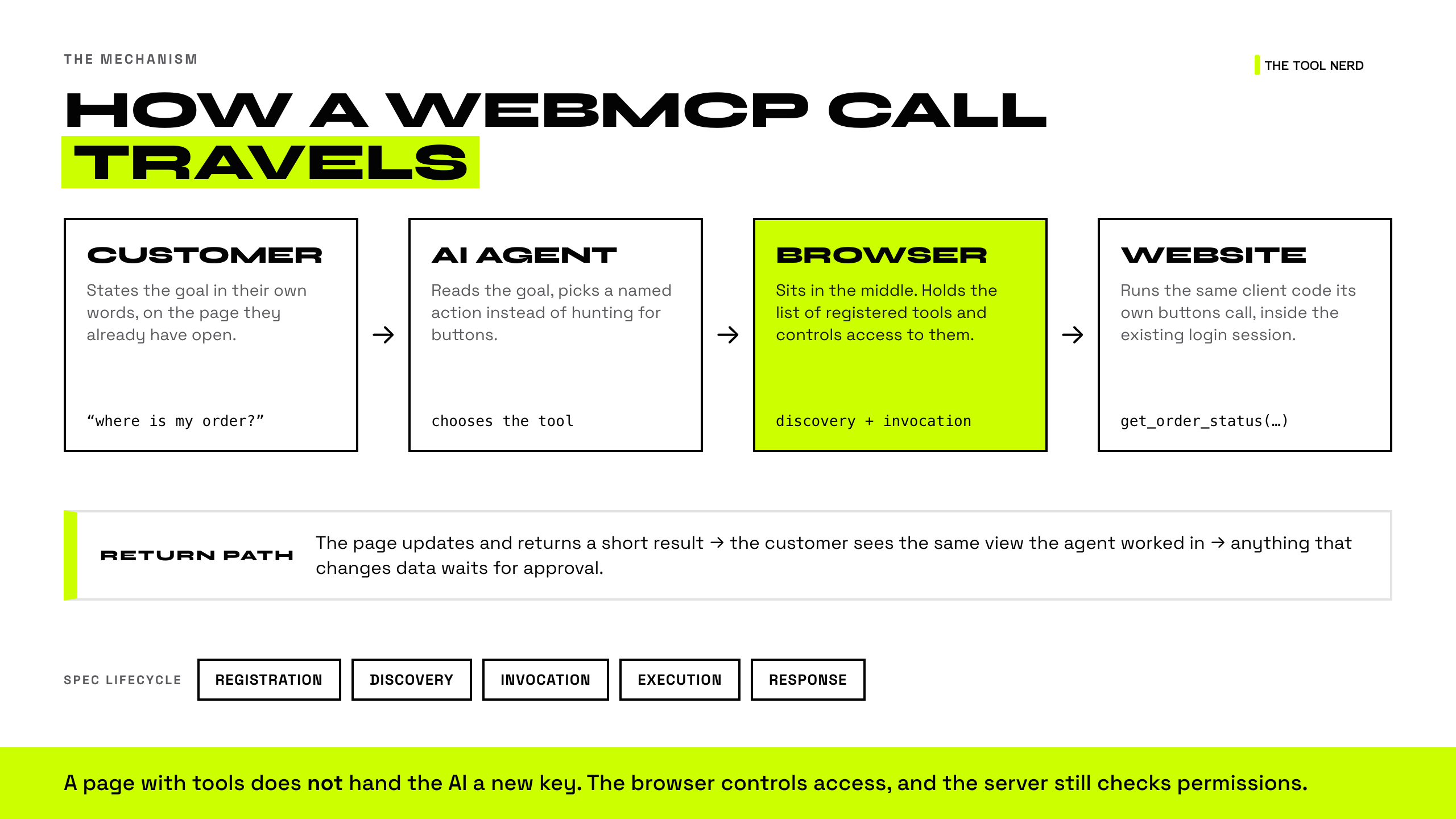
The WebMCP flow is short:
Customer asks for something
          ↓
AI agent understands the request
          ↓
Browser finds the website’s available actions
          ↓
AI sends named action + input
          ↓
Website runs its existing product logic
          ↓
Page updates and returns a result
          ↓
Customer sees the result and approves important actions
The browser sits in the middle. The page exposes selected actions, and the browser controls access to them.
The page keeps its current state and login session. The tool can call the same client code that a button uses. That reduces the need to build a second version of the product only for AI.
The official WebMCP repository describes this lifecycle as registration, discovery, invocation, execution, and response. The WebMCP repository has the current explainer and implementation details.
WebMCP vs. MCP vs. Browser Automation
These words are a bit confusing.
What Is Browser Automation?
The AI looks at a website and clicks or types. This is useful for many sites today. It can also be fragile because the AI has to guess what each control means.
What Is WebMCP?
The website tells a browser agent about the actions it supports. The actions live close to the page and its current state.
What Is MCP?
MCP usually connects an AI system to backend tools and data. It works well for tasks that do not need a visible website or a specific browser session.
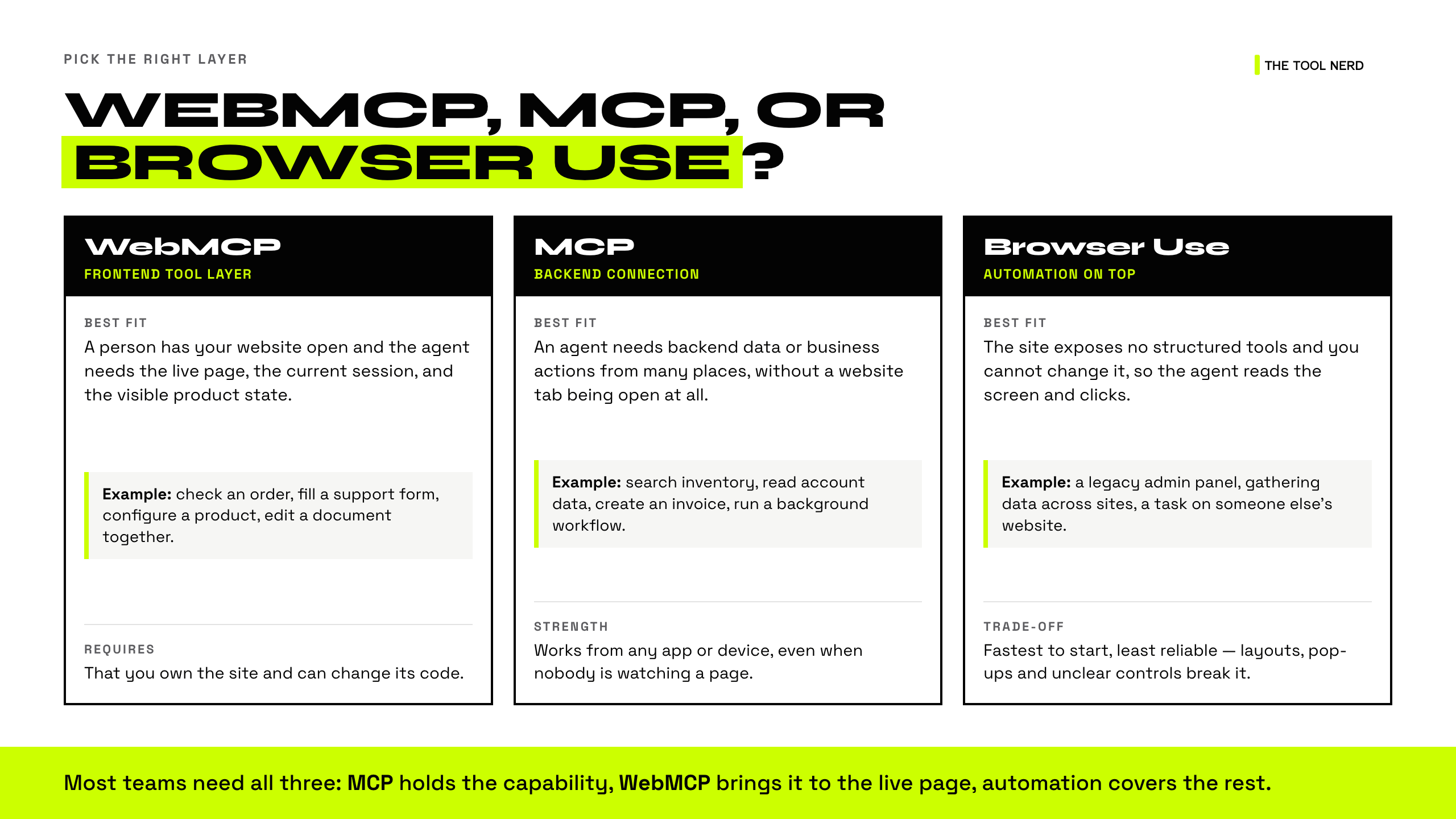
When to Use WebMCP, MCP, or Browser Automation
These tools solve different problems. The right choice depends on where the work happens and how much control the customer needs.
WebMCP, MCP, and Browser Automation Comparison
WebMCP: A person has your website open and an agent needs to use the live page, current session, and visible product state
Example: Check an order, fill a support form, configure a product, or edit a document together
MCP: An agent needs access to backend data or business actions from many places, without opening the website
Example: Search inventory, read account data, create an invoice, or run a background workflow
Browser Use or similar browser automation: You need an agent to work with an existing website that does not expose structured tools
Example: Use a legacy admin panel, collect information from several sites, or complete a task on a third-party website
Browser Use is often the fastest way to automate a site you do not own. WebMCP is the better long-term interface when you own the product and want agents to use it reliably.
How Businesses Can Combine WebMCP, MCP, and Browser Automation
MCP can hold the core business capability. WebMCP can connect that capability to the live customer experience. Browser automation can cover systems that are outside your control.
MCP is a backend connection, while WebMCP is for a live website in a browser.
OpenAI’s WebMCP Challenge and Real-World Demos
OpenAI is organizing a challenge. OpenAI’s WebMCP Challenge asks builders to explore what becomes possible when people and agents use the web together.
The challenge page includes these demos:
3D Modeling - build and refine a 3D model while watching the scene change.
Collaborative Writing - write and revise in a shared document where the agent can leave comments.
Crossword Builder - create and refine a crossword around a topic.
Wandernote - turn travel notes into an itinerary and shape it together.
Data Exploration - query data with DuckDB-Wasm and create visualizations in the browser.
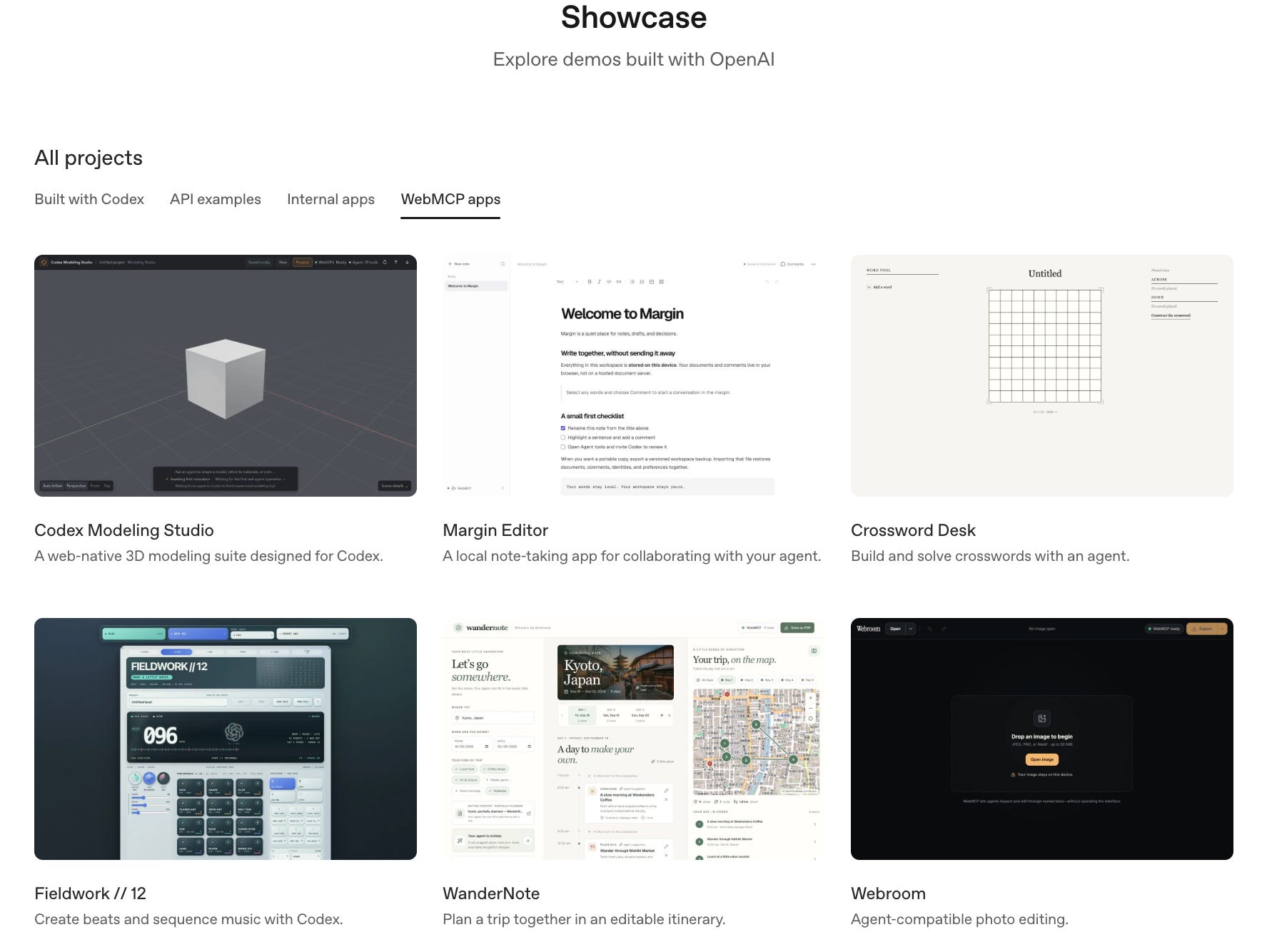
The OpenAI Developers WebMCP showcase adds more examples, including Fieldwork, WanderNote, Sunday Table, Paperie, Webroom, Verdant Market, Crossword Desk, and Codex Modeling Studio.
OpenAI describes site tools in the ChatGPT desktop app as a way for ChatGPT to use tools exposed by the website open in its built-in browser. The tools are available while that page is open.
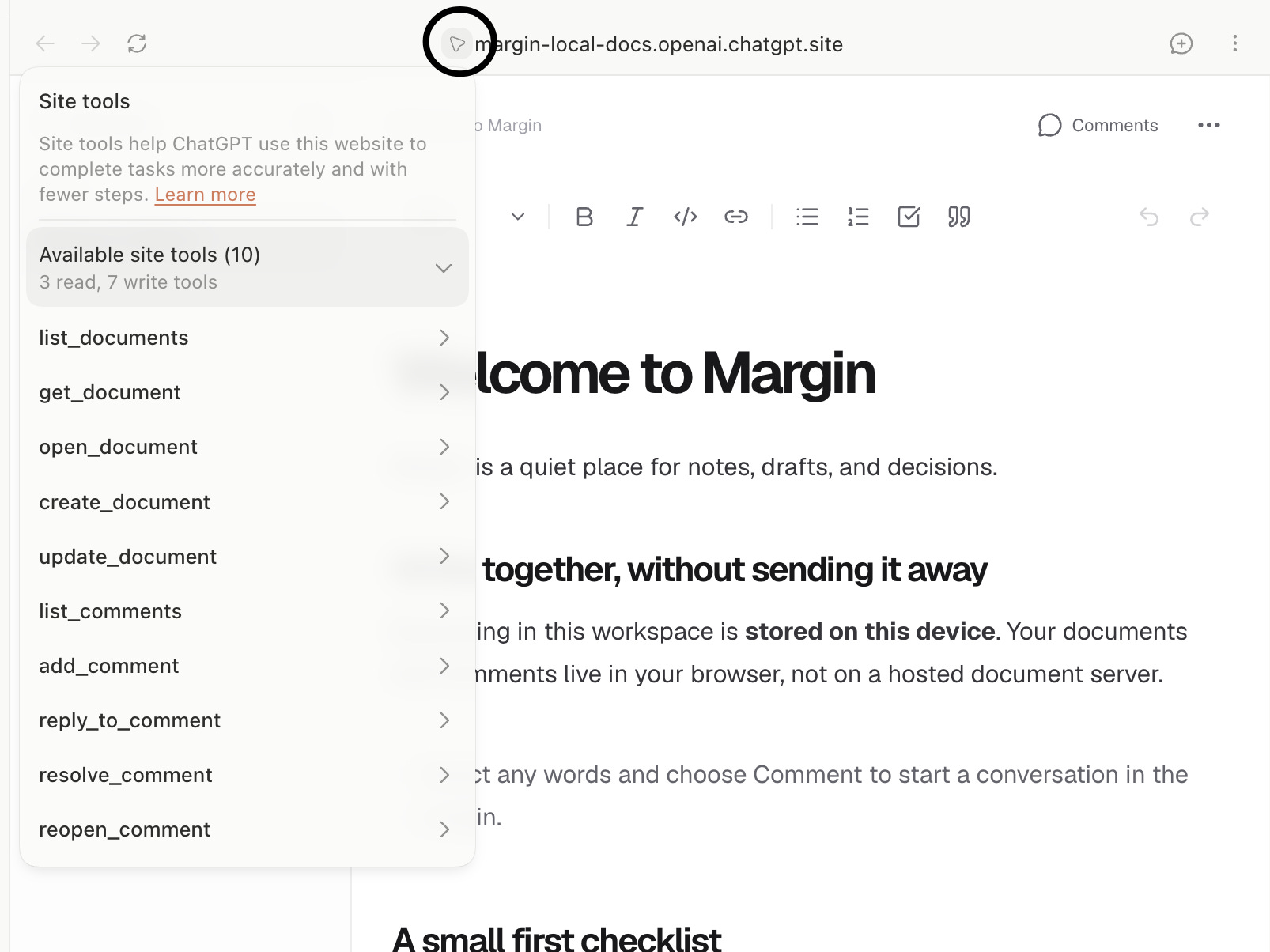
Read Using site tools in the ChatGPT desktop app.
What WebMCP Does Not Solve
WebMCP is useful, but it is not a complete agent strategy.
It does not replace:
Login and identity checks
Server-side permissions
Business rules
APIs
Backend MCP tools
Human approval for sensitive actions
Monitoring and support processes
Testing and evaluation
It also does not make every website agent-ready overnight. The product still needs clear actions, sensible limits, useful results, and a good customer journey.
The Future of AI-Ready Websites
WebMCP points to a change in product design.
For years, teams designed websites mainly for people. They focused on navigation, labels, forms, and visual hierarchy.
Those things still matter. Now teams also need to decide how an AI agent should understand the product and help a customer use it.
The best website is the one that works well for both people and AI.
WebMCP is an early step in that direction. It may reduce the gap between what a product can do and what an AI agent can reliably help a customer do.
For a founder or product manager, the practical question is simple:
Which important customer task is harder than it needs to be, and could a clear AI action make it easier without taking control away from the customer?