

Building an app with AI is the easy part now. Getting it in front of the people who need it is where most of these apps die.
I see it every week. Someone asks Claude for a dashboard, gets something good, and then it sits in a chat window. Nobody else can open it. The data is fake. By Friday, it’s forgotten.
This week I came across two tools working on exactly that problem. Devin Apps hosts the internal tools Devin builds for your team, behind a private link. Spacefast, a new company from the WordPress.com people at Automattic, gives the app you made in Claude or ChatGPT a home, a database and a link. Google is testing a version of the same idea for groups of friends, called Tabletop.
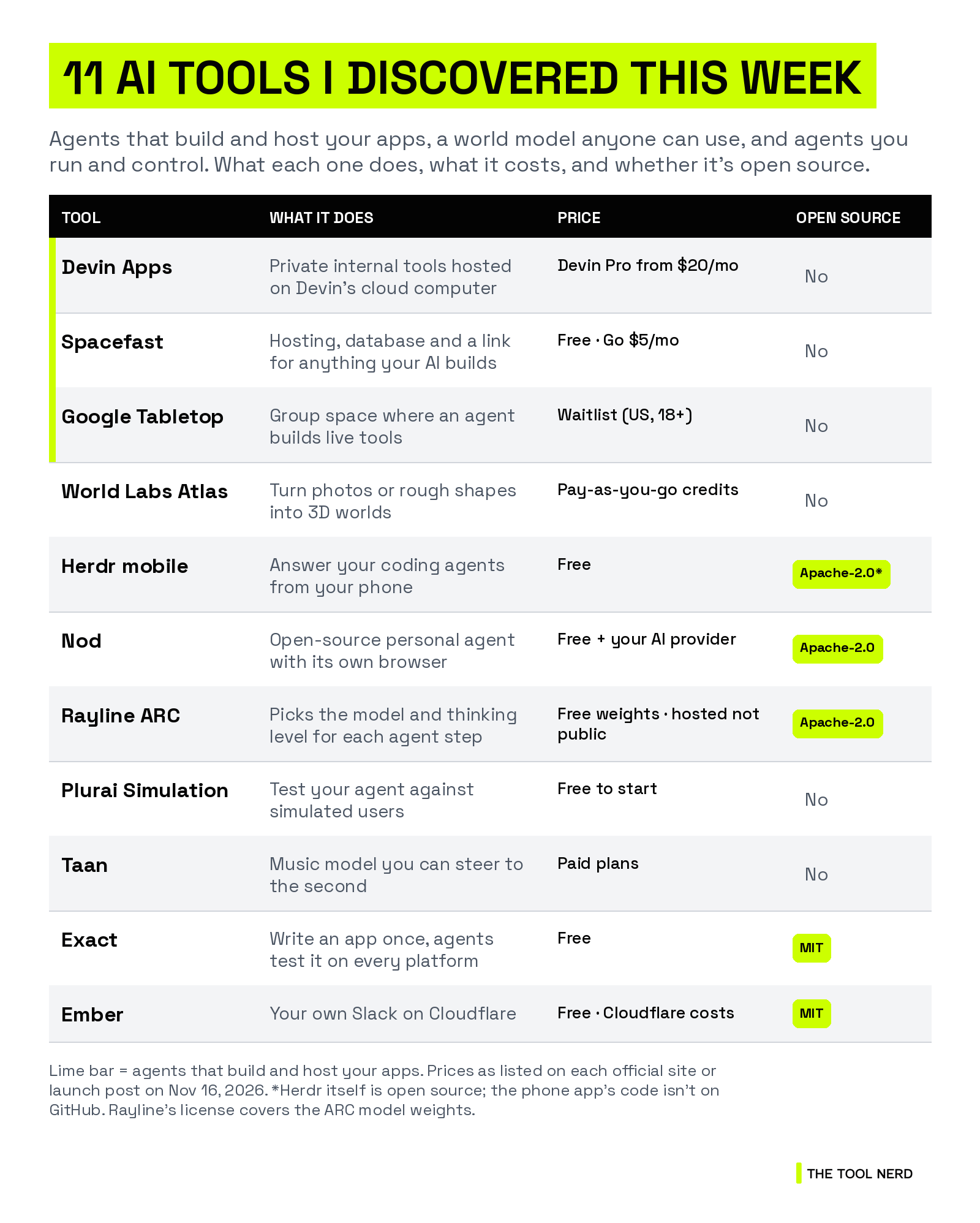
The other big one is World Labs. Its Atlas world model, which turns photos or rough shapes into 3D worlds, is now open to everyone. Then there’s an app to answer your coding agents from your phone, an open-source personal agent from the n8n team, a router that picks the model for each step of your agent, and a few more. Here are all 11 tools I discovered, and who each one is for.
TL;DR
Agents that build and host your apps: Devin Apps (private internal tools on Devin’s cloud computer), Spacefast (free hosting with a database for whatever your AI builds) and Google Tabletop (a shared space where an agent builds tools for your group, US waitlist only).
World models: World Labs Atlas turns photos, sketches or blocked-out shapes into 3D worlds you can export as video or Gaussian splats.
Agents you run and control: Herdr’s free phone app for your coding agents, Nod (an open-source personal agent from n8n Labs), Rayline ARC (an open-weight model router) and Plurai Simulation (test your agent against simulated users).
Also new to me: Taan (music you can steer to the second), plus two open-source finds on GitHub, Exact and Ember.
Agents that build and host your apps
Who should care: anyone who has built something useful with an AI agent and then had no good way to share it.
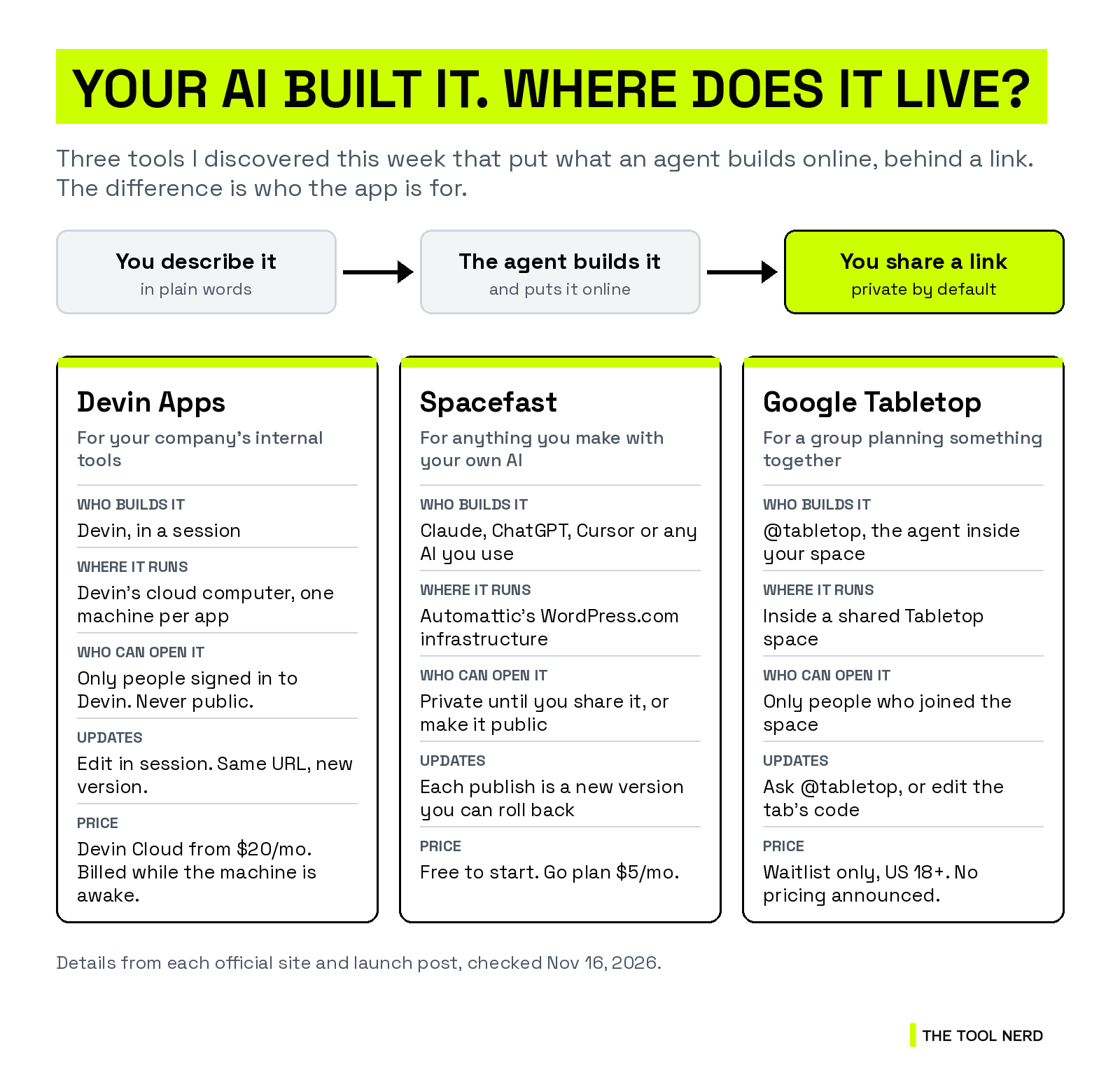
All three tools below do the same basic thing. An agent builds the app, puts it online, and you share a link. The difference is who the app is for. Devin Apps is for a company’s internal tools, Spacefast is for anything you make with your own AI, and Tabletop is for a group planning a trip or a party.
1. Devin Apps: internal tools your team opens from a link
Devin Apps are private web apps that run on Devin’s own cloud computer. You describe the tool your team needs, Devin builds it and puts it online, and your team opens it from a link that doesn’t change.
Because the app runs on Devin’s machine, it can use the MCPs, integrations and codebase Devin already has access to. To change it, you click Edit in session and tell Devin what you want. Each change is a new version, and if a new version fails to start, the old one keeps running.
Who it’s for: teams that keep asking engineers for admin panels, dashboards, approval queues or a staging copy of the product.
Pricing: it runs on Devin Cloud, which starts with the Pro plan at $20 a month. Apps are billed for the time the machine is awake, and the machine sleeps when nobody is using the app.
Good to know: everyone who opens an app has to sign in to Devin, and apps are never public. Each app runs on one machine, and Cognition itself says it’s meant for internal tools, not high-traffic products. The first load after a sleep can take a few seconds.
Links: Directory page · Official site

2. Spacefast: a home for whatever your AI makes
Spacefast is a new company from Automattic, the people behind WordPress.com and WooCommerce. It isn’t an app builder. You keep building in Claude, ChatGPT, Cursor or whatever AI you already use, then ask it to put the result on Spacefast. A link comes back in the chat.
Every project gets its own Space with a database, file uploads, page stats and a version history you can roll back. Spaces are private until you share them. People you invite can leave comments right on the page, and your AI can work through them. You can also publish without an account, from a folder, a Git repo or one terminal command.
The idea came from a hackathon. Batuhan İçöz, who now runs Spacefast, told TechCrunch that his non-technical friends kept sending him Vercel links:
“I thought there had to be a better way for everyone to set up and deploy their projects.”
Who it’s for: people who make pages, decks, dashboards and small apps with AI and want to share them without learning hosting.
Pricing: free to start. Automattic says the Personal plan includes $1 of usage a month with custom domains and a database, and the Go plan is $5 a month for unlimited Spaces and more usage.
Good to know: a Space you publish without an account normally expires after about 33 hours unless you claim it. It supports static sites plus Next.js, TanStack Start, Astro and PHP projects. Automattic says app sign-in, email and shared team knowledge are coming in the next few weeks.
Links: Directory page · Official site

3. Google Tabletop: a group space where an agent builds the tools
Tabletop is a Google Labs experiment for groups. You drop links and files into a shared space, invite your people, and ask @tabletop for what the group needs: a road-trip map, a dinner poll, an expense splitter or a seating chart you can drag names around on.
Each tool is a small app, which Google calls a tab, that everyone in the space uses at the same time, like a Google Doc. You can also edit a tab’s code yourself. Tabletop’s memory stays inside each space, and any member can see, edit or clear it.
Who it’s for: families, friends and clubs who plan things in a group chat and lose track of who said what.
Pricing: no pricing announced. It’s an experiment with a waitlist.
Good to know: it’s open only to people in the US who are 18 or older, through a waitlist, and Google says it’s letting more people in each week.
Links: Official site

Trending tools from our partners
Some links below are affiliate links, so The Tool Nerd may earn a commission at no extra cost to you.
Rank Prompt: see how your brand shows up in ChatGPT, Perplexity, Gemini and other AI answers.
Firecrawl: turns websites into clean data for agents. New this week: Firecrawl MCP v3, with 3,000+ tools and up to 60x higher rate limits, plus job-search tools for ChatGPT and Claude.
Replit: build apps with an AI agent. Replit Agent can now buy things for your business and run Google Ads, after you approve.
Cursor: AI code editor. Gemini 4 Hydrogen is now available in it.
Emergent: builds full apps from a prompt. Claude Fable 5.2 is now live on it.
Railway: deploys your apps and databases. Its Cloud Agent now takes tasks through MCP, the CLI and the API.
Runable: an AI agent for slides, sites, reports and video. Now makes video with Seedance 2.5.
Instantly: cold email at scale. Just introduced Pulse, an AI model trained on sales conversations.
Featured: World Labs Atlas opens to everyone
Who should care: filmmakers, game developers, architects and robotics teams who need a 3D space and don’t have weeks to model one.
4. World Labs Atlas: turn photos into 3D worlds you can move through
Atlas is the world model from World Labs, the company Fei-Fei Li co-founded. It was announced in September for a few partners. As of Nov 12, anyone can sign in and use it.
You start from photos, a generated image or rough blocked-out shapes. Atlas builds a 3D world from them, and you can move a camera through it and render the shots you want. You get keyframes, video clips or 3D Gaussian splats (a format for photo-real 3D scenes), and you can turn splats into meshes for game engines.
It launches with four tools:
Viewfinder rebuilds a scene from your photos and lets you render camera paths.
Chisel lets you block out a scene with simple shapes, move things around, and see every camera view update.
Splats to Mesh turns splats into meshes with real geometry.
Relight changes the lighting on your splats.
There’s also a developer API, and Atlas works with Blender.
Who it’s for: anyone who needs a set, a location or a test environment and would rather start from photos than from an empty 3D scene.
Pricing: pay as you go with credits. World Labs hasn’t published a full price list for Atlas yet. The current rates are shown inside the app, so run one small scene first and check your usage.
Good to know: this is hosted access, not open weights. The quality comparisons World Labs has shared come from World Labs.
Links: Official site


Agents you run and control
Who should care: builders who run several agents and want to watch them, steer them, and pay less for them.
5. Herdr mobile: answer your coding agents from your phone
Herdr runs your coding agents in terminal panes, a bit like tmux for agents. The new Herdr app for iPhone, iPad and Android shows an inbox of every agent on every machine, sorted by which ones need you, which are done and which are still working.
Tap an agent and you’re in its real terminal. You can type, paste a screenshot or dictate a reply. The phone connects to each machine over SSH, with no Herdr account and no Herdr server in between. Away from home, Tailscale or any VPN gets you there.
The launch post was short:
“okay okay. you want mobile, we get it.”
Who it’s for: developers who leave Claude Code or Codex running and keep walking back to the laptop to check on it.
Pricing: the app is free.
Open source: Herdr itself is open source under Apache-2.0, with 51,271 GitHub stars. The phone app’s code isn’t on GitHub.
Good to know: it works with herdr-core, which comes with the Herdr desktop app. Herdr TUI isn’t supported yet. There’s a demo mode if you want to look around before connecting anything.
Links: Directory page · Official site · GitHub


6. Nod: an open-source personal agent from n8n Labs
Nod is a personal agent that runs on your own computer with its own browser. It chases unpaid invoices, writes a one-page brief before each call, cancels trials and asks for refunds, and files month-end paperwork.
The rule is in the tagline: no nod, no action. Nod asks before it does anything your request doesn’t cover, like sending a second payment reminder. It remembers what you tell it, and you can see, edit or delete every memory.
Who it’s for: freelancers and small business owners who lose hours to invoices, follow-ups and supplier portals.
Pricing: free. You pay your AI provider, or use your ChatGPT Plus or Pro plan. It also runs local models through Ollama, LM Studio, vLLM or llama.cpp.
Open source: Apache-2.0, 1,815 GitHub stars.
Good to know: it’s a research preview from a small team inside n8n, and n8n says it doesn’t change where n8n is headed. It runs on a Mac (macOS 14 or later), with Windows 11 and Linux in preview. n8n says Nod finished 98% of 226 test jobs and took zero actions without permission in 678 runs. Those are n8n’s own tests. Your computer has to stay awake for scheduled jobs.
Links: Directory page · Official site · GitHub

7. Rayline ARC: a router that picks the model for each step
Most agents use one model for the whole job. That means paying Opus prices to rename a file. Rayline ARC is a small model that decides, for each step, which model should do the work and how much it should think.
You can let Rayline run the chosen model for you, or take the recommendation and run it on your own providers, local models or negotiated prices. It works in Claude Code, Codex, Cursor, Cline, OpenCode and other agent tools. Rayline also has a Decisions API that returns choices, probabilities and scores, and it describes it as compatible with Jev.
Who it’s for: teams whose agent bill keeps growing, and anyone who wants simple steps sent to cheap or local models.
Pricing: not public on the site. The weights are free to download and run yourself.
Open source: the ARC 1.0 weights are on Hugging Face under Apache-2.0. Rayline’s open-source CLI on GitHub has 41 stars.
Claims (from Rayline): 97.4% of Opus 5.5’s quality at 14.3% of the cost, or 7.1% when it also sends work to local models, from Rayline’s own technical report. The founder says the company raised $8.5M.
Links: Official site · Hugging Face · GitHub


8. Plurai Simulation: test your agent against simulated users
Plurai Simulation builds a copy of your agent and its world, with its tools, sub-agents and knowledge base, and then sends simulated users at it. It looks for broken tool calls, policy violations, made-up answers and failed tasks. For each failure, you get the run that caused it and a suggested fix.
It runs inside the coding agent you already use: Claude Code, Codex or GitHub Copilot. You can also turn a failure from production into a simulation and replay it against every new version of your agent.
Who it’s for: teams shipping customer-facing agents, like support or booking bots, who are tired of finding edge cases in production.
Pricing: free to start. Paid plans aren’t listed.
Good to know: Plurai raised a $13M seed round led by Team8, which TechCrunch reported. Its founders spent a decade working on autonomous driving. Plurai says its design partners saw 82% fewer failures reach users and 97% lower running costs. Those numbers come from the company.
Links: Directory page · Official site


Also new to me this week
9. Taan: music you can steer to the second
Taan is a music model from a Y Combinator startup, built for people who need a soundtrack that fits their video. Upload a video and it scores it to the cuts and the mood. You can also give it a script, reference audio, a hummed melody or a MIDI file.
The pitch is control. The founder’s launch post put the problem like this:
“Ask for ‘violin at exactly the 11th second’ and they usually skip it.”
With Taan you can change one instrument or one section without regenerating the whole track.
Who it’s for: video editors and creators who want an original score timed to their cuts.
Pricing: paid plans, starting with a Creator plan. I couldn’t confirm the price on the site.
Good to know: this first preview only does orchestral and cinematic music, and Taan says more genres are coming. The site says you get perpetual rights to full commercial use. It also has an MCP for use from your AI tools.
Links: Official site


10. Exact: write an app once, and an agent can test it everywhere
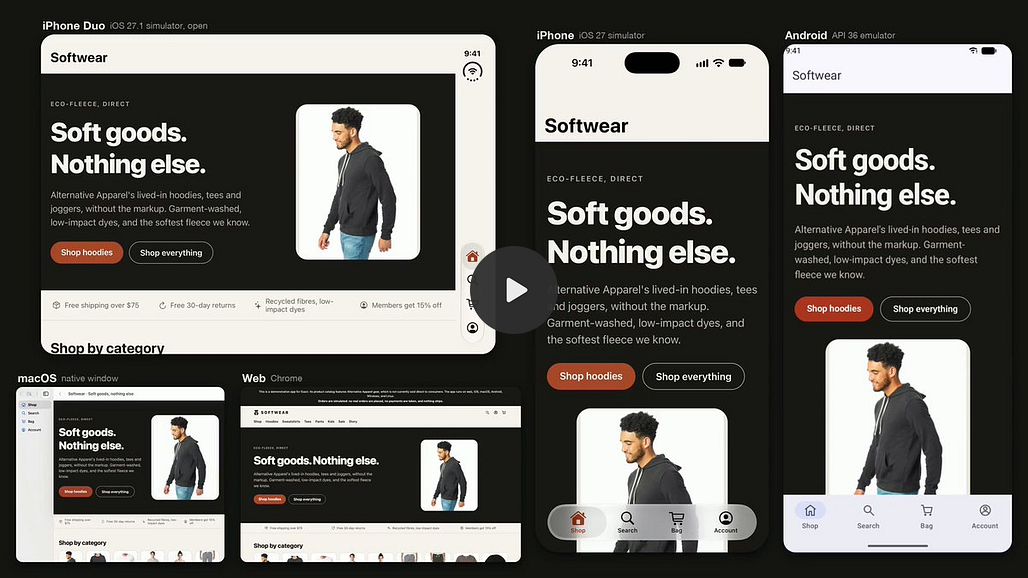
Exact is a preview of a new app framework from Charlie Cheever, co-founder and CEO of Expo. You write the app once and it runs natively on the web, macOS, iOS and Linux. Android and Windows are early.
The interesting part is the agent side. An AI agent can build the app, run it, see it and test it on every platform. The README includes a prompt you can paste into Claude Code to build a test app.
Who it’s for: developers who build cross-platform apps with coding agents and want the agent to check its own work.
Pricing: free.
Open source: MIT, 4,372 GitHub stars.
Links: GitHub

11. Ember: your own Slack on Cloudflare
Ember is team chat you deploy to your own Cloudflare account in one click. It has rooms, threads, DMs, file sharing, search, bots and push notifications, plus an AI assistant. Kevin Rose open-sourced it:
“Want your own Slack for $0?”
Who it’s for: small teams that want chat history they own, without paying per seat.
Pricing: free and open source. It runs on Cloudflare’s free tier for a small team, and the README says it’s $5 a month for the whole Cloudflare account as you grow.
Open source: MIT, 1,213 GitHub stars.
Good to know: Kevin Rose says it works with Slack-compatible payloads. Messages and files stay in your Cloudflare account.
Links: GitHub


Keep reading
Want more tools like these? Browse more than 1,300 of them on The Tool Nerd directory, and subscribe to get this roundup every Tuesday.