

Stop making your voice agent read before it can listen.
In September I wrote about Jev, a model that doesn’t chat. You give it a question and a list of answers, and it tells you which answer is right and how sure it is. For voice, there was a catch. Jev reads text, so every call had to be turned into a transcript first, and the tone, the pause and the sigh got lost on the way.
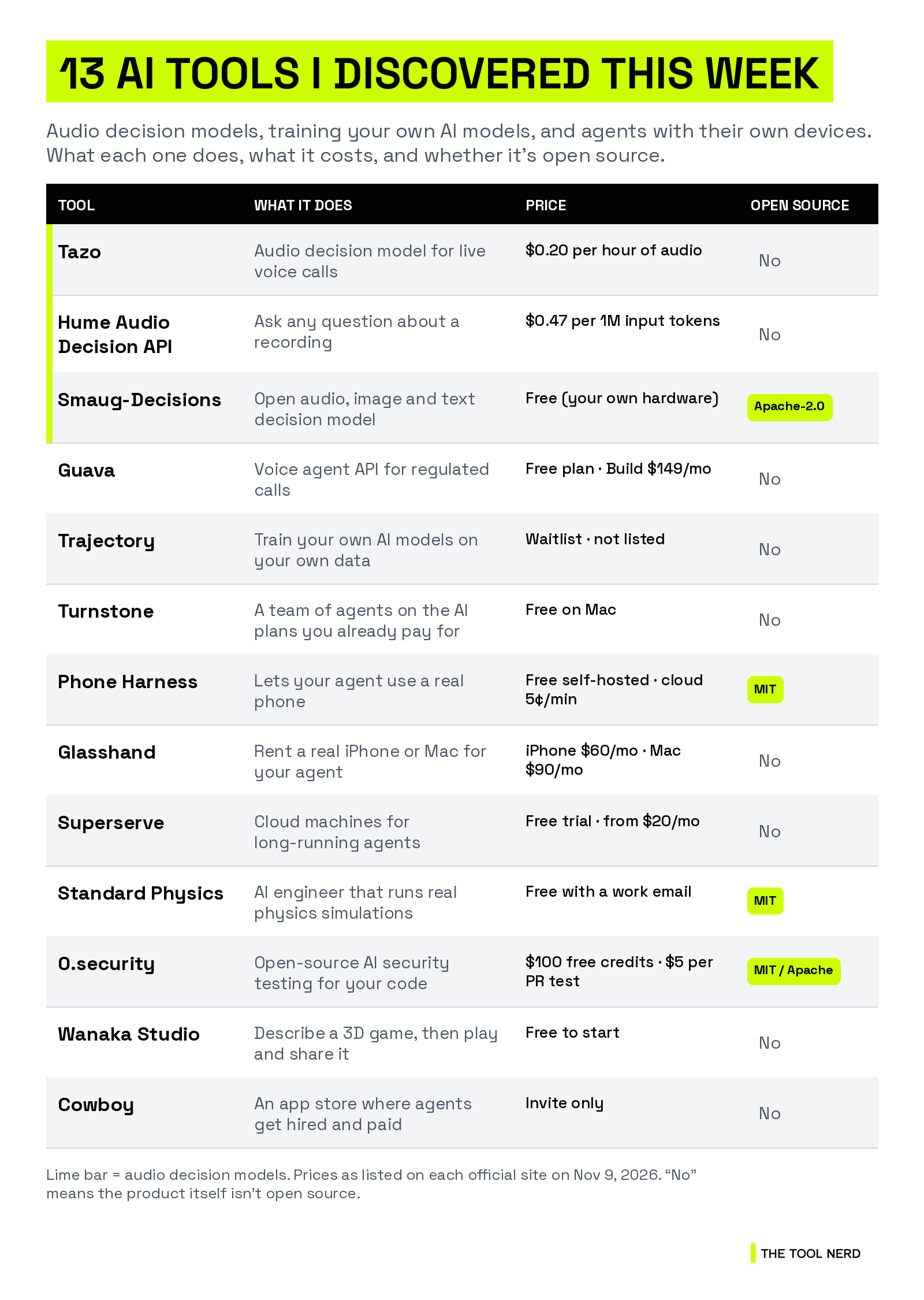
This week I came across three teams working on the same idea for sound. Tazo, Hume and Abacus.AI all have audio decision models that hear the call and pick the next move straight from the audio.
The other one I keep thinking about is Trajectory, which lets you train your own AI models on your own data. Then there are agents that get their own phones and computers, a free team of agents that runs on the AI plans you already pay for, and a few more. Here are all 13 tools I discovered, and who each one is for.
TL;DR
Audio decision models: Tazo (for live calls, $0.20 per hour of audio), Hume’s Audio Decision API (ask any question about a recording) and Abacus.AI’s Smaug-Decisions (free, open weights, runs on a phone). Every benchmark in this section comes from the company that made the model.
Voice agents for regulated calls: Guava gives banks, hospitals and insurers a voice agent with compliance built in.
Train your own AI models: Trajectory post-trains open models on your own production data. Harvey, Rogo, Decagon and Mercor already use it.
A team of agents for free: Turnstone runs a team of agents on the ChatGPT, Claude or Grok plan you already have, and switches plans when one hits its limit.
Agents with their own devices: Phone Harness (open source), Glasshand (real iPhones and Macs) and Superserve (cloud machines for long-running agents).
Also new: Standard Physics (physics simulation agents), 0.security (open-source security testing), Wanaka Studio (3D games from a prompt) and Cowboy (an app store for agents).
Audio decision models: AI that hears the call and picks the next move
Who should care: anyone building a voice agent, running a call center, or sitting on a pile of call recordings nobody has time to listen to.
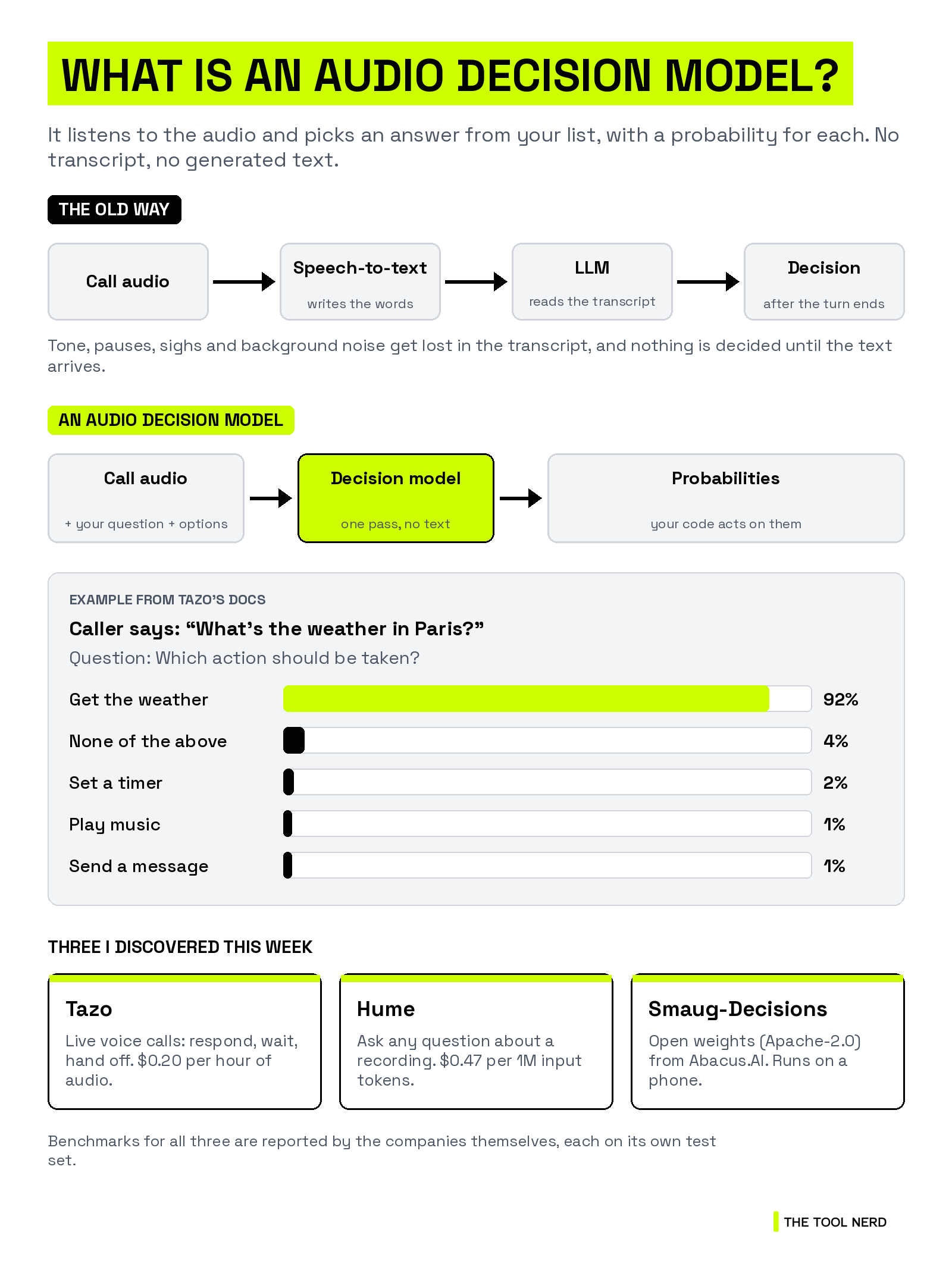
A normal voice agent works in a chain. Speech-to-text writes down the words, a language model reads them, and only then does anything get decided. An audio decision model skips the transcript. You send the audio, a question (”Has the caller finished talking?”) and the possible answers. You get back a probability for each answer, and your code acts on it.
The probabilities are the point. If a model is calibrated, 0.9 should mean it’s right about nine times out of ten. Then you can set simple rules, like “hand the call to a human only above 0.9.”
1. Tazo: decisions for live voice calls
Tazo is built for calls that are happening right now. It reads the raw call audio and decides when your agent should respond, wait, say “mm-hm,” hand the call to a person or start a tool call early. You write the options in the request, so a new decision is a new list, not a new model.
It runs next to the speech-to-text, LLM and text-to-speech you already use. Your LLM still decides what to say. Tazo decides when, and what happens next. You can send a file or stream live audio over a WebSocket.
Who it’s for: teams running voice agents that talk over callers, wait too long or miss when someone is upset.
Pricing: $0.20 per hour of audio, billed by the second. New sign-ups get free credits.
Benchmarks (from Tazo): 70.9% accuracy on real production calls, against 46.4% for a transcript fed to Jev, and under 200 ms model latency. Tazo also released DECIDE, a benchmark for audio decisions in voice agents made with Bolna, and open-sourced its evaluation code.
Good to know: the current models answer one question per request. The site says developers from Google, Microsoft, Vapi and ElevenLabs use it.
Links: Directory page · Official site


2. Hume Audio Decision API: ask any question about a recording
Hume is best known for emotion research. Its new Audio Decision API lets you ask plain-language questions about a recording, like “Does the customer sound frustrated?”, “How many people are speaking?” or “Is this voice AI-generated?”
Answers come back as yes/no, a choice from your list, a score on your scale, or the time spans where something happens, like a laugh or a sigh. All your questions about one file are answered in one call, so ten questions cost little more than one.
Who it’s for: contact centers that score calls, and teams testing how natural their voice agent sounds.
Pricing: $0.47 per million input tokens, with no commitment. The length of the audio makes up most of the tokens. You get 1M free input tokens once Hume grants access.
Benchmarks (from Hume): 70.7% agreement with the average judgment of a human panel, against 56.5% for a single human rater. Hume says it’s trained on more than 10 million human judgments.
Good to know: access is by request right now. It takes MP3 or WAV files from 5 seconds to 5 minutes. For live calls, you send clips of at least 5 seconds as they come in.
Links: Directory page · Official site

3. Smaug-Decisions: an open audio decision model you can run yourself
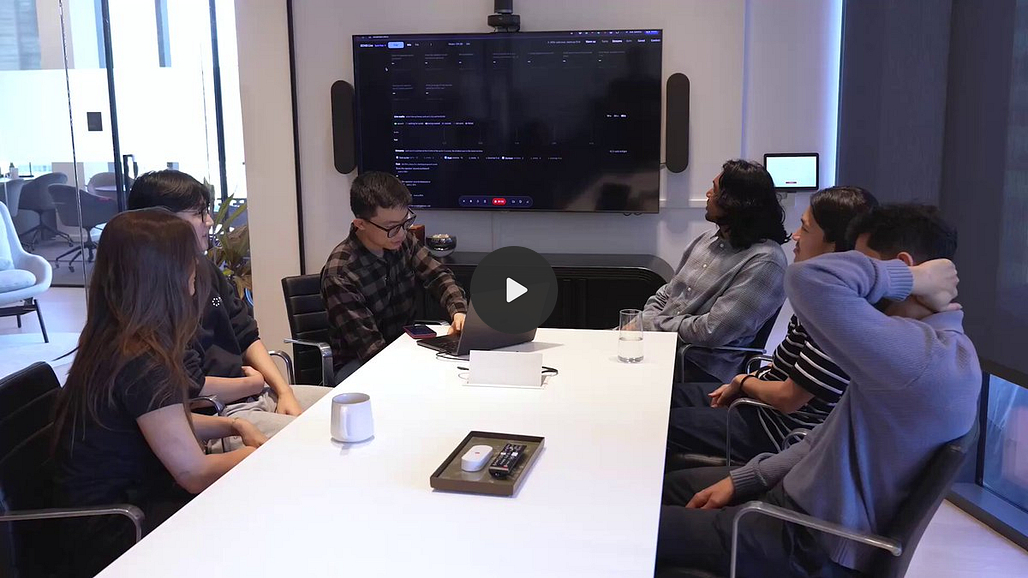
Smaug-Decisions is Abacus.AI’s free option. It’s a 4B model built on Google’s Gemma 4, and it answers questions about audio clips up to 30 seconds long, images and text. A smaller 0.7B version handles audio only and answers in about 10 ms on a server GPU.
Both run offline on a phone. Abacus.AI ships them in an iPhone and Android app called Cascade, where the small model answers the easy questions and hands harder ones to the big one.
Who it’s for: developers who want audio decisions on their own servers or on the device, without paying per call.
Pricing: free to download. You pay for your own hardware.
Open source: open weights under Apache 2.0 on Hugging Face. The GitHub repo for the phone app and helper scripts has 0 stars so far.
Benchmarks (from Abacus.AI): 60.1 on Earshot, Abacus.AI’s own audio benchmark, against 59.4 for Gemini 4 Argon and 50.5 for Gemini 3.8 Flash, with better-calibrated probabilities than both.
Links: Official blog post · Hugging Face


Before you pick one: each company tested its model on its own benchmark, so the numbers above can’t be compared with each other. Run 50 of your own calls through two of them and see which one gets your hard cases right.
4. Guava: a voice agent for calls that have to be right
Guava is a voice agent API for banks, hospitals, insurers and other regulated businesses. It’s not a decision model, but it fits here because it tackles the same problem. Guava built its own speech stack, including the part that decides when to wait and when to speak, instead of stitching together other vendors.
You write the call logic in code rather than in a long prompt, so a fix is a versioned, tested code change instead of one more rule in a prompt that keeps growing.
Who it’s for: healthcare, insurance, fintech and call-center teams that need SOC 2 Type II, HITRUST i1 and PCI DSS Level 1 compliance from day one.
Pricing: a free Starter plan with 500 minutes a year. Build is $149 a month, Scale is $499 a month and Enterprise is custom.
Good to know: Guava says it takes 14 days from kickoff to the first live regulated call. It just raised a $12.5M seed led by Acrew Capital.
Links: Directory page · Official site


Trending tools from our partners
Some links below are affiliate links, so The Tool Nerd may earn a commission at no extra cost to you.
Rank Prompt: see how your brand shows up in ChatGPT, Perplexity, Gemini and other AI answers.
Runable: an AI agent for slides, sites, reports and video. New guide on running a whole business on it.
Cursor: AI code editor. This week it shipped Live Apps.
Emergent: builds full apps from a prompt. Just named its VibeCon SF winners.
Lovable: builds apps from a chat. This week it brought on the Radish AI team.
Firecrawl: turns websites into clean data for agents. New this week: headless Clay for agents.
Synthesia: AI avatar videos. Now works inside ChatGPT.
Replit: build apps with an AI agent. Replit Agent now works in Slack.
Anything: builds web and mobile apps from a chat.
Magica: an AI worker for campaigns, video and apps. Just added GPT Image 2.6.
Featured: train your own AI models
Who should care: companies whose AI agent keeps making the same mistakes, and who have experts who know what a good answer looks like.
5. Trajectory: train your own AI models on your own data
Most AI models stop learning the day they ship. If your agent gets something wrong, it gets it wrong again tomorrow, unless you hire researchers to retrain it.
Trajectory is a platform for post-training open models on your own production data. It collects your agent’s traces and your team’s corrections, trains the model on what good looks like, tests it against other leading models, and pushes the update live in one click. It works with any agent harness, and Trajectory says it takes two code changes to start.
It’s built for the lawyers, analysts and support leads who know the right answer, not only for ML engineers. Two research previews push this further: Continual Grading applies your grading of a few traces to all of them, and Group Size 1 lets a model keep learning from every production interaction.
Who it’s for: teams running AI in law, finance, support and other specialist work who want a model that improves from their own data.
Pricing: not listed. The site has a waitlist.
Customers: Harvey, Rogo, Decagon, Mercor and Nvidia, according to TechCrunch. Clay also appears on Trajectory’s site.
Good to know: it raised a $45M Series A led by Sequoia at a $300M valuation, and $60M in total. Every model update runs through your own evals and approval step before it reaches production.
Links: Directory page · Official site


Featured: a team of agents on the AI you already pay for
Who should care: anyone paying for ChatGPT, Claude or another AI plan who keeps hitting the usage limit.
6. Turnstone: free AI teammates that switch plans when one runs out
Turnstone gives you a team of agents that run on the AI subscriptions you already have. Sign in with ChatGPT, Claude, Grok or Cursor, add an OpenRouter key, or run local models through Ollama. When one subscription hits its limit, your agent switches to another and keeps working.
You start with a Chief of Staff agent. Tell it what you’re working on and it sets up an agent for each job, like outreach, writing or engineering. Each agent remembers how you like the work done, works in its own browser tab and can run on a schedule, like a brief every weekday at 9.
It learns how you write from the apps you connect, and nothing goes out until you send it.
Who it’s for: founders and solo operators who already pay for two or more AI plans and want them working as one team.
Pricing: free forever on your Mac. Turnstone Cloud, which keeps agents running when your Mac is closed, is coming soon at $49 a month after a free first month.
Good to know: your agents, chats and memory stay on your Mac, in a folder you can open. It’s backed by Y Combinator.
Links: Directory page · Official site


Agents with their own phone or computer
Who should care: builders whose agents need to use real apps, test mobile builds or run for days without stopping.
7. Phone Harness: let your agent use a phone
Phone Harness lets an AI agent tap, type and scroll through apps on an iPhone or Android. It can be your own phone (iPhone through iPhone Mirroring, Android over adb) or a cloud phone. The agent reads the screen with OCR or the phone’s accessibility tree, and connects through MCP, a CLI or an API.
With a real phone number, your agent can also send messages and grab 2FA codes.
Who it’s for: developers testing mobile apps, and anyone whose agent needs an app that has no API.
Pricing: the open-source version is free with your own phone. Cloud Android is pay as you go at 5¢ a phone-minute, with $5 of credit to start, or $20 a month for 1,000 minutes. A cloud iPhone is $80 a month ($64 billed yearly), or $100 with an eSIM.
Open source: MIT license, about 4,700 GitHub stars. Part of Y Combinator’s Fall 2026 batch.
Links: Official site · GitHub


8. Glasshand: rent a real iPhone or Mac for your agent
Glasshand rents your agent a real iPhone or Mac in its data center, not an emulator. Claude Code, Codex, Cursor or any other agent connects through the Glasshand API, sees the screen and taps, types and clicks like a person would.
The device is only yours. You set the password, install apps from the App Store, sign in to iCloud and add an eSIM for texts. When you release it, Glasshand wipes it.
Who it’s for: people who need a Mac to build iOS apps in Xcode, or a real iPhone for apps that block emulators.
Pricing: $60 a month for an iPhone, $90 a month for a Mac. Month to month, cancel anytime.
Good to know: Glasshand rents dedicated devices, Macs included. Phone Harness is open source and can also drive your own phone.
Links: Official site


9. Superserve: cloud machines for agents that run for days
Superserve gives each agent its own virtual machine. You can pause it, resume it later with everything still there, or fork it to try another approach from a saved snapshot. There’s no fixed session limit, so an agent can work for days or weeks.
Your API keys stay outside the machine. Superserve adds them to requests only for the hosts you allow. You can run Claude Code, Codex or your own agent loop inside and control it from TypeScript, Python, MCP, the CLI or the API.
Who it’s for: teams building agents that need a full computer for long jobs, not a sandbox that resets every task.
Pricing: a free trial with no card. Developer is $20 a month with $20 of usage included, Pro is $250 a month with $250 included, and Enterprise is custom.
Customers: Lindy and Phaser are quoted on its site, and the launch post says Y Combinator runs on it too.
Good to know: in a ComputeSDK benchmark the site cites, Superserve started a machine in a median 0.41 seconds, faster than E2B, Daytona, Modal, Vercel and Cloudflare. It’s part of Y Combinator’s Fall 2026 batch.
Links: Directory page · Official site


Simulate, secure, build and sell
Who should care: engineers, security teams, first-time game makers and developers who want to get paid for their agents.
10. Standard Physics: an AI engineer that runs real physics
Standard Physics puts agents on a real physics solver instead of training an AI model to approximate physics. Reynolds, its simulation agent, takes a flow described in plain words, writes the case, runs the solver and gives you the figures and numbers.
Archimedes sends swarms of agents through thousands of design layouts, simulates each one through Reynolds and keeps what works. The team says it redesigned a data center’s cooling to use less electricity and found a turbine blade that beat a leading published design.
Who it’s for: mechanical and thermal engineers who run CFD simulations.
Pricing: Reynolds is free for individual engineers with a verified work email, no card needed.
Open source: Reynolds is MIT-licensed, about 110 GitHub stars. Backed by Y Combinator (W26).
Links: Directory page · Official site


11. 0.security: an open-source security tester for your codebase
0.security built “0,” an open-source AI security harness that tests everything from web apps and APIs down to binaries and the Linux kernel. Parallel agents look for vulnerabilities, reproduce them and test the fixes. It has a web interface, plus a CLI and an MCP server for your coding agent.
The hosted version reviews every pull request and posts a one-click fix in the same PR. The team says 0 found more than 30 Linux kernel 0-days.
Who it’s for: teams shipping code fast with coding agents who don’t have a security engineer.
Pricing: a 14-day trial with $100 in free credits. After that, credits are $1 each, and a PR security test costs $5. Enterprise is custom.
Open source: MIT or Apache-2.0, about 850 GitHub stars. Part of Y Combinator’s Fall 2026 batch.
Links: Directory page · Official site · GitHub

12. Wanaka Studio: describe a 3D game and play it
Wanaka Studio is a game engine built for AI. Describe a game in one sentence and it builds a playable 3D world, with models, animation, gameplay and sound. Then you keep directing the AI or edit the scene yourself, and the agent picks up from your changes.
Every game is a link that anyone can play in a browser, multiplayer included.
Who it’s for: people who want to make a game and have never written code.
Pricing: free to start. The site lists monthly and yearly plans, but the prices didn’t load when I checked.
Good to know: Wanaka says it’s 5x faster than Opus 5.5 with Unity, at 82% lower agent cost, on its own benchmark.
Links: Directory page · Official site


13. Cowboy: an app store for AI agents
Cowboy is a store where developers list agents and get paid when someone hires them. Each agent has its own wallet, schedule and files, so it can run on its own and remember what it did yesterday.
You can build one from Claude Code or Codex with the Cowboy CLI. Developers earn from monthly hires, per-use fees and one-time purchases. Every agent in the store passes a code review first.
Who it’s for: developers who have built a useful agent and want to sell it, and people who’d rather hire an agent than build one.
Pricing: not listed. Access is by invite request.
Good to know: it launched with more than 100 agents and 10,000 data feeds, and $5M in seed funding.
Links: Directory page · Official site


Keep reading
Want more tools like these? Browse more than 1,300 of them on The Tool Nerd directory, and subscribe to get this roundup every Tuesday.