

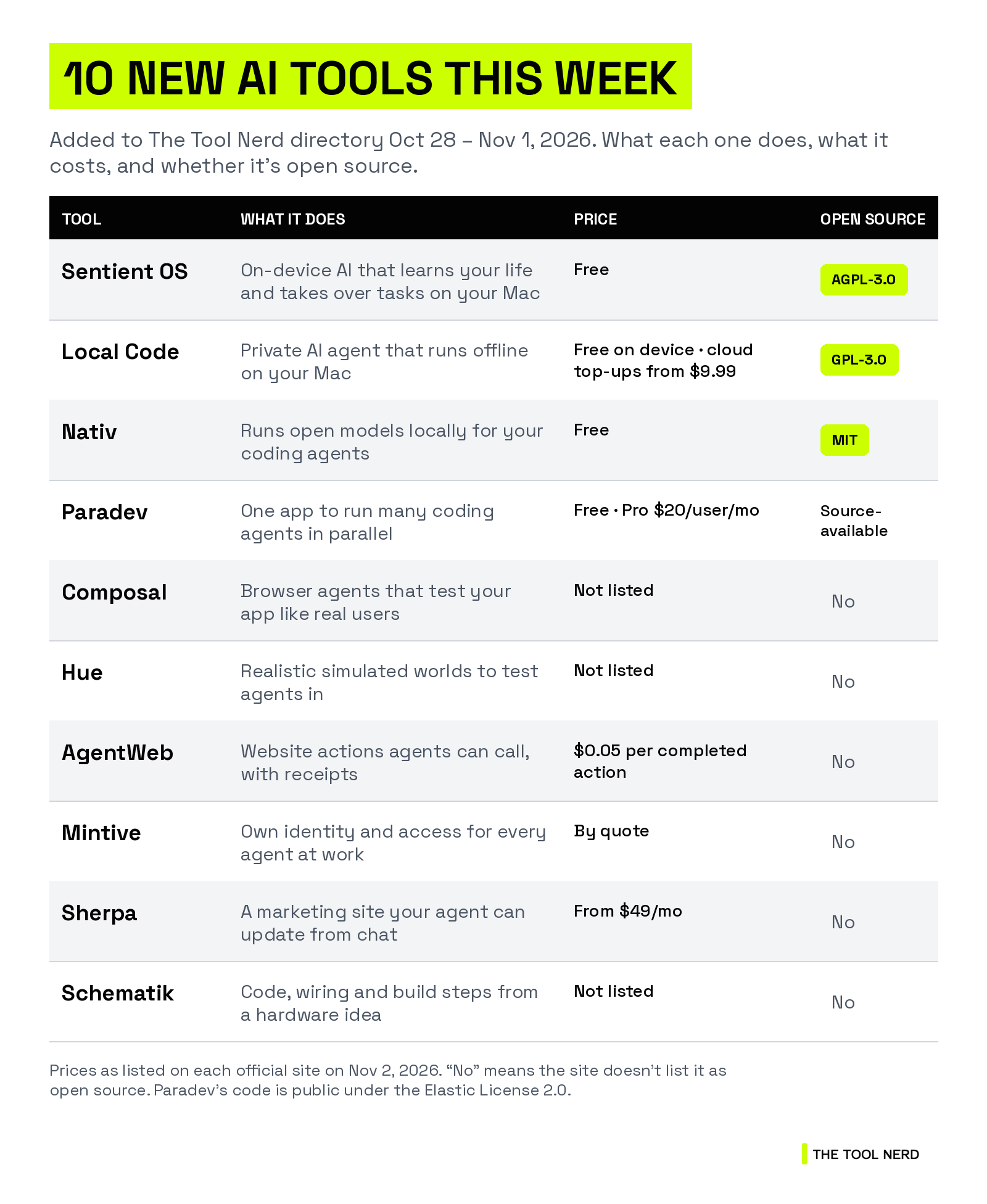
Two ideas kept showing up this week. The first is local AI: three of these tools run models on your own Mac, so your files and prompts stay with you.
The second is what happens after your coding agent writes the code. Someone still has to run it and check it works for real users, and this week’s tools hand that job to more agents.
All 10 were added to The Tool Nerd directory between Oct 28 and Nov 1, 2026. I checked every official site, and prices are as listed there today.
TL;DR
AI on your own Mac: Sentient OS (a computer-use agent that learns your life overnight), Local Code (a private agent from the Draw Things team) and Nativ (local models for your coding agents). All three are free and open source.
Coding agents, run and tested: Paradev runs many coding agents side by side, Composal sends agents to break your app before users do, and Hue builds fake worlds to test agents in.
Agents at work: AgentWeb gives agents real website actions, Mintive gives each agent its own work identity, and Sherpa lets your agent run your marketing site.
For makers: Schematik turns a plain-English idea into Arduino or ESP32 code and wiring.
AI that runs on your own Mac
Who should care: anyone who wants an AI helper but would rather not send their files, emails and prompts to someone else’s cloud.
1. Sentient OS: an assistant that reads your life overnight
Sentient OS runs a model on your Mac that reads your notes, emails, messages, calendar, files and screenshots while you sleep. By morning, it has written what it learned into a folder of plain Markdown files that you can open and edit.
Click the notch and Sidekick takes over a task with its own mouse cursor. Double-tap the right ⌘ key and it drafts a reply in your writing style.
Who it’s for: Mac users buried in email and small tasks.
Pricing: free. The site says entering the code FINAL_1000 in the app keeps it free for life.
License: open source (AGPL-3.0), about 690 GitHub stars. Part of Y Combinator’s Fall 2026 batch.
Good to know: it needs an Apple silicon Mac (M1 or newer) on macOS 15.4 or later. Windows has a waitlist.
Links: Directory page · Official site


2. Local Code: a private AI agent from the Draw Things team
Local Code is an AI agent that runs entirely on your Mac and works offline. Share a folder and ask for a chart, a 5-slide deck or a simple web page, and it works with Python, Node.js and a shell built into the app.
Apple’s App Sandbox keeps it to the folders you share. Qwen 3.8 27B runs on Macs with 16 GB of memory, and the bigger DeepSeek models from 32 GB by streaming from your SSD. Cloud models are optional.
Who it’s for: people who want an agent for docs, data and code that never leaves the laptop.
Pricing: free on your own hardware. Your own API keys have no markup, and hosted models use top-ups from $9.99. No subscription.
License: open source (GPL-3.0), about 85 GitHub stars. Now on the Mac App Store.
Links: Directory page · Official site


3. Nativ: local models for the coding agents you already use
Nativ is a Mac app for running open models. The part developers will like is the local server: point Claude Code, Codex, OpenCode, Aider or Goose at it, and your agent runs on your machine with no per-token bill.
It’s built on MLX-VLM and comes from Neywa Labs, the new company of the developer behind MLX-VLM.
Who it’s for: developers who want to try local models with their coding agents.
Pricing: free. No account, no credits. A Pro version is listed as coming soon.
License: open source (MIT), about 1,570 GitHub stars.
Links: Directory page · Official site


Coding agents, run and tested
Who should care: developers who let agents write code and now need a way to run more of them and check the results.
4. Paradev: one app for an army of coding agents
Paradev is the new name for Superset, a desktop app for running many coding agents at once. Claude Code, Codex, OpenCode, Cursor’s agent and others each get their own Git worktree and branch, so they don’t overwrite each other’s files. You review every change in one place.
Agents can also run on a schedule, like triaging new issues each morning, and open pull requests for you to review.
Who it’s for: developers who already run two or more coding agents and are tired of juggling terminals.
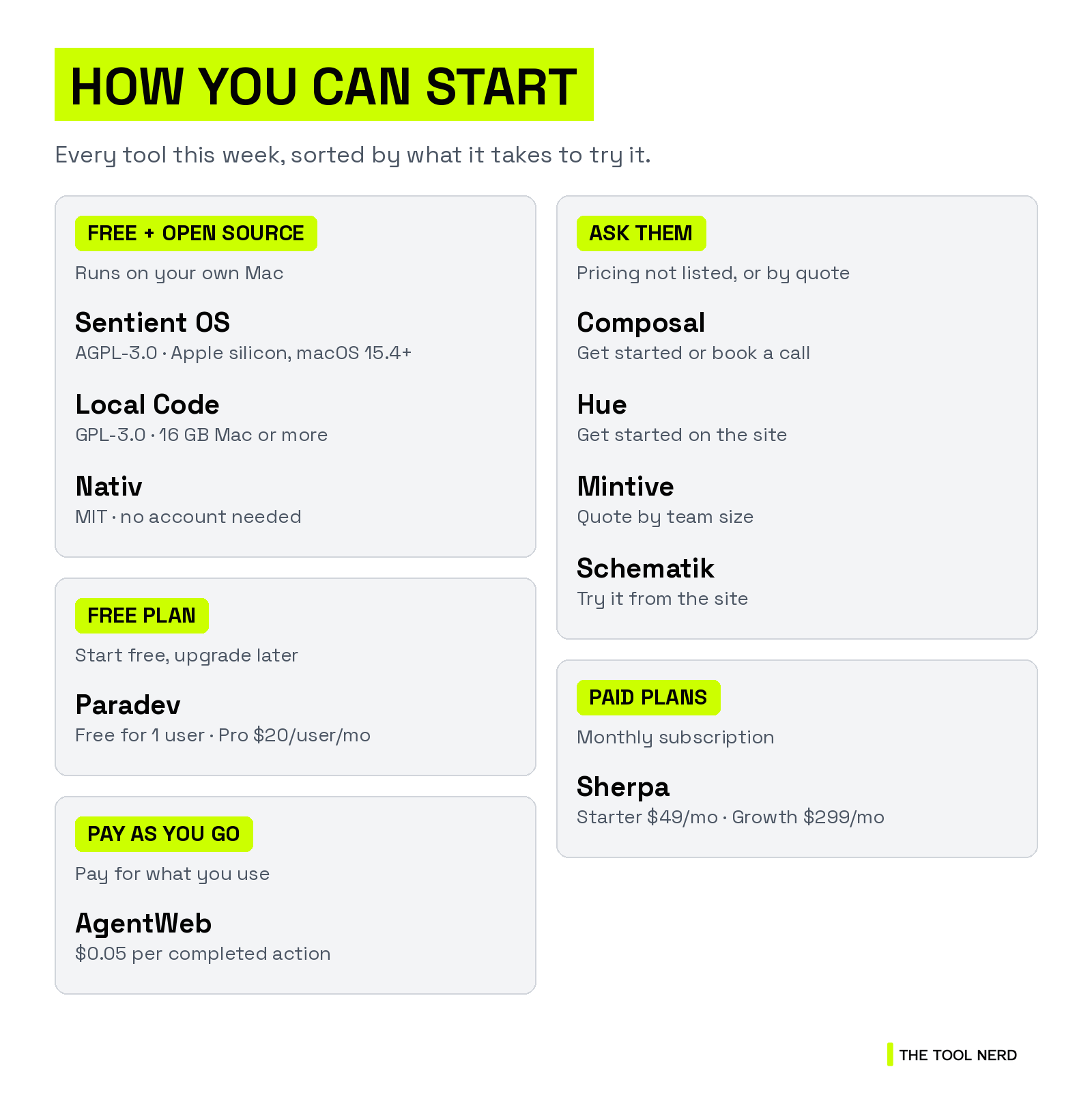
Pricing: free for one user. Pro is $20 per user a month with automations and remote access. Team ($60) and Ultra ($200) add cloud workspaces in beta. You still pay for your own agents.
License: source-available on GitHub under the Elastic License 2.0 (not an open-source license), about 15.8k GitHub stars.
Good to know: it just raised an $11.5M seed led by USV, with Y Combinator.
Links: Directory page · Official site


5. Composal: agents that try to break your app
Composal tests your product the way users do. Give it your URL and connect your repo, specs, PostHog or Sentry, and it sends a group of browser agents through your key flows and edge cases at the same time.
When something breaks, you get a video, logs and steps to reproduce it. Pass those to your coding agent through Composal’s CLI, and Composal checks the fix.
Who it’s for: teams shipping fast with coding agents.
Pricing: not listed. You can get started on the site or book a call.
Good to know: part of Y Combinator’s Fall 2026 batch.
Links: Directory page · Official site


6. Hue: practice worlds for your agent
Hue builds a fake but realistic copy of the world your agent works in. Describe it (”a 15-person startup that uses Gmail, Notion and Slack”) and Hue fills it with months of believable data, or rebuild it from your agent’s real traces.
Each run gets its own world that keeps every change and resets easily, and you score runs to compare agent versions. Your agent connects the way it would to the real apps, through API, MCP, Composio or Pipedream.
It’s a close cousin of Rystic from last week’s roundup, with more focus on realistic data.
Who it’s for: teams building agents that work across email, docs, chat and CRM tools.
Pricing: not listed on the site.
Good to know: part of Y Combinator’s Fall 2026 batch.
Links: Directory page · Official site


Agents at work, and one for makers
Who should care: teams putting agents to work on websites and company tools, and anyone who wants to build hardware without reading datasheets.
7. AgentWeb: website actions without a browser
AgentWeb turns real websites into actions an agent can call, like ordering, booking or submitting a form. Instead of clicking through pages, the agent calls the action and gets structured results plus a receipt.
It’s one command to add in Claude Code and works in other MCP clients. Not every site is covered yet, and you can request one.
Who it’s for: builders whose agents need to get things done on websites that have no API.
Pricing: $0.05 per completed action, in blocks from $25 (500 actions). Credits never expire, and failed actions aren’t billed.
Links: Directory page · Official site
8. Mintive: give every agent its own work identity
Mintive, formerly MintMCP, treats each AI agent like an employee. Each one gets its own identity, credentials and only the access its job needs, instead of borrowing a person’s login.
An MCP gateway lets IT approve which tools teams can use, an LLM gateway sets models and budgets per team, and Mint Guard screens calls for prompt injection and leaked secrets. It works with Claude, ChatGPT, Copilot and Cursor.
Who it’s for: IT and security teams that keep saying no to agents because of access worries.
Pricing: by quote, based on team size and active users.
Good to know: customers listed on its site include Stability AI, Coursera, Braze and Eurostar. It just announced $11M in funding.
Links: Directory page · Official site

9. Sherpa: a marketing site your agent can run
Sherpa moves your marketing website into code that you own, synced to your GitHub. Anyone on the team can ask for a change in Claude, ChatGPT or Slack (”cut the homepage copy in half”). Sherpa builds it, and you review and publish.
Who it’s for: marketing teams that wait days on developers for small website changes.
Pricing: Starter is $49 a month with 5 seats and hosting. Growth is $299 a month and adds A/B tests and site migration. Scale is custom.
Good to know: backed by Y Combinator.
Links: Directory page · Official site
10. Schematik: build hardware from a plain-English idea
Schematik calls itself the “Cursor for hardware.” Describe a project, like a weather station, and it gives you the code, a wiring diagram, a parts list and step-by-step assembly, ready to flash to your board.
It works with Arduino Uno, ESP32 and Raspberry Pi Pico, in the browser or a desktop app.
Who it’s for: makers, students and software people who want to build a gadget without starting from datasheets.
Pricing: not listed. You can try it from the site.
Links: Directory page · Official site
Trending tools from our partners
These are well-known tools with real news this week. Some links below are affiliate links, which means The Tool Nerd may earn a commission at no extra cost to you.
Instantly is a cold-email platform with sending inboxes, warmup and a lead database. This week it relaunched Lead Finder, which searches 550M+ contacts and flags who’s showing buying signals.
Wispr Flow turns your voice into clean text in any app. This week it passed 100 billion words transcribed. I’ve used it for a year, and my review is linked below.
Supermemory is a memory layer for AI agents, with plugins for Claude Code, Cursor and Codex. This week it published a deep dive on how Claude Code’s memory works and shipped a new CLI.
Emergent builds full-stack web and mobile apps from a plain-English prompt. This week it wrapped VibeCon SF, two days of building at Y Combinator’s office.
Keep reading
10 New AI Tools This Week: Ghosthand, Rystic, Isoquant and More (Oct 2026)
A Year of Talking to My Computer: My Honest Wispr Flow Review
Want more tools like these? Browse nearly 1,300 of them on The Tool Nerd directory, and subscribe to get this roundup every Tuesday.