

I noticed a simple problem: people wanted to showcase their tech stack visually, but there was no easy, beautiful way to do it — no simple visual tech stack generator. You’d end up with text lists, messy screenshots from Notion, or needing Figma skills you don’t have.
The inspiration came from this post by Lorenzo Cabra ( A designer by profession), who made this beautiful visually appealing stack. I wanted to make something similar. Instead of doing it on Figma/Canva, I thought why not make it easy for anyone to create their stack and share.
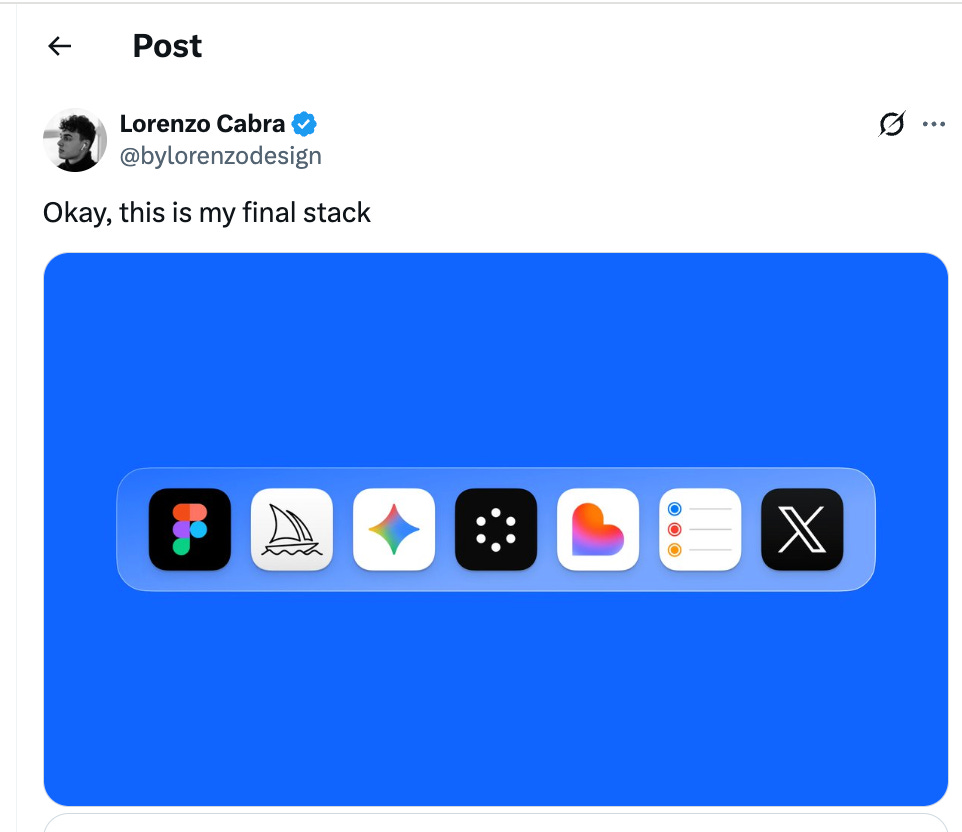
I thought: This should be simple to build. So I did. From idea to a live, monetized app with Replit Auth, a database, and Dodo Payments integrated — all in just a few hours.
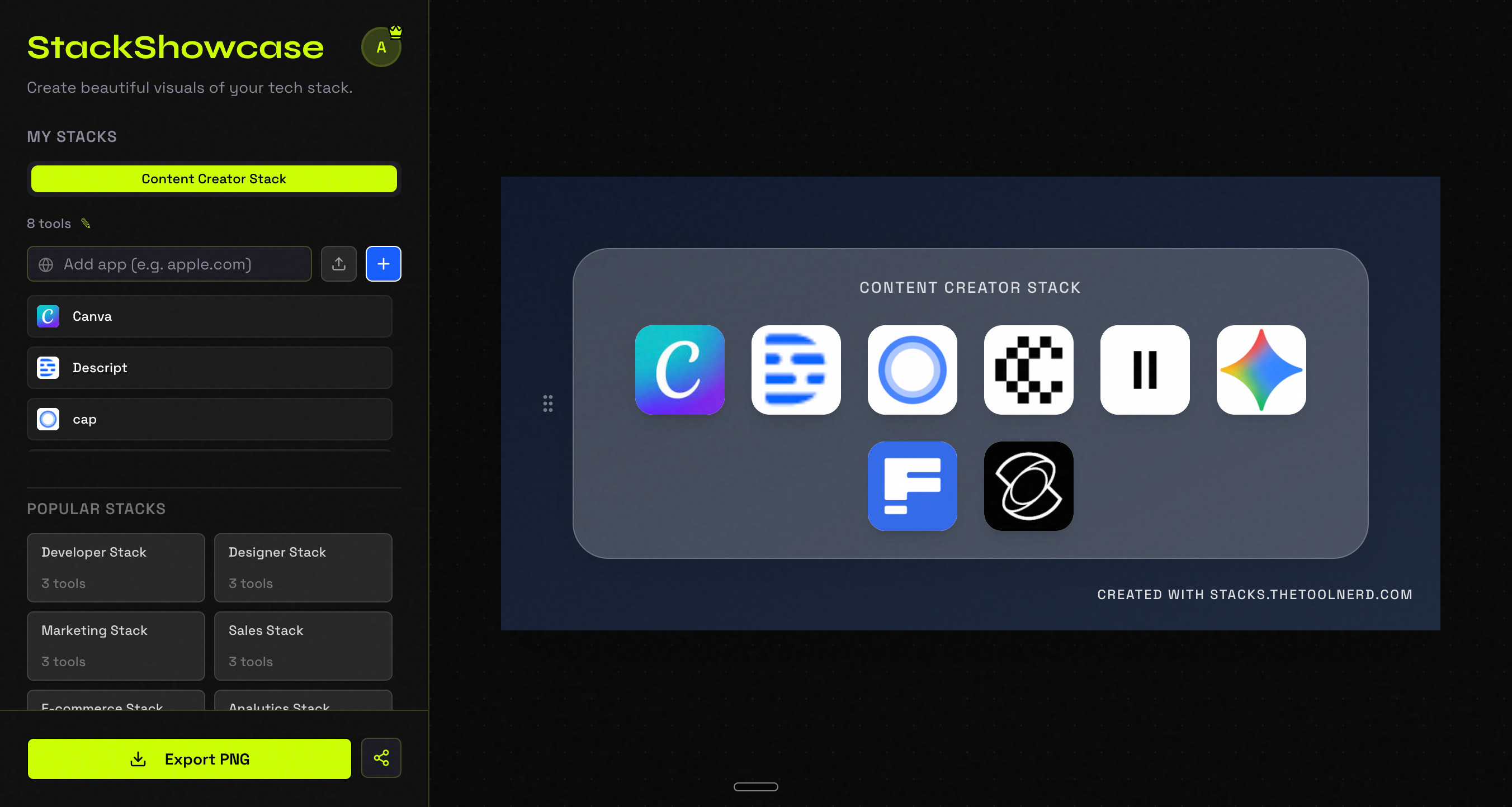
This is the final product:
Here’s what I learned about shipping fast by starting with design.
Checkout my previous articles:


The Core Idea: Visual Tech Stack Generator
The problem was specific: people want to create and share their tech stacks visually. Not as text. Not as screenshots. As something that looks professionally designed and is easy to share on Twitter, LinkedIn, and Instagram.
The solution needed three things:
Auto-fetching logos — Input a product name or URL, automatically pull the favicon
Real-time visual preview — See exactly what you’re creating
One-click export — Download as PNG or share directly
Simple. Solvable. No rocket science.
The Design-First Approach (Why This Mattered)
I started with design first, code second. This was the key decision.
Here’s what I did: I worked on the UI/UX design using Replit’s design agent before touching the backend. I iterated on the design multiple times to get something that looked polished and professional.
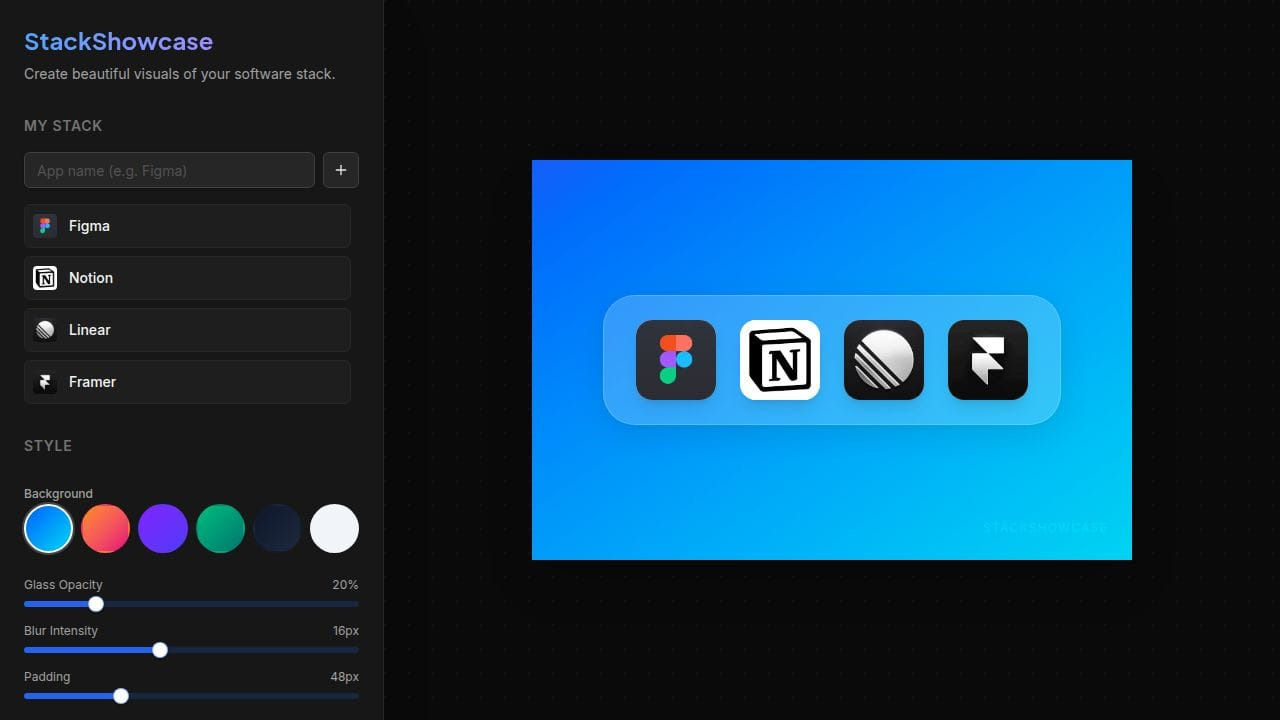
The goal was to show users exactly what they were building — live preview on the right, controls on the left. Once I had a design that felt right, I could lock it down and build around it.
This design-first approach prevented months of rework.
This is what I have given to the Replit Agent to start working!! - An image reference of the output I want and my requirements dictated with Wispr Flow (
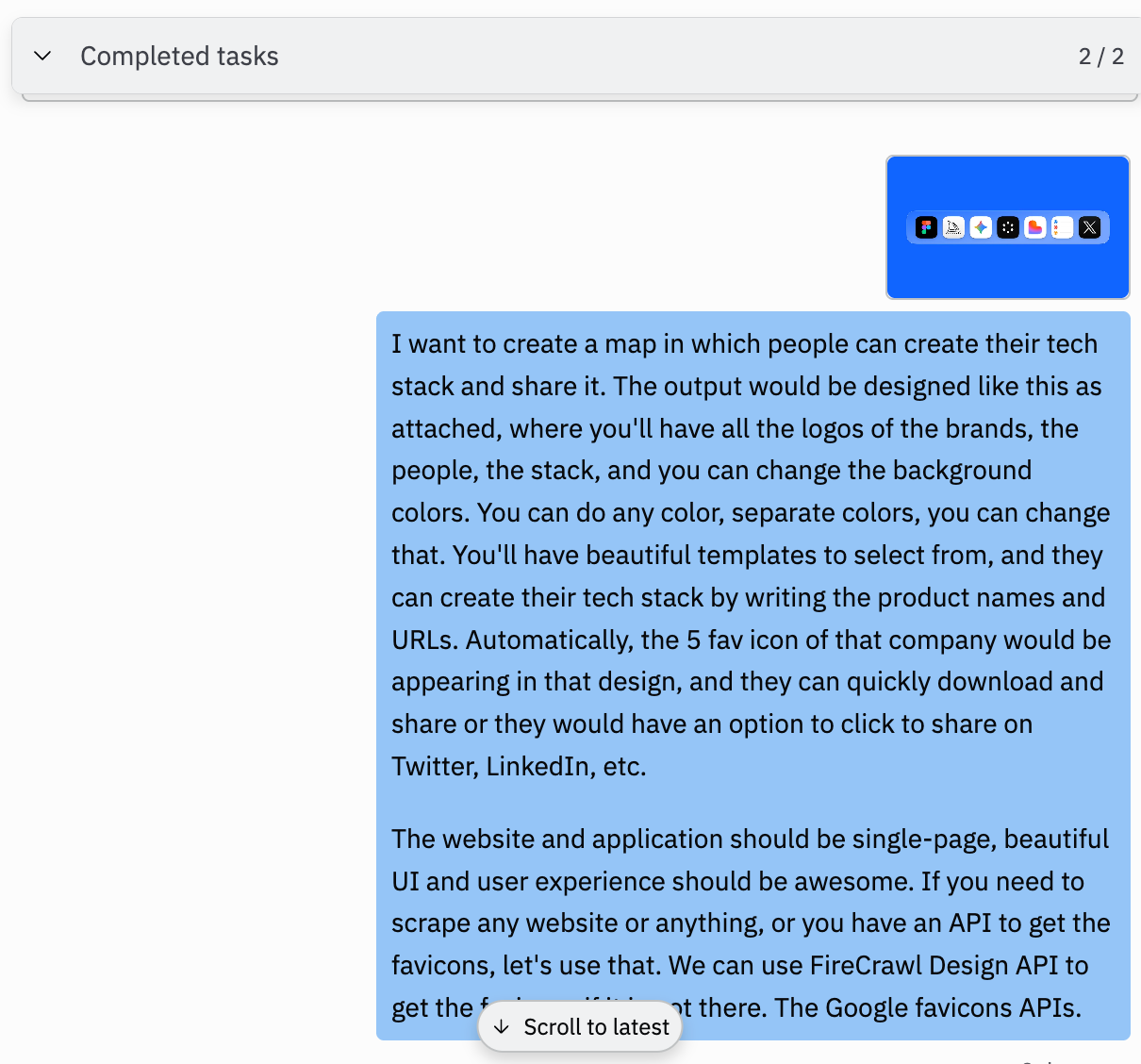
Version 1 - Created the design with just $0.83
Final Version : After Multiple Iterations.
Building with Speed in Mind: Tech Choices
I didn’t overthink the tech stack. I let Replit select the right stack. I am not sure, whether this will be useful or viral, so I wanted to ship quickly. It picked right stack that let me ship fast:
Frontend: React with a beautiful UI that felt premium
Authorization: Replit Auth - Built In Auth system by Replit, so easy to build. Replit Does everything for you (no password management headaches)
Database: Replit’s built-in database (PostgreSQL powered by Neon)
Logo Fetching: Google Favicon API (with fallbacks for missing favicons)
Export: Simple PNG export functionality
Deployment: Straight to Replit, then connected it to custom domain (stacks.thetoolnerd.com)
Payments: Dodo Payments (integrated directly) - This had a few challenges but I gave it the website URL and my approach of using payment link and it worked.
Each choice was about removing friction. Every tool I picked had one job: let me focus on the product, not infrastructure.
What Shipped: The Feature Set
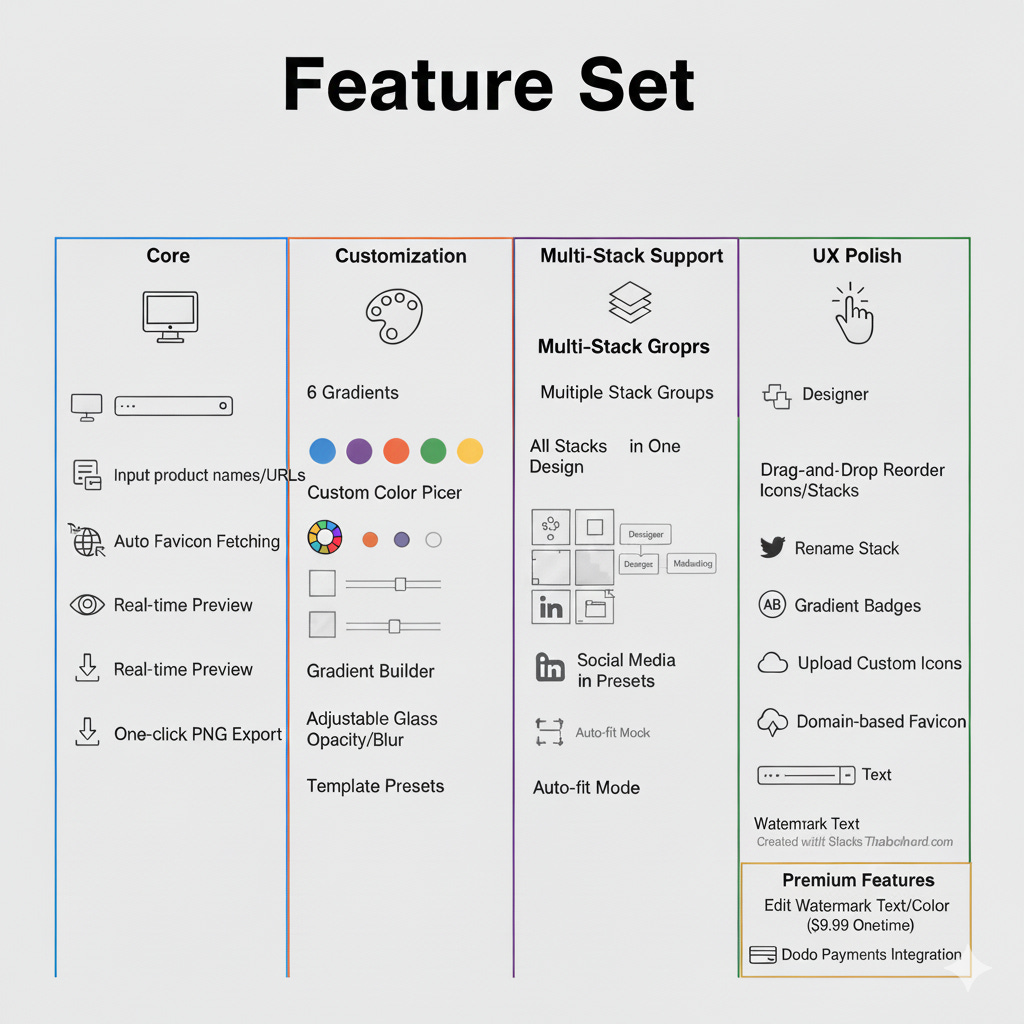
Core:
Input product names or URLs
Automatic favicon fetching with Google API
Real-time preview of your stack
One-click PNG export
Customization:
6 vibrant background gradients (Electric Blue, Sunset Vibes, Deep Space, etc.)
Custom color picker for backgrounds
Gradient builder (multi-stop gradients)
Adjustable glass opacity and blur intensity
Template presets for quick starts (Designer, Developer, Marketing stacks)
Multi-Stack Support:
Create multiple stack groups (Designer Stack, Developer Stack, Marketing Stack, etc.)
Show all stacks in one design
Social media canvas presets (Twitter: 1500x500px, LinkedIn: 1584x396px, Instagram: 1080x1080px, etc.)
Auto-fit mode for custom sizes
UX Polish:
Drag-and-drop to reorder icons within stacks
Drag-and-drop to reorder entire stacks
Rename any stack (Designer → “My Stack”, etc.)
Gradient badges for missing favicons (shows initials if icon unavailable)
Upload custom icons
Domain-based favicon fetching (type apple.com, it fetches the favicon)
Watermark text (default: “Created with Stacks.Thetoolnerd.com“)
Premium Features:
Paid users can edit watermark text and color ($9.99 one-time)
Dodo Payments integration
How the Feature Set Evolved (Real Feedback Loop)
The interesting part: this feature set didn’t come from my head. It came from talking to Replit agent and realizing what users would want.
Early feedback → Quick iterations:

User Question #1: “I have a designer stack, a dev stack, AND a marketing stack. Can I show all three?”

Result: Multi-stack groups implemented.

User Question #2: “How do I export this for Twitter? It’s too wide.”

Result: Canvas size presets (Twitter, LinkedIn, Instagram, auto-fit).

User Question #3: “What if the favicon doesn’t load?”

Result: Beautiful gradient badges with app initials instead of broken images.

User Question #4: “I want drag-and-drop like Figma.”

Result: Drag-and-drop for both icons and stacks implemented.

User Question #5: “Can I customize backgrounds with my own colors and gradients?”

Result: Custom color picker and gradient builder added.

User Question #6: “Can I rename the stack names?”

Result: Inline rename functionality added.

Each iteration was based on actual user feedback, not guessing.
If you think this will benefit your friends, do share with them.
Monetisation Strategy: The Watermark Approach
While building the app, I was thinking: How do I monetise this?
Most SaaS apps charge for features. But I wanted to keep the core free—let everyone create and export stacks without friction. The monetisation needed to be optional, not blocking.
The idea came naturally: What if I add a small watermark? “Created with Stacks.TheToolNerd.com” at the bottom of every export.
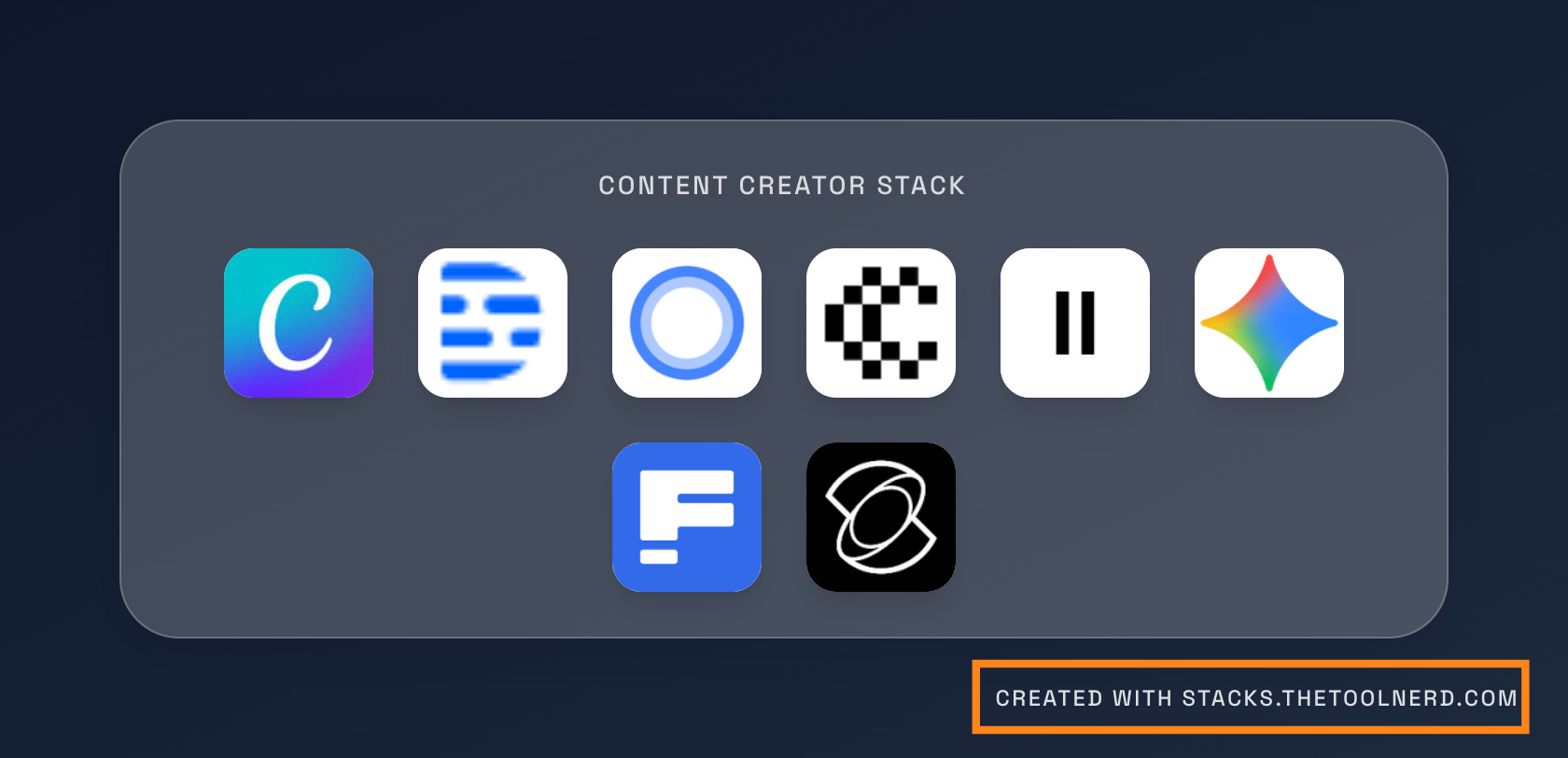
Here’s the logic:
Free users: See the watermark. It’s a small branding reminder, not intrusive.
Paid users ($9.99 one-time): Can remove the watermark and customise it however they want (change the text, colour, size, and positioning).
Why this works:
It doesn’t block the product. Free users still get full functionality. The watermark is located in the bottom-right corner. It doesn’t ruin their design.
It’s a natural upgrade. If someone’s using this professionally—sharing on LinkedIn, including in portfolios, showing clients—they’ll want to remove the branding.
It’s psychological. A watermark isn’t a wall; it’s a gentle reminder. “Want to remove this?” Yes, some will. And when they do, they’ve validated the app is valuable.
It’s simple to implement. One database flag (
isPaid: true), one payment integration (Dodo Payments), one conditional render. Done.
This single-idea monetisation prevented feature-bloat. I didn’t need to gate individual features, build paywalls, or create a confusing pricing matrix. Just: free with branding, paid without branding.
It was a way to validate who values this enough to pay while respecting users who just want to test the idea for free.
Integration: Auth, Database, Payments
Authentication: Used Replit Auth for a quick start — no credential management, no JWT headaches.
Database: Replit’s built-in database stores user stacks so they persist when users log back in.
Payments: Integrated Dodo Payments with a one-time purchase model ($9.99 for premium features).
Deployment: Deployed on Replit, then created a custom subdomain (stacks.thetoolnerd.com) pointing to the Replit URL.
The Key Insight: It’s About the Problem, Not the Time
The most surprising part? “It’s absolutely surprising how I could do it within few hours right from idea to launch.”
Most people think building an app takes months. It doesn’t — if you:
Start with design. Lock it down before coding.
Pick the right platform. One that handles auth, database, and deployment.
Focus on one problem. Not “build a design tool” but “let people share their tech stack.”
Build iteratively. Real feedback drives features, not guesses.
Ship what works. Not what’s perfect.
The Real Lessons
1. UI/UX first prevents rework.
By designing before coding, I avoided mid-project pivots that waste time.
2. Platform matters more than language.
Replit’s all-in-one approach (auth + database + deploy) saved hours of infrastructure setup.
3. Real feedback beats assumptions.
The features that matter came from questions like “Can I upload custom icons?” not from my original spec.
4. Constraints force focus.
A few hours to ship meant: no bloat, no unnecessary features, no over-engineering.
5. Monetization works when aligned with value.
The watermark boundary (free users see branding, paid users remove it) is a natural, non-blocking upgrade.
It Didn’t Get Traction (And That’s Okay)
Here’s the honest part: Did the app get traction? Not yet. Will people pay? Maybe not.
But the point wasn’t to build a billion-dollar business. The point was to validate an idea in a few hours. To prove you could take a problem, design a solution, build it, deploy it, and add payments — all before most people finish their morning coffee.
The product proved one thing:
If building an idea is simple, then testing ideas becomes cheap.
For Non-Technical Founders
If you’re thinking “I have an idea but I don’t know how to code,” this is your roadmap:
Start with design. Sketch the idea or use AI design tools. Lock it down.
Pick a platform that abstracts boring stuff. (Replit, Emergent, Bolt, Lovable etc.)
Build the core loop only. Not all features. Just what solves the problem.
Get real feedback. From real users, tomorrow.
Iterate fast. One request → one feature by evening.
Ship and learn. Perfect is the enemy of shipped.
The gap between “I have an idea” and “I have a live product” is smaller than you think. It’s a few hours.
Give it a shot!!
Try the visual tech stack generator:
Visit: https://stacks.thetoolnerd.com to build and share your tech stack.
Share it: Post your stack on Twitter or LinkedIn and tag @thetoolnerd.
Learn from it: This approach works for any small, focused problem. Design first, ship fast, iterate based on feedback.