

Here’s what happened when I typed one sentence into Claude Code:
“Create a skill to write test-driven development cases for any feature.”
That was the full prompt. No spec document, no example files, no instructions on how to build it. Claude took that single line and handled everything — writing the skill, testing it, comparing results, and packaging a .skill file ready to use. This is what that process looked like.
The one-prompt demo is impressive — but that’s not how I usually build skills. My workflow is at the end of the article
What My Test Driven Development Skill Does
The finished skill, called tdd-writer, gives you this whenever you describe a feature:
A full test file in whatever framework your project uses (Jest, pytest, Go testing, RSpec...)
Tests in the right order: happy path first, then edge cases, then error scenarios
A one-liner to run the tests immediately
A short list of what you need to build to make them pass
No implementation code. Only failing tests that define what the code should do — the way TDD is supposed to work.
If you would like to know more about Claude Skill 2.0 , check out this article


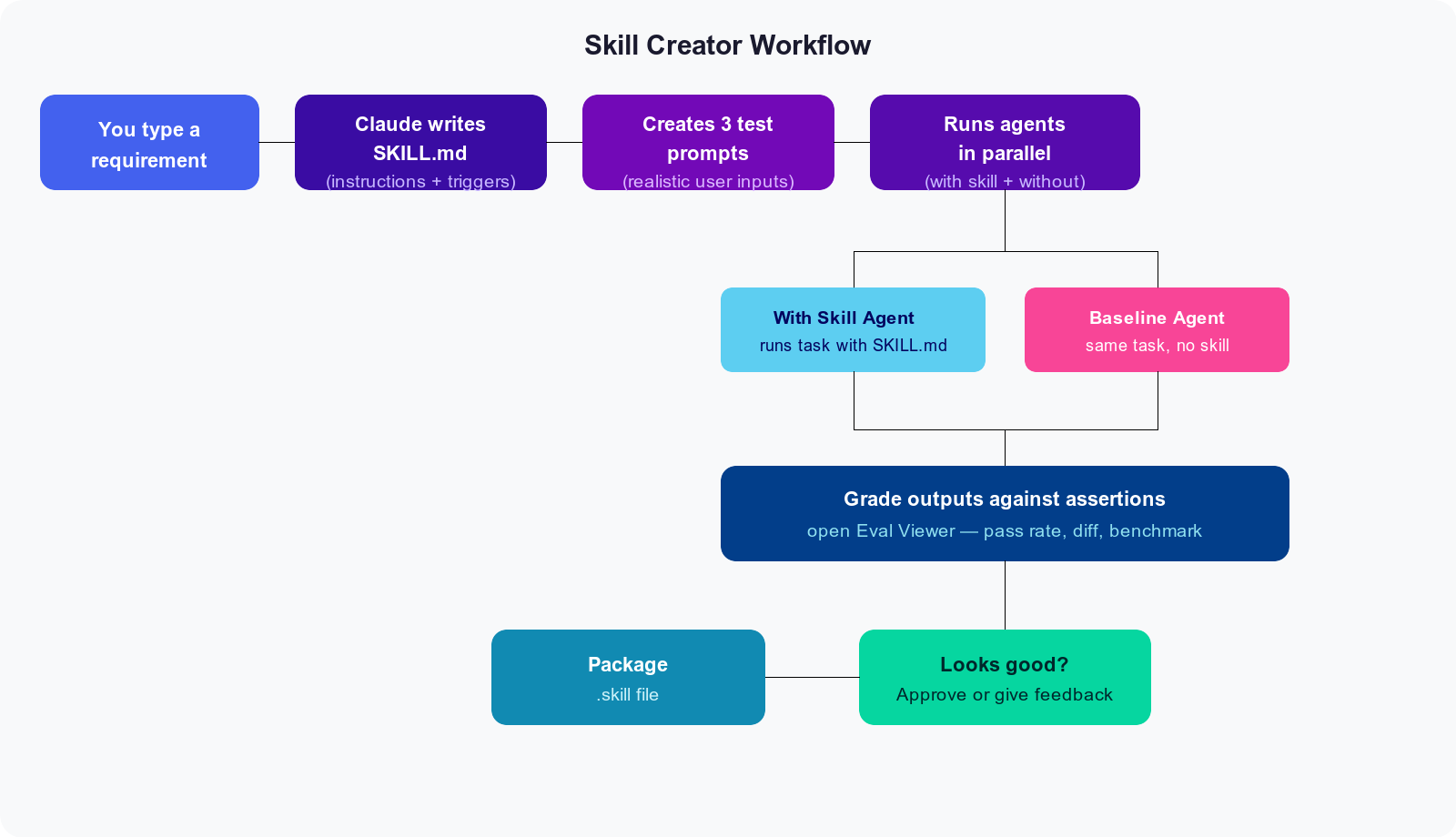
How Claude Built the Skill - Skill Creator Workflow
The workflow Claude follows when using skill creator looks like this:
1. Wrote the Skill File
The first thing Claude produced was SKILL.md — a plain text file that acts as the skill’s brain. The top section (frontmatter) tells Claude when to use it:
---
name: tdd-writer
description: >
  Writes test-driven development (TDD) cases for any feature before
  implementation code exists. Trigger on phrases like "write tests for",
  "tests before code", "help me TDD this", or when a user describes a
  feature and asks how to approach it.
---
The rest of the file contains the actual instructions — things like: detect the test framework from the project files, write tests in happy-path-first order, never write implementation code.
That last rule got its own dedicated section:
## What NOT to do

- Don't write implementation code. If you find yourself writing the
  actual feature, stop.
- Don't write tests that always pass (e.g. `assert True`).
- Don't mock everything — only mock at system boundaries.
2. Created Test Prompts
Next, Claude wrote three realistic prompts to check whether the skill actually works. These aren’t hypothetical — they’re the kind of messages a developer would actually send:
Python password validator — check for min length, uppercase, digits, special characters
Jest shopping cart — an
addItemfunction that handles duplicates and rejects bad pricesGo database query —
FetchUserByIDusing testify, with proper error types
3. Ran Two Agents Per Prompt (in Parallel)
For each of those three prompts, Claude launched two subagents simultaneously — one with the skill loaded, one without.
The idea: if the skill is doing its job, the outputs should be noticeably better.
Here’s what the skill produced for the Python prompt:
"""
TDD tests for password_validator module.
All tests should currently FAIL (Red phase).

Run with:
    pytest test_password_validator.py -v
"""

import pytest
from password_validator import validate_password

# Happy path
def test_valid_password_returns_true():
    # Arrange
    password = "Abcdef1!"
    # Act
    result = validate_password(password)
    # Assert
    assert result is True

# Edge case — boundary value
def test_valid_password_exactly_eight_characters_returns_true():
    password = "A1!bcdef"  # exactly 8 chars, all rules satisfied
    assert validate_password(password) is True

# Error case
def test_none_input_raises_type_error():
    with pytest.raises(TypeError):
        validate_password(None)
And it closed with a plain-English reminder of what to do next:
Red:      Run the tests now — they should all fail. That's correct.
Green:    Implement the minimum code to make each test pass, one at a time.
Refactor: Once all green, clean up. The tests protect you.
The baseline agent (no skill) produced equally good test code. What it skipped: the run command, the “what to implement” list, and the Red-Green-Refactor reminder at the end.
4. Graded and Reviewed
Each run was scored against six assertions — things like “test names are descriptive,” “no implementation code was written,” and “run instructions are included.” Results went into an eval viewer:
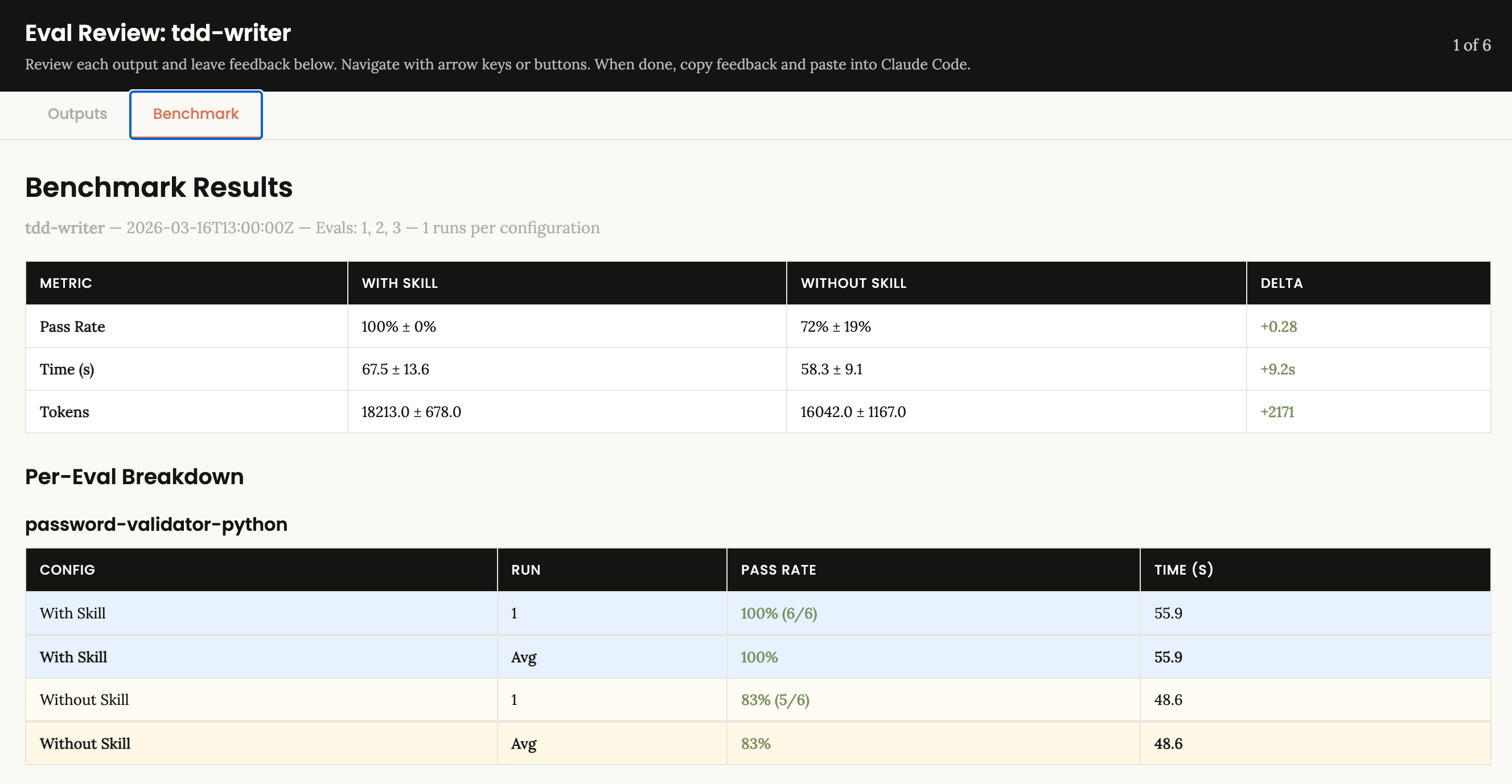
The 28% gap traces back to one thing: the skill consistently added the scaffolding — run instructions, implementation roadmap, Red-Green-Refactor — that plain Claude left out.
5. Packaged
One command:
python3 -m scripts.package_skill ~/.claude/skills/tdd-writer
✅ Skill is valid!
✅ Successfully packaged to: tdd-writer.skill
The skill was already active in the Claude Code session from the moment it was created. No restart, no configuration.
How I Actually Use Skill Creator (In Practice)
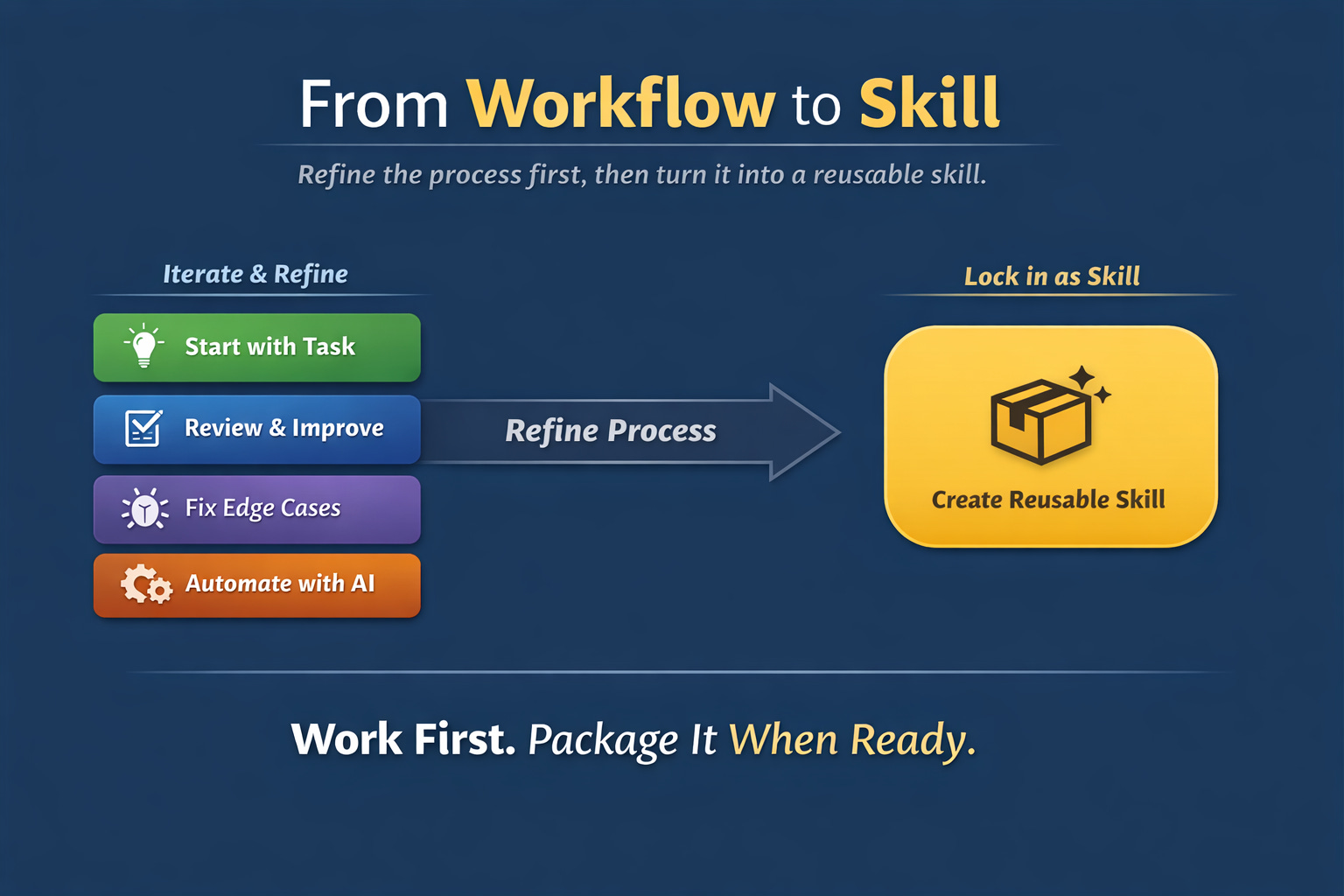
In reality, I work with Claude step by step, just like I would with a developer:
I start with a task (e.g., generate tests, extract data, structure output)
I refine the output through multiple iterations
I correct edge cases, improve structure, and push it toward what I actually need
I don’t touch the implementation manually — I let Claude handle everything
Only once I’m fully satisfied with the behavior…
👉 I ask Claude to convert that workflow into a reusable skill.
So instead of:
“Create a skill from scratch”
The real pattern is:
“Refine a workflow → Lock it in as a skill”
That’s the shift.
Skills aren’t where you start —
they’re what you create after something works reliably.
The Whole Thing Took One Prompt
The user typed: “Create a skill to write test-driven development cases for any feature.”
Claude wrote the skill, designed the test cases, ran six parallel agents, graded the outputs, opened the review UI, and packaged the result. The only human input after the initial prompt was a single word: “approved.”
That’s what skill creator is for.