

I tried running my blog with a team of AI agents. Here’s what actually happened.
I wanted a personal assistant who never sleeps. Someone to handle the repetitive stuff scheduled tasks, tool research, email management - while keeping my context and preferences front and center. When OpenClaw started going viral in early 2026, it seemed like exactly what I was looking for.
If you haven’t yet heard of OpenClaw - it’s basically an open-source personal AI assistant that lives where you do: in your messaging apps. Unlike cloud-only assistants, OpenClaw is a local-first agent runtime that bridges powerful LLMs (like Claude 4.5 Sonnet) with your actual system tools.
But it has a challenging setup process, broken configs, and hours of debugging before I got my first agent to respond. But once it worked, it really worked good for sometime, till you try to more complex tasks. However, I must this is still a product that you should learn and know as it has a great potential.
This is the honest story of how I built Mission Control to manage TheToolNerd.com, - what works, what breaks, and why you should still try it.
(inspired by this post by Bhanu Teja P)

If you wanted to get started with OpenClaw easily check out this article:
Set Up OpenClaw(Clawdbot) in Minutes: 6 Easy Deployment Options for Beginners

The Twitter world has been taken by storm by an open-source project called OpenClaw. Everyone wants to jump in, try it out, and see what it can actually do.
What I Built - Mission Control Dashboard
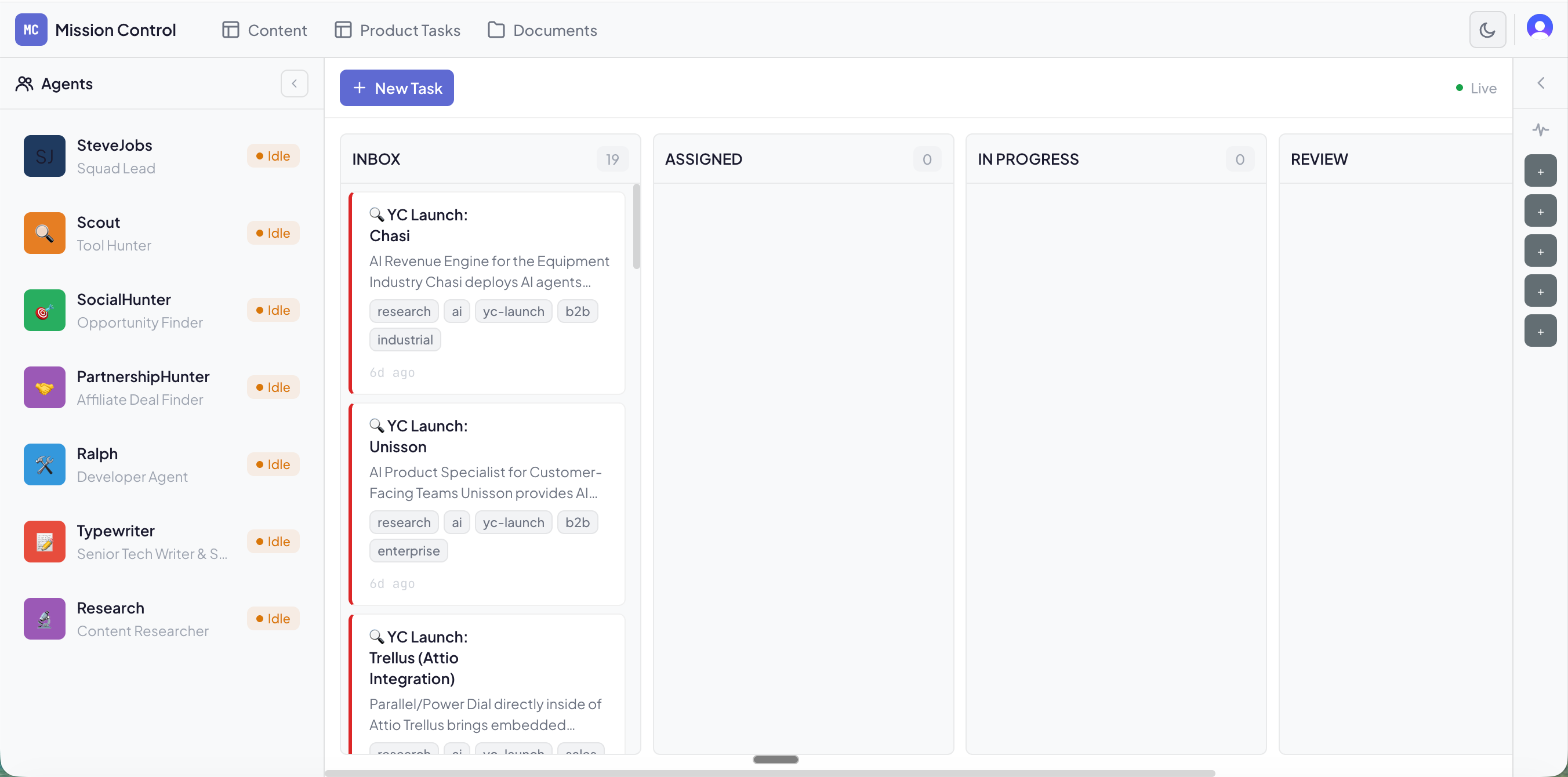
Mission Control is a 7-agent system running on OpenClaw, purpose-built to handle TheToolNerd operations
Cron Tasks
Content Tasks
Product Tasks
The whole workflow can work autonomously but I don’t as I still can’t rely on it.
The backend: Convex.dev handles real-time database, task queues, and agent status. It’s the only reliable part of the stack.
The infrastructure: Started on Railway, because I had the subscription from Lenny’s Newsletter - but I would recommend Hostinger, if you are starting New.
The Problem I Was Solving
Running TheToolNerd.com involves a lot of moving parts:
Tool research: Finding new AI tools, checking pricing, writing descriptions
Content pipeline: Articles, newsletters, social posts
Email management: Partnership inquiries, reader questions
Database updates: Adding tools, updating affiliate links
Social monitoring: Watching for trending tools, competitor moves
I wanted an AI system that could handle 70% of this on autopilot - with my preferences, my tone, my context baked in. Not a generic assistant. My assistant.
OpenClaw promised exactly that: specialized agents with persistent memory, scheduled tasks, and the ability to actually do things (not just chat). But it’s not yet there.
Tools I have connected
Supabase — To access my ToolNerd Database
GitHub CLI — To let agents create commits, open PRs, and manage code changes directly from workflows.
Vercel CLI — To deploy site updates and trigger builds automatically when agents ship changes.
Zoho Mail — To read, draft, and manage partnership and reader emails inside agent workflows.
Agent Mail — To give agents a dedicated inbox for notifications, task updates, and automated communications.
Make.com — To connect OpenClaw with external apps and orchestrate automations without custom code.
Brave API — To run live web searches so agents can discover tools, news, and fresh information.
Firecrawl API — To reliably scrape and extract structured data from websites for research tasks.
How It Works (When It Works)
1. Discovery
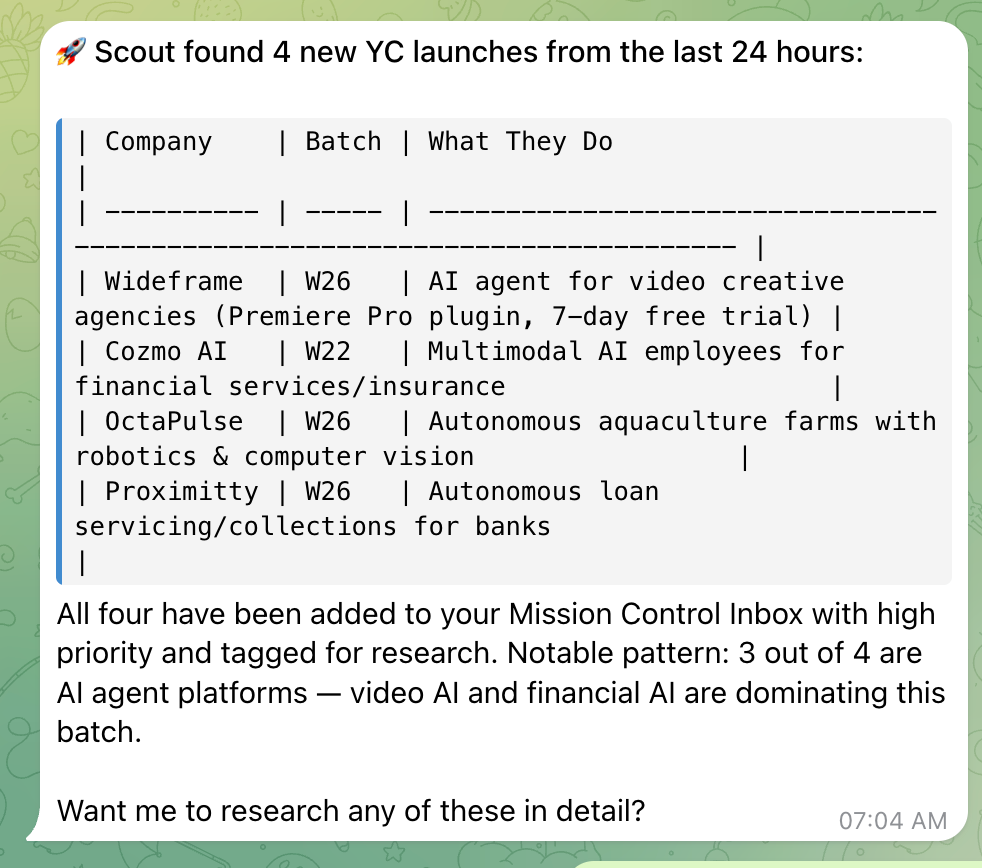
Every morning at 7 AM, Scout wakes up and scans YC launches, GitHub trending, and Product Hunt. When it finds something relevant, it creates a task card in the Mission Control Dashboard (Inbox column).
This it works consistenly most of the time.
2. My Approval
I get a Telegram notification:
“New AI tool found: [Name] - [One-line description].”
In this image below, I actually gave it a voice note, not even typed it and it did the job.
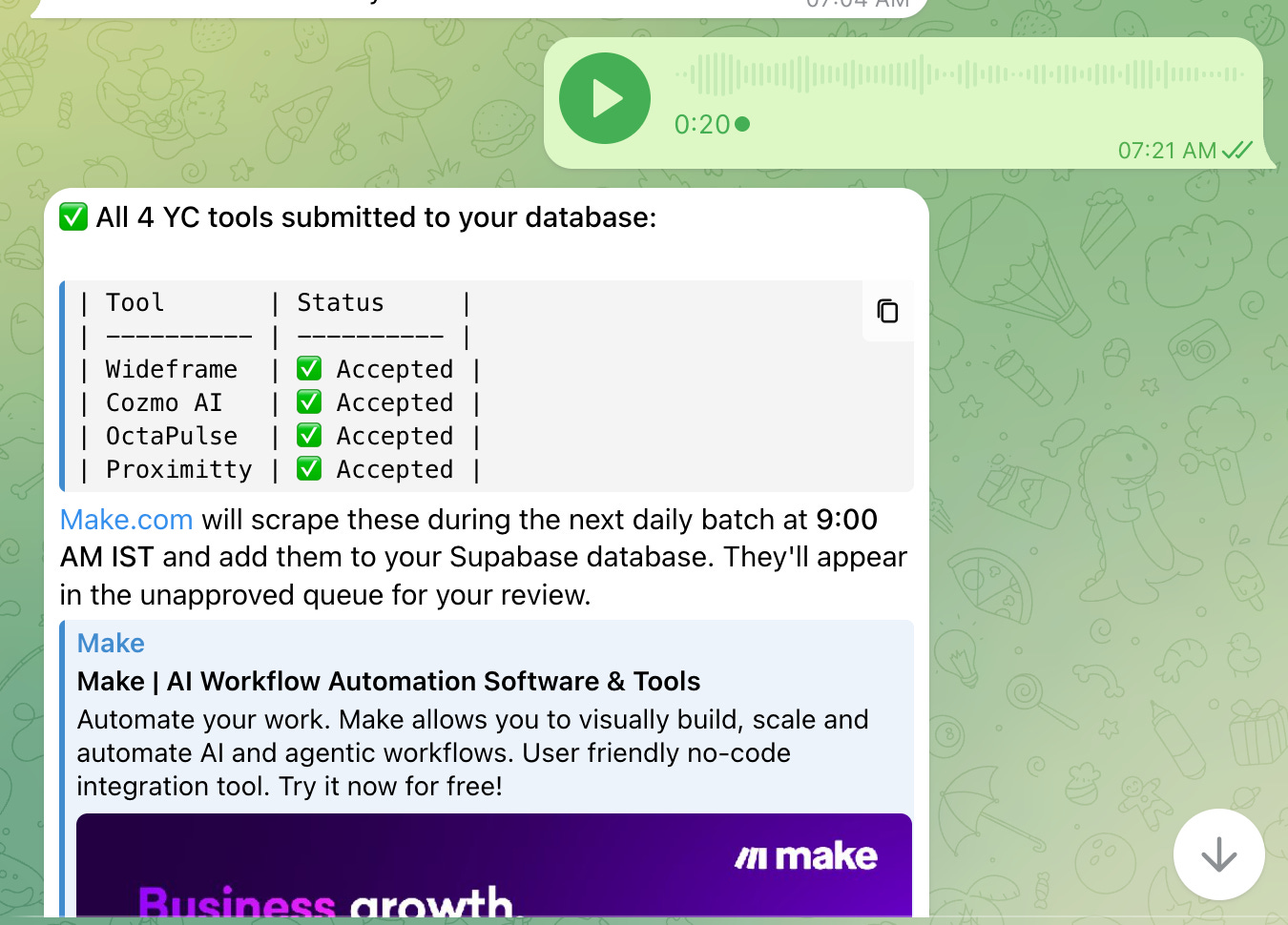
I can approve on the Mission Control Dashboard if I want Scout to research it further. I often approve from the telegram itself and it does the work.
3. Auto-Assignment
The system spawns Scout as a sub-agent, updates status to WORKING, and moves the task to In Progress.
4. Deep Research
Scout extracts tool info using Browser Tools/Web Fetch Tool via Browser API or Firecrawl API.
It adds findings as comments on the task card, then moves it to Review.
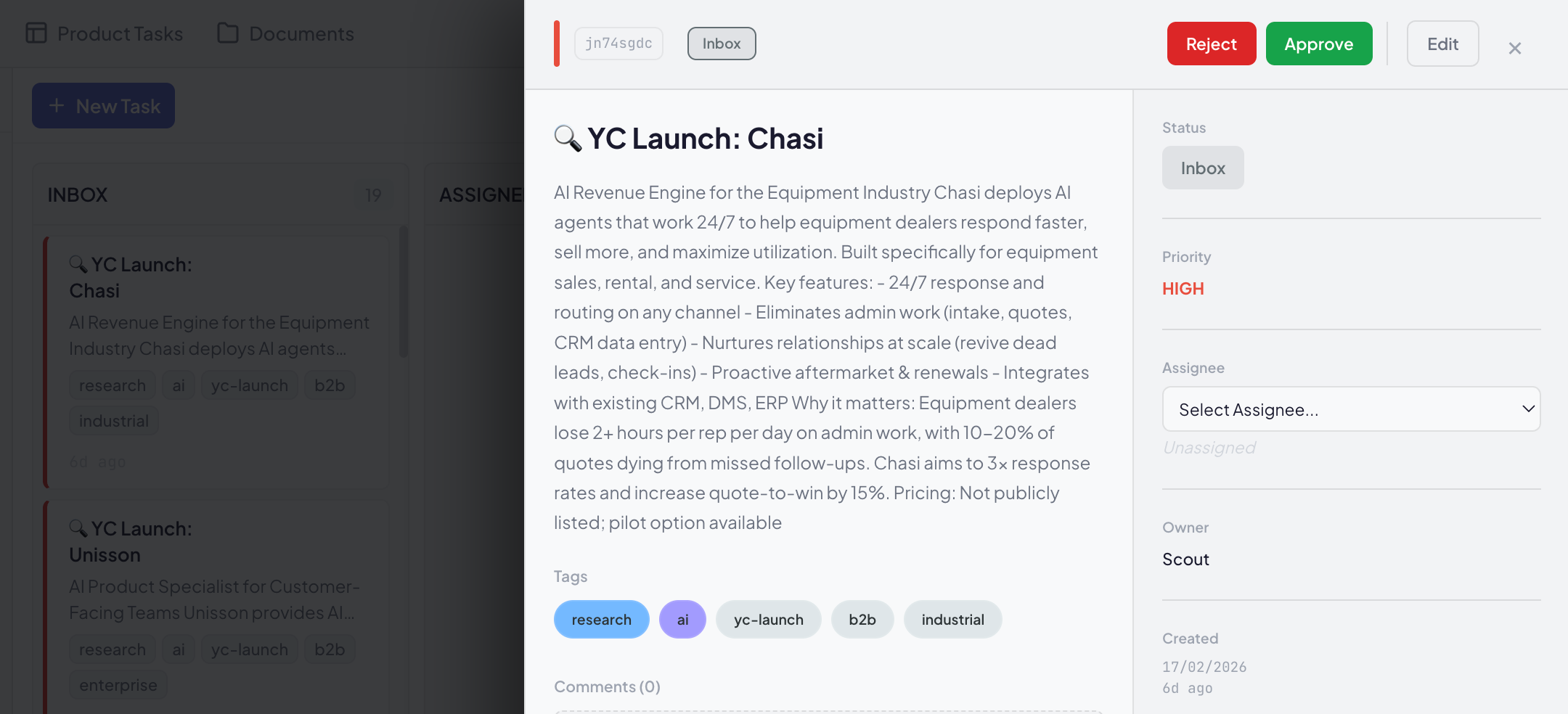
5. SteveJobs Review
Every 4 hours, SteveJobs checks the Review column, prioritizes tasks, and sends me a Telegram brief:
📋 DAILY PRIORITY LIST — Feb 17
NEEDS YOUR APPROVAL
🔥 AI image generator [Tool X] — 50% cheaper than Midjourney
New YC launch [Tool Y] — Workflow automation, trending on HN

✅ READY TO EXECUTE
Research on [Tool Z] → Add to Supabase?

📊 SQUAD STATUS
Scout: Researching 2 tools
SocialHunter: Found 3 opportunities
6. Execution
If I approve, SteveJobs either:
Tells Scout to add the tool to our Supabase database
Assigns Ralph to build a new feature for the site
Flags it for my manual review if it’s complex
Building Agent Skills is key to running OpenClaw effectively.
I’ve created 3–4 dedicated skills specifically for ToolNerd workflows. Here’s the process I followed:
Step 1 — Break down the task: I’d go to Claude Code and ask it to outline the work step by step until the workflow felt solid. I would actually work along with Claude Code to ensure the output is as expected.
Step 2 — Convert into a skill: At the end of the conversation, I’d ask Claude to package those steps into a reusable skill.
Step 3 — Deploy via Telegram: Once ready, I’d update the skill in OpenClaw directly through Telegram so agents could start using it.
This simple loop — design → convert → deploy — made it much easier to standardize repetitive operations.
There are many companies building OpenClaw deployment wrappers and already hitting $20K MRR, check out the article here.

The Reality: What Breaks
OpenClaw Updates Always breaks what I had configured
Every time I update OpenClaw to the latest version, something breaks. Config files get overwritten. Environment variables disappear. Agents stop responding. Then I’m in the terminal debugging, fixing configs, restarting services.
It’s not “set and forget” — it’s “set and maintain constantly.”
OpenClaw is Token Hungry
OpenClaw consumes a ton of tokens. Context windows fill up fast with agent spawns, sub-agents, tool calls, and memory syncs. I burned through my OpenAI credits in a day.
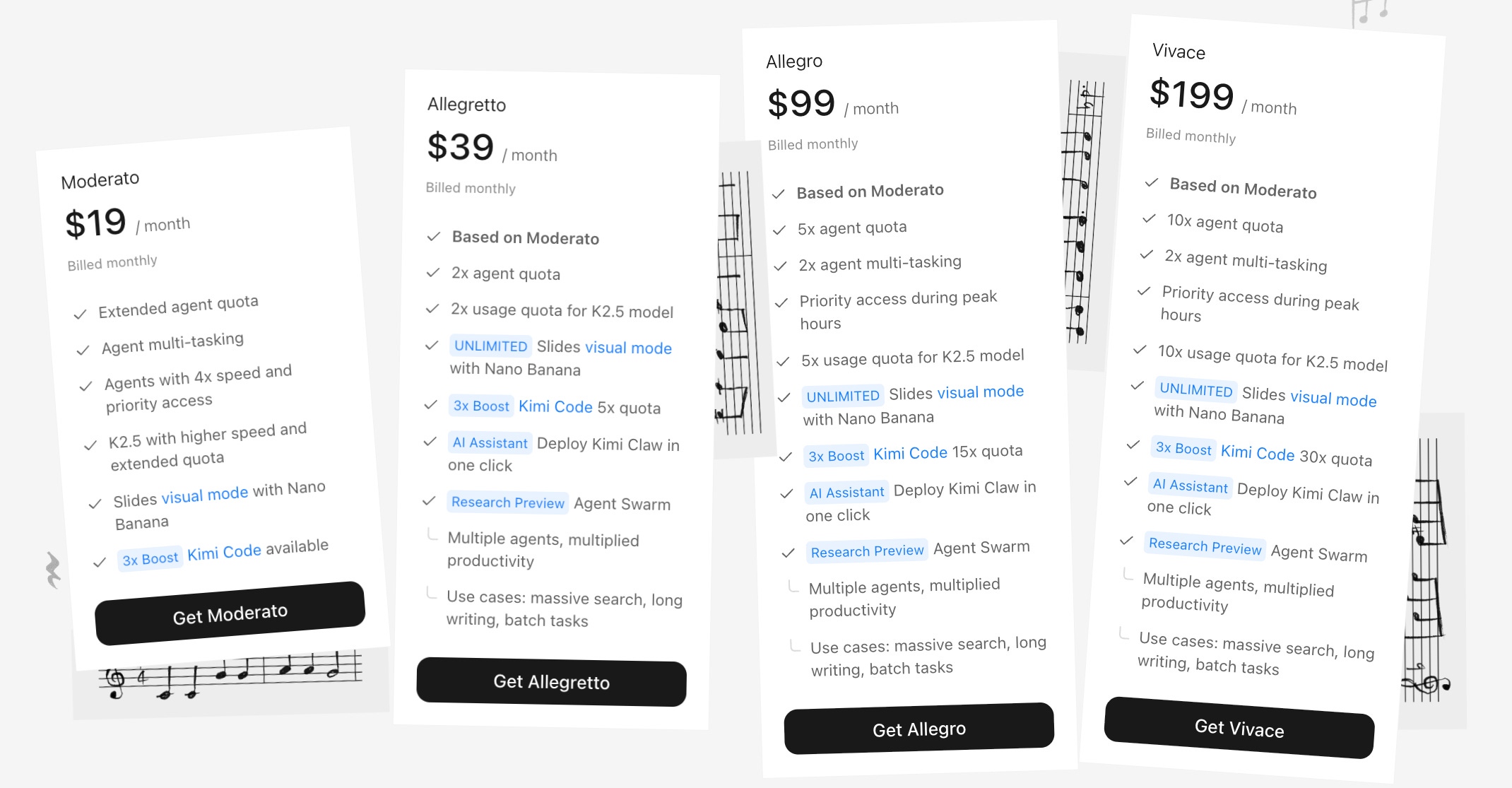
My solution: Switched to Kimi K2.5 paid plan of $40. Better token limits, sufficient quality for my use cases, and significantly cheaper. I use it extensively now.
Context Loss
OpenClaw gets confused. It forgets context between sessions.
The compaction/memory flush is supposed to help, but agents still lose track of what they were doing.
I have to re-explain preferences repeatedly — “No, I prefer bullet points over paragraphs” shouldn’t need to be said five times.
Not Reliable Enough for Production
The system works 80% of the time. The other 20%? Agents fail silently, tasks get stuck in limbo, heartbeats miss spawns. I can’t trust it for mission-critical work like sending newsletters or publishing articles. It’s a helper, not a replacement for human oversight.
The Honest Assessment
What Works
Specialized agents with clear roles
Scout doesn’t do SteveJobs’s job. Ralph doesn’t research. Boundaries matter — when each agent has a narrow focus, they perform better.
ConvexDB as source of truth
Real-time sync, reliable, never breaks. The dashboard shows accurate status. Even when OpenClaw glitches, I can see exactly what’s happening in the database. This is actually good, if someone uses it.
To be honest, I started realising that I am able to do a lot without even referring to the dashboard
When agents work, they save real time
2–3 hours daily on research, monitoring, and data entry. Scout finds tools faster than I could. SocialHunter catches opportunities I’d miss. But this only happens when the system is stable.
What Doesn’t Work
Maintenance burden : Updates break things. Configs need tweaking. Agents need restarting. It’s a part-time job.
Token costs : Expensive to run at scale. Budget planning is essential.
Reliability : 80% success rate isn’t good enough for business-critical workflows. I still manually check everything before publishing.
Context management: Agents forget preferences. You repeat yourself. Frustrating.
What can I build with OpenClaw
Chief of Staff agents to coordinate priorities and keep everything moving.
Marketing agents to research, draft, schedule, and optimize campaigns.
Personal assistants to manage your inbox, calendar, and daily operations.
Sales agents to qualify leads, follow up, and keep your pipeline warm.
…and countless other roles you can spin up as needed.
Build a virtual team that runs the day-to-day so you can focus on what actually grows the business.
My Verdict
OpenClaw has great potential. The architecture is good and evolving. The agent system is powerful. But it’s not ready for prime time as a “set and forget” solution.
Maintenance is hard. Updates break things. Token costs are high. Reliability is spotty.
I keep using it because when it works, it’s magical. Having Scout find tools while I sleep, having SteveJobs prioritize my morning, having Ralph build features from a sentence — that’s the future.
If you try OpenClaw, go in with eyes open. It’s a hobby project that happens to be powerful, not enterprise software. Beautiful, powerful, frustrating.
What I Would Do Differently
Skip Railway, use Hostinger VPS from day one — more control, cheaper, no surprise bills
Start with Kimi K2.5 - better token economics, don’t burn through OpenAI credits learning
Build smaller - 3 agents, not 5. Less coordination overhead while learning
Have Claude Code/Codex on standby - you will need it for debugging
Keep expectations low - this is experimental tech, not a productivity miracle